Portable DVD Player i1155_V11M11_IM_EN_10052007
www.i-Luv.com - 10 -
GETTING STARTED
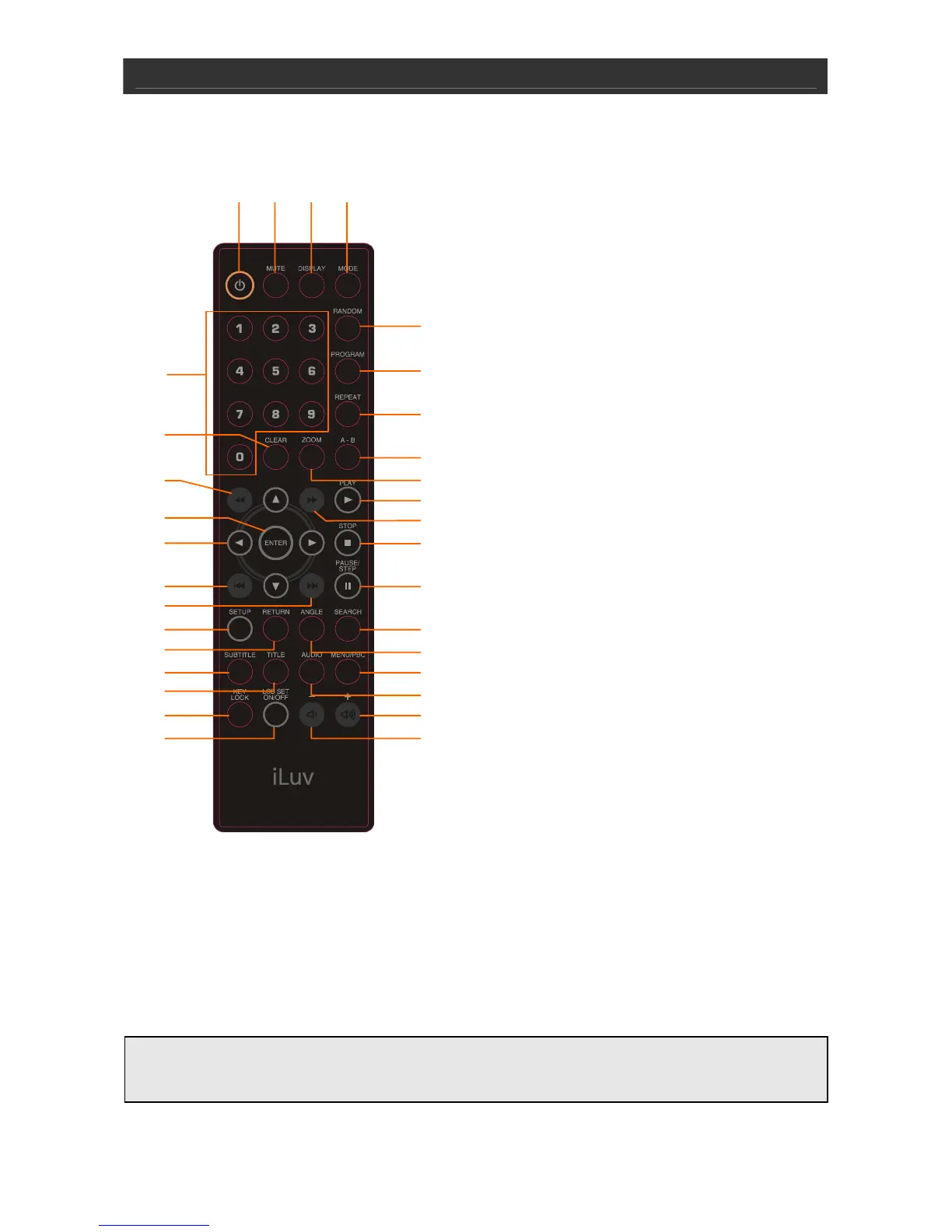
Location of Controls on the Remote Control
1. NUMBER 0 TO 9 BUTTONS
2. CLEAR BUTTON
3. SEARCH REVERSE BUTTON
4. ENTER BUTTON
5. NAVIGATION (W / X / S / T) BUTTON
6. SKIP REVERSE BUTTON
7. SKIP FORWARD BUTTON
8. SETUP BUTTON
9. RETURN BUTTON
10. SUBTITLE BUTTON
11. TITLE BUTTON
12. KEY LOCK BUTTON
13. LCD SET ON/OFF BUTTON
14. VOLUME DOWN BUTTON
15. VOLUME UP BUTTON
16. AUDIO BUTTON
17. MENU/PBC BUTTON
18. ANGLE BUTTON
19. SEARCH BUTTON
20. PAUSE / STEP BUTTON
21. STOP BUTTON
22. SEARCH FORWARD BUTTON
23. PLAY BUTTON
24. ZOOM BUTTON
25. A-B BUTTON
26. REPEAT BUTTON
27. PROGRAM BUTTON
28. RANDOM BUTTON
29. MODE BUTTON
30. DISPLAY BUTTON
31. MUTE BUTTON
32. STANDBY ON / OFF BUTTON
IMPORTANT NOTE
The included remote control can control your iPod.
Point the remote control unit no more than 6m from the remote sensor and within about
30° of the front of the unit.
1
29
2
3
4
5
6
8
9
10
11
12
13
7
24
22
21
20
19
18
17
16
15
14
23
25
28
303132
26
27



 To Next Page