
 Need help?
Do you have a question about the Imagine AMAZON ECHO DOT 3RD GEN and is the answer not in the manual?
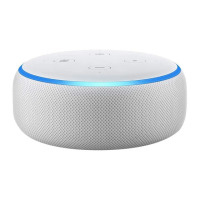
Highlights the key features of the Amazon Echo Dot (3rd Gen) smart speaker.
Details physical dimensions, weight, Wi-Fi, and Bluetooth connectivity.
Covers finding the Alexa app and initial usage instructions.
Explains how Alexa processes voice commands and manages data.
Details how to review, delete voice recordings, and manage privacy settings.
Explains how Alexa works with smart home devices and data received.
Covers Alexa messaging, calling, and supported devices.
Details the Drop In feature and how to make announcements.
Explains how Echo devices recognize wake words and send audio to the cloud.
Details how to turn off microphones and cameras on Echo devices.
The Amazon Echo Dot (3rd Gen) is a popular smart speaker designed for small spaces, offering a range of voice-controlled features through Alexa. This device serves as a central hub for various smart home functionalities, entertainment, and communication, all managed through simple voice commands.
The primary function of the Echo Dot is to act as a voice-controlled smart assistant. It allows users to stream music from popular services like Amazon Music, Apple Music, Spotify, and Sirius XM, providing richer and louder sound compared to previous generations. Users can pair two Echo Dot devices for stereo sound, enhancing the audio experience. Beyond music, Alexa, the integrated AI, is ready to assist with a multitude of tasks. You can ask Alexa questions, get news updates, check the weather, set alarms, and control compatible smart home devices. This includes turning on lights, adjusting thermostats, and locking doors, making your home more connected and convenient.
The Echo Dot also facilitates communication. You can make hands-free calls to almost anyone, drop in on other rooms in your home, or make announcements to all compatible Echo devices within your household. This feature allows for seamless inter-room communication and quick contact with friends and family. Alexa's capabilities are continuously expanding through "skills," which are voice-driven applications that add new functionalities like fitness tracking, games, and more. With tens of thousands of skills available and counting, Alexa is always getting smarter and more versatile.
For privacy, the Echo Dot is designed with multiple layers of protection. It includes a microphone off button that electronically disconnects the microphones, ensuring that the device cannot record or stream audio to the cloud when privacy is desired. This physical control offers peace of mind to users concerned about their conversations being monitored.
Using the Echo Dot is primarily a voice-controlled experience. To activate Alexa, you typically say a "wake word" such as "Alexa," "Amazon," "Computer," or "Echo." Once the wake word is detected, the device begins processing your request. For devices with screens, you can also activate Alexa by pressing a button or through motion detection. When Alexa is active and streaming audio to the cloud, a visual indicator (like a blue light ring on the Echo Dot) will appear, letting you know the device is listening. You can also configure the device to play a short audible tone when audio is sent to the cloud.
Alexa's smart home integration is a key usage feature. You can connect various smart home devices like lights, switches, plugs, thermostats, cameras, locks, televisions, printers, kitchen appliances, and robot vacuums. These devices can be connected through Alexa smart home skills, directly to Echo devices with built-in hubs (like Zigbee), or via Bluetooth or Wi-Fi. Some devices may even connect automatically through Frustration-Free Setup. Once connected, you can control them with voice commands, such as "Alexa, turn on the living room lights." Alexa also receives information about these devices, such as their status and usage history, to provide correct answers to your questions and personalize your experience.
Communication features are extensive. Alexa Communication allows you to send and receive voice and text messages to other Alexa Communication users and place outbound calls to most phone numbers in the United States, Canada, Mexico, and the United Kingdom. When you receive a call or message, your Echo device will provide an audio tone and visual notification, and you can answer or retrieve messages with voice commands. The "Drop In" feature allows for instant, two-way audio (and video on screen devices) connections with household members or trusted contacts, acting like an intercom. "Announcements" provide a one-way intercom feature to broadcast messages to all supported devices in your household.
Privacy controls are integrated into daily usage. Users can review and delete their voice recordings, including those resulting from "false wakes," through the Alexa app or Amazon's privacy settings page. You can choose to automatically delete recordings after a set period or opt not to save any recordings at all. Voice deletion can also be done by voice command, such as "Alexa, delete what I just said." Alexa Guard is another usage feature that allows supported Echo devices to detect specific sounds like smoke alarms, carbon monoxide alarms, and glass breaking when set to "Away mode," sending Smart Alerts to your mobile device.
While the Echo Dot itself requires minimal physical maintenance, its functionality is continuously maintained and improved through software updates and user feedback. Alexa is designed to get smarter every day, with Amazon using customer requests to train its speech recognition and natural language understanding systems through machine learning. This process involves human review of a small sample of requests to ensure Alexa correctly interprets commands and provides appropriate responses. Safeguards are in place to protect customer privacy during this process.
Users can actively participate in maintaining and improving their Alexa experience. The Voice History feature in the Alexa app allows you to play back audio recordings, review text transcripts of what Alexa thought you said, and see Alexa's responses. This helps users understand how Alexa works and identify any misunderstandings, providing an opportunity to give feedback to Amazon to improve voice services.
Managing privacy settings is a key maintenance aspect. Users can manage their voice recordings, including deleting them, through the Alexa app or Amazon's privacy settings. This control extends to managing information received from smart home devices, allowing users to delete status and usage history. However, deleting this information may degrade certain Alexa features.
For communication, contacts can be imported from your device or manually added and deleted in the Alexa app or online. The "Do Not Disturb" mode can be activated by voice or through the Alexa app to prevent receiving calls or messages, effectively silencing the device. For devices with cameras, the Microphone/Camera Off button physically disconnects both the camera and microphones, ensuring privacy and preventing motion detection.
The system requirements for the Echo Dot are simple: it needs to connect to your Wi-Fi network. The Alexa App is compatible with Fire OS, Android, and iOS devices, and is also accessible via a web browser, ensuring broad compatibility for managing the device. Certain skills and services may require subscription fees, which users can manage as needed. Firmware for connected smart home devices may be automatically updated by Alexa on behalf of the manufacturer, ensuring optimal performance and security without user intervention.
 General
| Weight | 10.6 oz (300 grams) |
|---|---|
| Power | 15W power adapter |
| Voice Assistant | Alexa |
| Colors | Charcoal, Heather Gray, Sandstone |
| Dimensions | 3.9 x 3.9 x 1.7 inches (99 x 99 x 43 mm) |
| Audio | 1.6" speaker |
| Connectivity | Wi-Fi, Bluetooth |
| Audio Output | 3.5 mm audio output |
| Microphones | 4-microphone array |

 To Next Page