EN-03
Mounting the video doorbell
Find a Mounting Spot
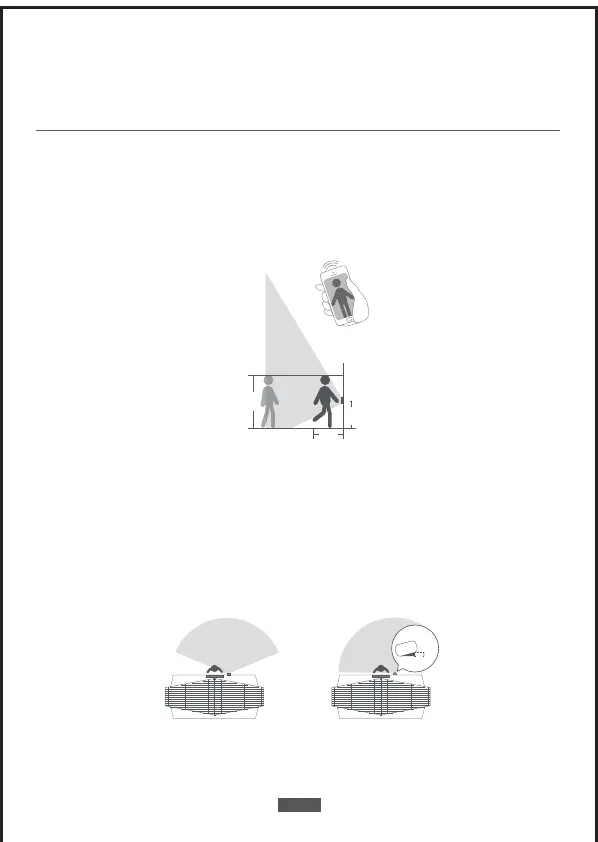
Take the video doorbell to your front door and check the live view on the App at the same
time. Find a location where you can get the desired field of view.
Consider the below factors:
1.If you want to place the doorbell close to a side wall, make sure the wall doesn’t show
up in the field of view. Otherwise IR light will be reflected and night vision will become
blurry.
1.2m
(48”)
1m
(40”)
0.3m
(12”)
1.76m
(5‘9”)
2.If you are drilling the mounting holes for the first time, the recommended mounting
height is 48”/1.2 m from the ground.
3.Use the 15
° mounting wedge as a supplementary mounting bracket if you wish to see
more on a specific side.
Door Video Doorbell
Without 15° Mounting wedge
(Overlook verb)
Door Video Doorbell
With 15° Mounting wedge
(Overlook verb)
15°


 To Next Page