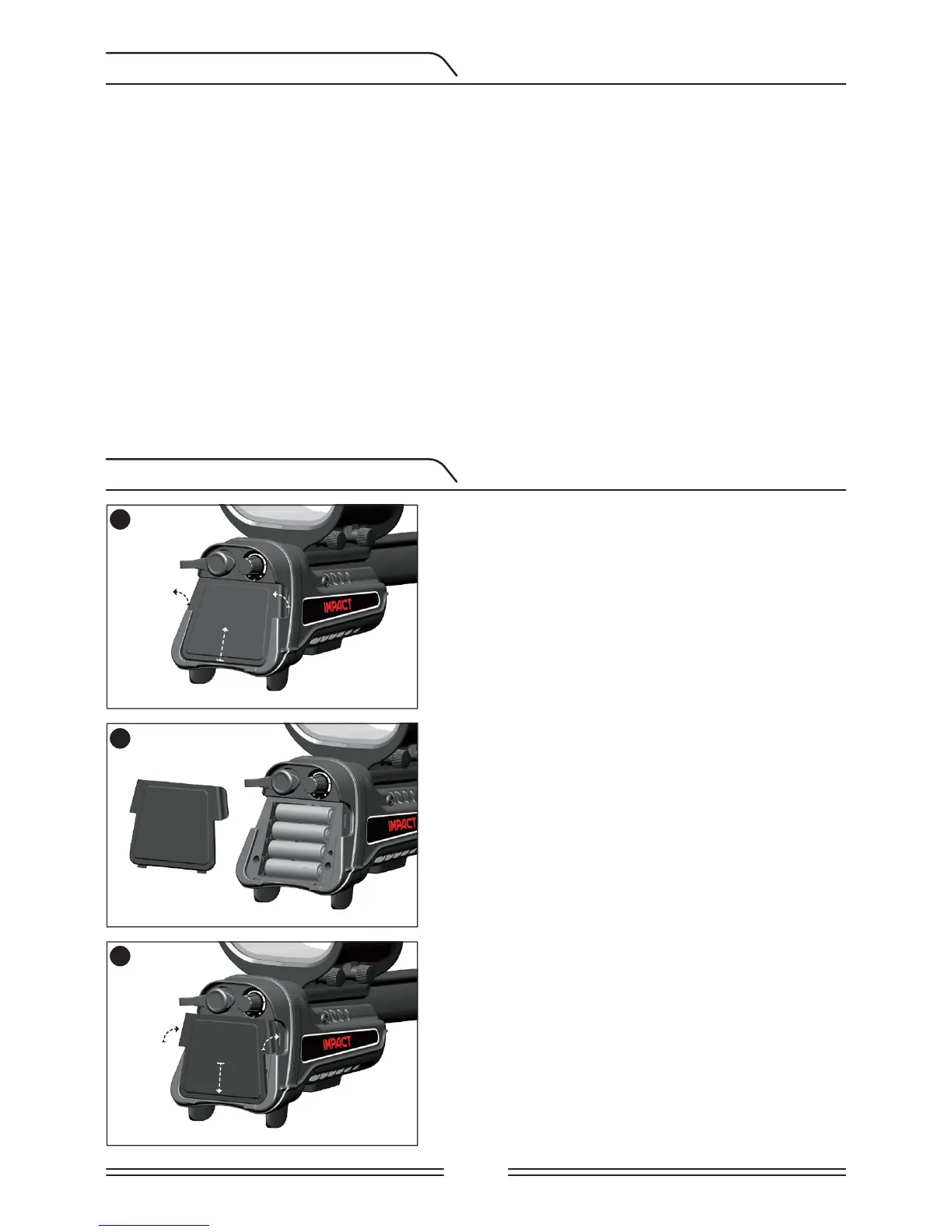
1
Push down on the tabs on both sides and pull the
cover up in the direction of the arrow shown in
the picture.
Install the batteries, making sure to match the
positive and negative ends of the batteries to
the correct contacts.
Place the battery cover in the direction of the
arrow shown in the picture. Push down on the
tabs to get the cover click into its place.
2
3
Page 3
BATTERY INFORMATION
BATTERY INSTALLATION
The device is supplied with 4 AA Alkaline batteries.
The device can be used for approximately 9-17 hours based on the operating frequency
chosen. Battery life will be less in 5kHz compared to other frequencies. Other factors such
as LED flashlight usage and usage of speaker or wired/wireless headphones will also affect
battery life.
AA Alkaline batteries are recommended for the best performance. Good quality Ni-MH
rechargeable batteries can be used, instead. Rechargeable batteries with high mAh (capacity)
ratings offer extended operating times versus batteries with lower rating. Do not mix alkaline
and rechargeable batteries.
Low Battery Level
Battery icon on the display shows the battery life status. When the charge decreases, the
bars inside the battery icon decrease, too. "Lo" message appears on the display when the
batteries are depleted.


 To Next Page