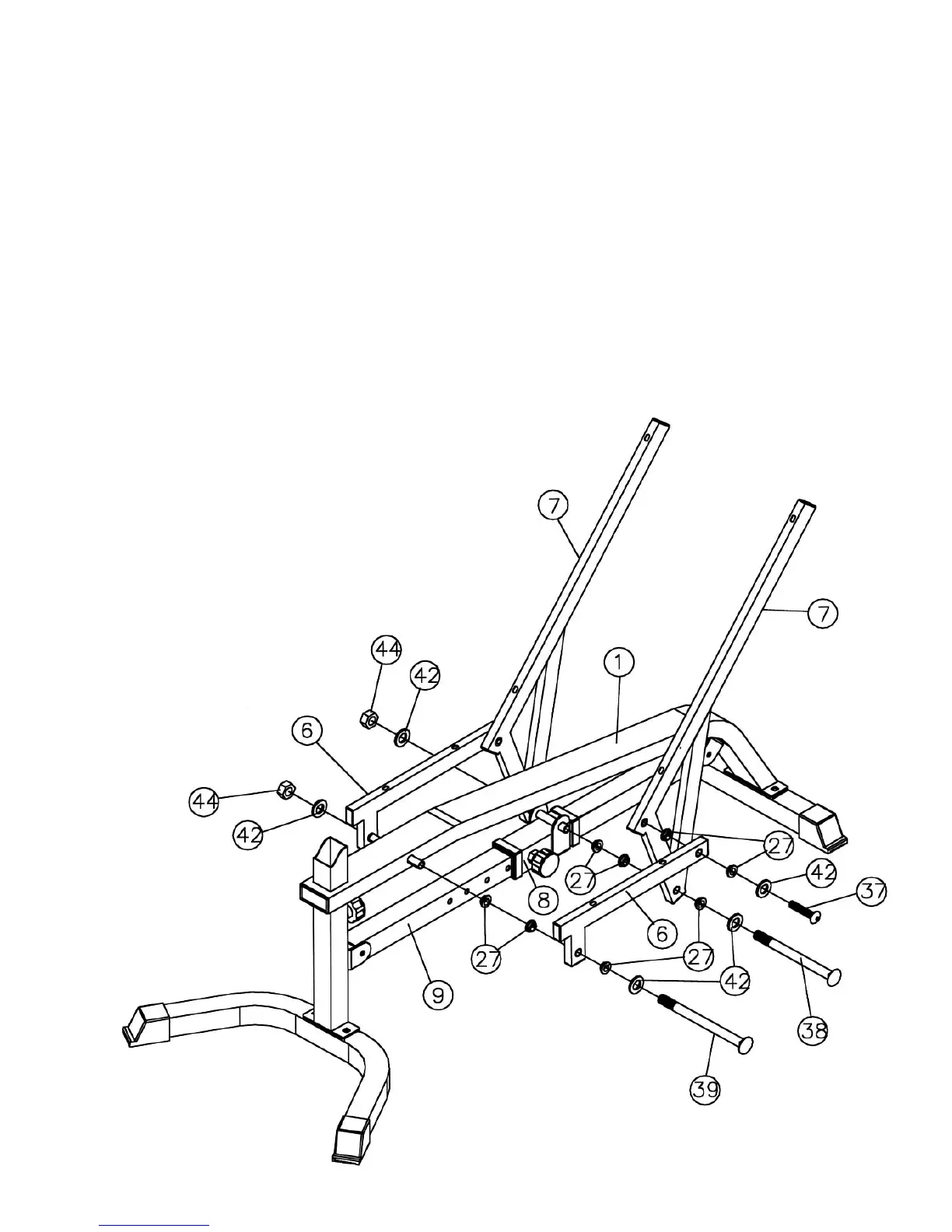
STEP 2 (See Diagram 2)
A.) Attach four Bushings (#27) to a Seat Support Frame (#6).
B.) Attach a Backrest Support (#7) to the rear of the Seat Support Frame (#6). Align the holes
and secure them with one M10 x 1 ¾” Allen Bolt (#37) and ∅ ¾” Washer (#42). Repeat
the same procedure to install the other side.
C.) Attach two Bushings to the pivot on the Sliding Block (#8). Attach two Bushings to each
Backrest Supports (#7). Align the holes and secure them with one M10 x 6 ¾” Allen Bolt
(#38), two ∅ ¾” Washers (#42), and one M10 Aircraft Nut (#44). Do not over tighten the
nut and bolt. The Supports need to swivel on the Bolt.
D.) Attach two Bushings to the pivot on the Main Frame (#1). Loosen and pull the Lock Knob
on the Sliding Block (#8). The Sliding Block needs to be able to slide on the Chromed
Incline Adjustment Bar (#9). Align the two Seat Support Frames (#6) to both ends of the
pivot on Main Frame. Secure them with one M10 x 8 ¼” Allen Bolt (#39), two ∅ ¾”
Washers (#42), and one M10 Aircraft Nut (#44).
E.) Use the Lock Knob on the Sliding Block (#8) to adjust and secure the backrest incline
position.
6



 To Next Page