6
Basic functionality
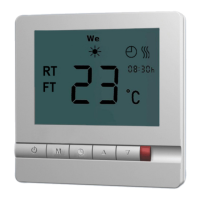
POWER ON/OFF
To turn thermostat on or off press “
”
SELECT HOW TO CONTROL YOUR FLOOR HEATING SYSTEM
Your oor heating system can be controlled either by the:
• Floor temperature - program mode 2
The heating element turns on/off around a oor temperature
setpoint (the temperature shown in the display is the actual
oor temperature)
• Room temperature - program modes 1 & 4
The heating element turns on/off around a room temperature
setpoint (the temperature shown in the display is the actual
room temperature)
• Combined oor and room temperature
- program modes 3 & 5
The heating element turns on/off around a room tempera-
ture setpoint with a requested max. oor temperature (oor
temperature is prioritized over room temperature)
Change between the above oor heating modes:
With the thermostat turned off.
Press “
” and “ ” for 6 seconds
Select mode 1 to 5 (see table on next page)
After choosing the desired mode do not press any further buttons and
the thermostat will go back to normal standby mode.


 To Next Page