RS-232 Module Pin Assignments
A
B
D
F
A
Remove
Slot 2
Panel
ISOLATED COMMUNICATION
SLOT# [2]
TERMINAL BLOCK
1. NC
2. NC
3. NC
4. RX -
5. RX +
6. TX -
7. COMM GROUND
8. TX +
• ISOLATED COMMUNICATION
ISOLATED COMMUNIC
ATIO N
S
LOT# [1] [2] [3
]
T
E
R
M
IN
A
L
B
L
O
C
K
1
. N
C
2
. N
C
3
. N
C
4
. R
X
-
5
. R
X
+
6
. T
X
-
7
. C
O
M
M
G
R
O
U
N
D
8
. T
X
+
• ISOLATED COMMUNICATION
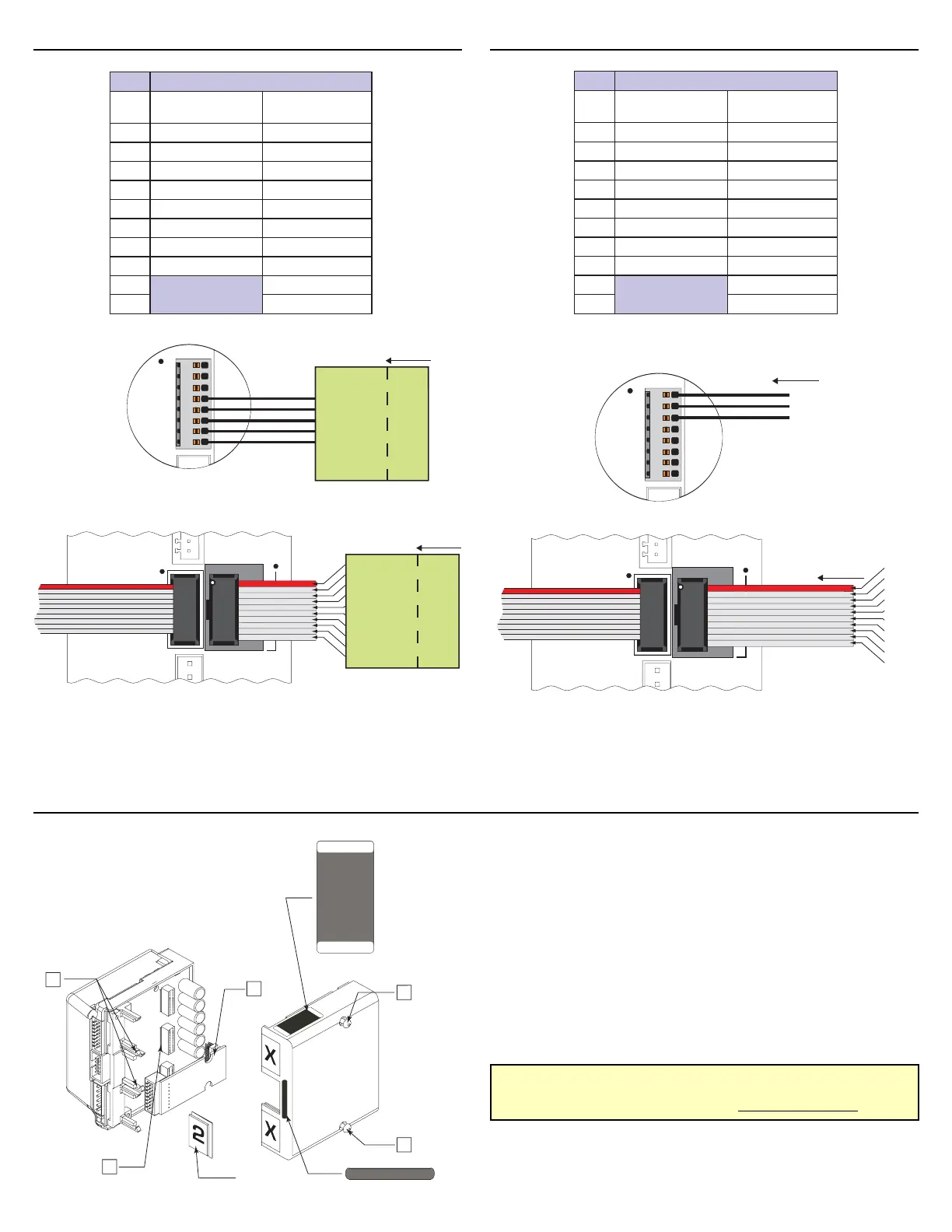
Installing the Isolated Communications Module
To Install the Module:
1) Remove the two retaining screws (A) from the cover.
2) Remove the blank panel from the #2 slot
3) Carefully press the Expansion Module (B) into place by
plugging the 28 pin connector into the #2 receptacle
and snapping it into place under the retaining clips (F).
4) Reinstall the MicroLYNX cover.
5) Affix the labels supplied with the Module as shown.
For More Information:
See the complete LYNX Product Family Operating Manual
on the IMS Product CD or at www.imshome.com
RS-485 Module Pin Assignments
TX
RX
CGND
From PC
RS-232
RS-485
1
--------
3
--------
5
--------
7
--------
9
--------
2
---
4
---
6
---
8
---
1
0
---
NC
NC
NC
NC
CGND
RS-485 RX+
RS-485 RX-
RS-485 TX-
RS-485 TX+
CGND
TX
RX
CGND
From PC
RS-232
RS-485
RX-
RX+
TX-
CGND
TX+
1
2
3
4
5
6
7
8
C
A
N
B
U
S
S
C
A
N
L
C
A
N
H
8 Pin Terminal
10 Pin Header
RS-232 to R
S-485
Converter*
RS-232 to RS-485
Converter*
1
--------
3
--------
5
--------
7
--------
9
--------
2
---
4
---
6
---
8
---
1
0
---
From PC
RS-232
CGND
RX
TX
1
2
3
4
5
6
7
8
8 Pin Terminal
C
A
N
B
U
S
S
C
A
N
L
C
A
N
H
10 Pin Header
NC
TX
RX
NC
CGN
NC
NC
NC
NC
NC
From PC
RS-232
* The recommended RS-232 to RS-485 Converter is IMS Part Number CV-3222.
If your PC is equipped with an RS-485 board, no converter is necessary. Connect the
RS-485 lines from the host PC directly to the MicroLYNX.
#niP noitpOrotcennoC232-SR
niP8
kcolBlanimreT
redaeHniP01
1dnuorGmmoCCN
2XRXT
3XTXR
4CNCN
5CNdnuorGmmoC
6CNCN
7CNCN
8CNCN
9
CN
01CN
#niP noitpOrotcennoC584-SR
niP8
kcolBlanimreT
redaeHniP01
1CNCN
2CNCN
3CNCN
4-XRCN
5+XRdnuorGmmoC
6-XT+XR
7dnuorGmmoC-XR
8+XT-XT
9
+XT
01dnuorGmmoC


 To Previous Page
 Loading...
