L
R
L
R
LINE INLINE OUT
MIN
LEVEL SUBSONIC
15HzMAX
BASS
BOOST
0dB50Hz 250Hz50Hz
L.P.F
12dB
PHASE
0
180
REMOTE
SLAVEMASTER
OUT
IN
MASTER/SLAVE
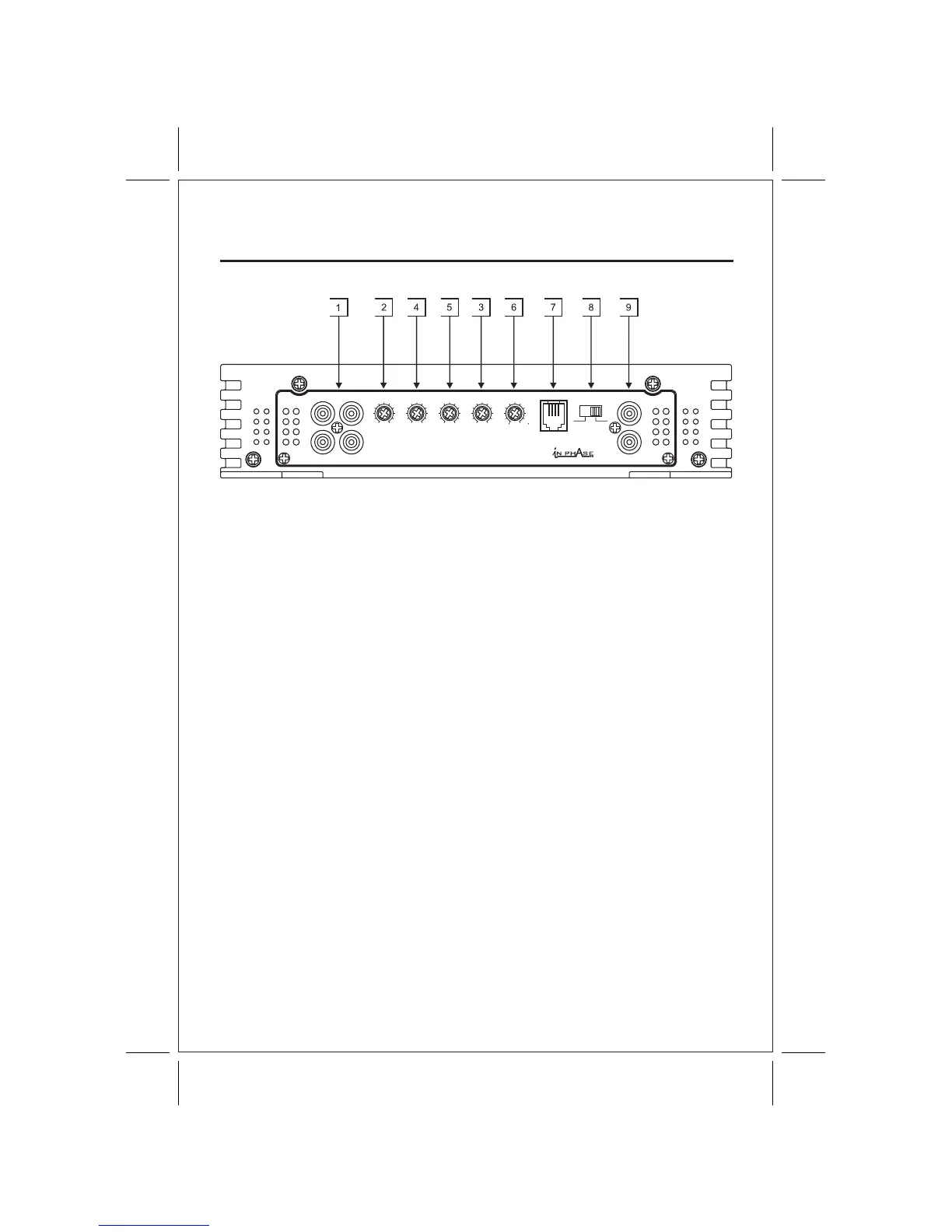
1. RCA Input Jacks 2. Input Level Control 3. Low Pass Frequency
4. Subsonic Filter 5. Bass Boost Control 6. Phase Control
7. Remote Control Jack 8. Master/Slave Switch 9. Slave Input Jack
CONTROL AND CROSSOVER
OPERATION
1. RCA Input Jacks- Low level-high impedance inputs.
U se high quality RCA cables designed for mobile applications.
2. Input Level Control- Adjust the input level for the marked channels.
T urn clockwise to increase the level, counterclockwise to decrease.
Amplifiers will run cooler and produce less system noise at lower level settings.
3. Low Pass Frequency- Adjust the crossover frequency by turning clockwise to set
to a higher f requency, counterclockwise to set to a lower frequency.
4 . Subsonic Filter Frequency- Adjust the subsonic filter frequency by turning clockwise
to set to a higher frequency, counterclockwise to set to a lower frequency.
5 . The Bass Boost control is used for a1-12dB Gain at 45Hz for extra bass punch.
6. Phase Control- Adjust the relative phase of the output a range of 0 to - 1 80 degrees
for solid bass r esponse and accurate imaging.
7. Remote Control Jack- For connecting the remote control module to the amplifier.
8. Master/Slave Switch- Select the remote level control or the on-board level control
as the master control.
9. Slave Input Jack- Used to connect to another amplifier when bridging 2 amps together.
T he Slave mode bypasses normal input jacks and controls.
7



 To Next Page