INSTALLATION
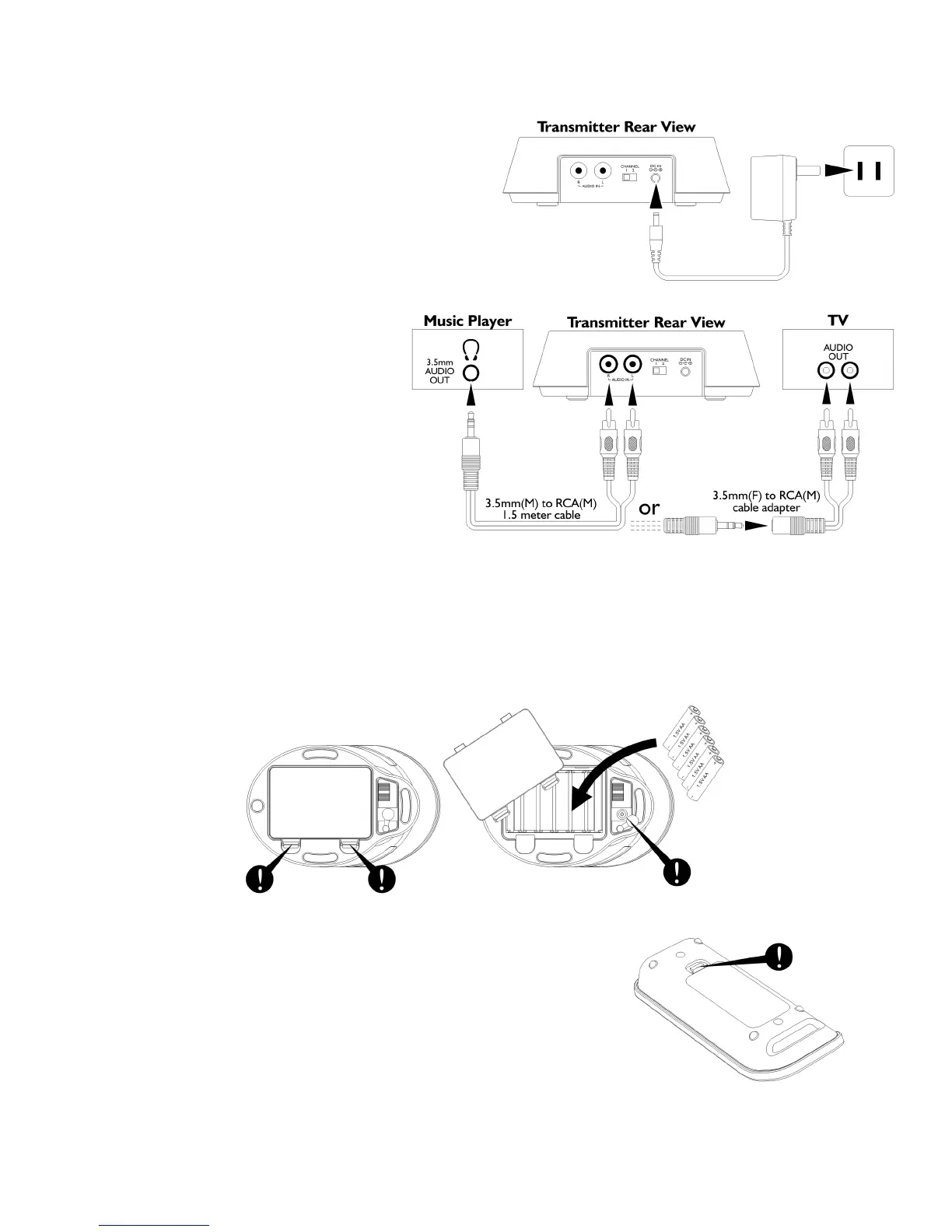
TRANSMITTER
1. Plugthesupplied8VAC/DCpoweradapterintothe
DCjacklocatedontherearofthetransmitter.
2. Connectthesupplied8VAC/DCpoweradapterto
anelectricalwalloutlet.ThePowerLEDlightsup.
3. Connectthetransmittertotheaudiooutputjack
ofyourTV,Monitor,VCR,Radio,CD,MP3/iPod/iPhone,
VCRorDVDplayerwiththecablesprovided.
TheLEDwillglowwhenthetransmitter
detectsanaudioinputsignalfromthe
sourcedevice.
SPEAKERRECEIVERS
1. Removethedoorofthebatterycompartment.
2. Insert6‘AA’sizebatteriesintothebatterycompartmentwiththecorrectpolarity.Replacethebatterycompart-
mentcover,orconnecttheprovidedAC/DC9VAdaptertotheDCinputjack,thenplugitintothewallACoutlet.
REMOTECONTROL
1. Removethedoorofthebatterycompartment.
2. Insert2xAAA1.5Vbatteries(notincluded)intothecompartment.
Power
Outlet
Note:
6 ‘AA’ size batteries
are required for full
wireless function


 To Next Page