OPERATION
1. Turnontheaudiosourcetowhichthetransmitterisconnectedwith.TheSignalLEDontransmitterwilllightup.
2. Selectachannelofthetransmitterforbestperformanceinyourlocation.
3. SelecttheL/M/R(Left/Mono/Right)selectorunderthespeakers,onetoL(Left)andtheothertoR(Right)for
thebeststereoreception.IncasetheaudiodeviceonlyprovidesaMonoaudiosignal,selectM(Mono)forthe
bestmonoreception.
4. Pressthe“POWER”buttononthespeakertoturnonthespeaker.Pressthe“TUNE”buttontogetthebest
tuningreceptioninthespeakers.Whenthebuttonispressed,frequencytuningstartsautomaticallyandit
stopswhenasignalisdetected.
5. Volumecanbeadjustedupfromthespeakerbypressingthe“”buttonordownbypressingthebutton““,
orbypressing“+“or“–“ontheremotecontrol,tothedesiredlisteninglevel.
6. Tuning
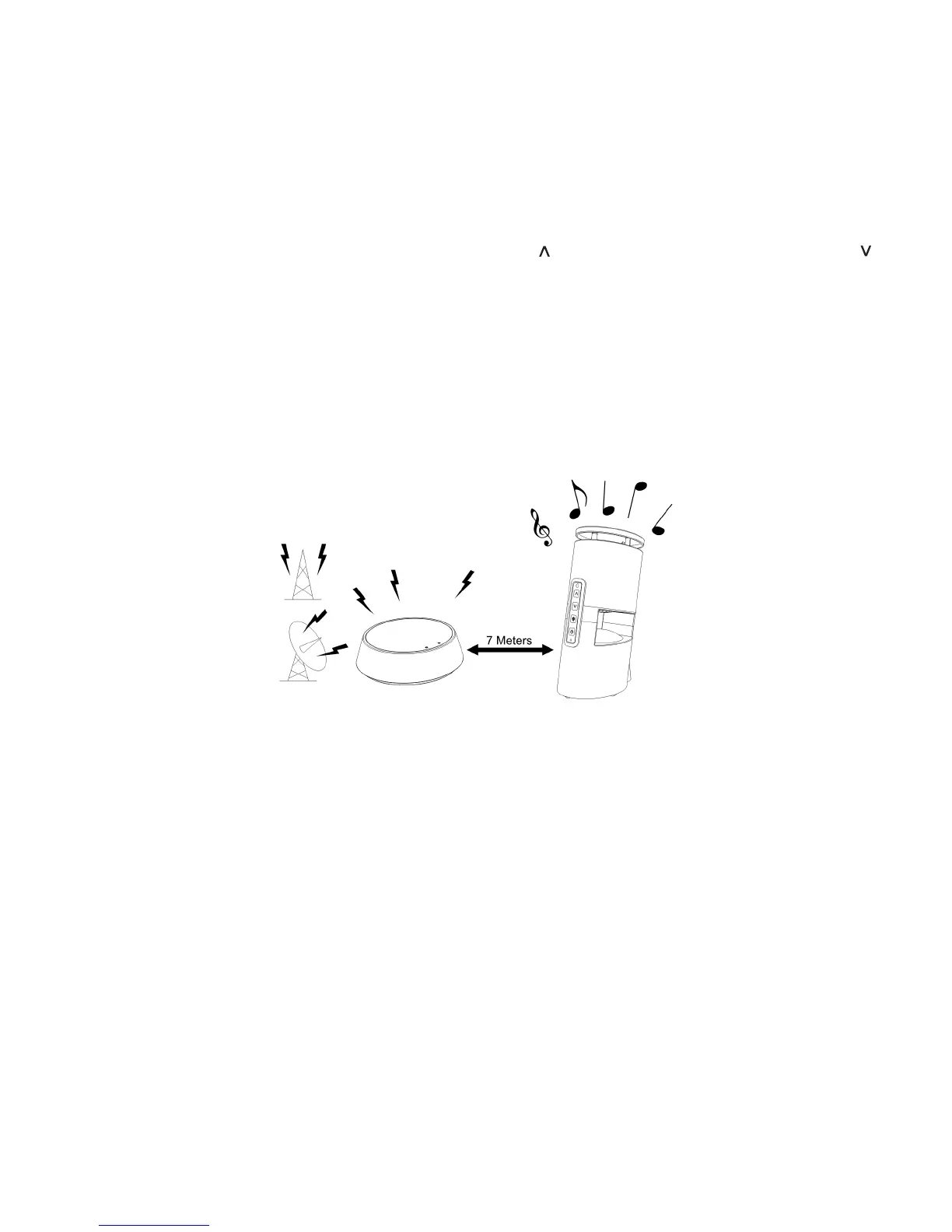
a)Keepadistanceof7metersbetweenthespeakersandtransmitter,andthenpressthe“TUNE“button
forbesttuningreception.
b)Ifthefrequencyispoor,selectanotherchannelonthetransmitter,thenpressthe“TUNE“buttonagain.
7. SwitchingOff
a) Forprotectionandpowersaving,thetransmitterwillsleepautomaticallyifthereisnosignalfromtheaudio
sourcefor4minutes.Whentheaudiosignalreturns,thetransmitterwillrestartautomatically.
b) Pressthe“POWER”buttontoturnoffthespeakerandtheLEDlightgoesoff.
NOTE :
Youshouldnowbeabletoplacethespeakersfreelyanywhereindoorsoroutdoorswithoutdistortion.
Ifthesignalisinterrupted,pressthe“TUNE”buttonunderthespeakerstomaximizethereception.
Ifyouhearinterferencefromothercomponents,switchthechannelcontroloftransmitter,andthenmovethe
speakerstoanotherlocation.Youcanre-adjustthetuningcontrolbyswitchingchannelsonthetransmitter,then
pressingthe“TUNE”buttononthespeakerstoimprovereception.
Whentransmitting/receivingoverlongdistances,thesignalfromthesystemwillbecomeweaker.
TROUBLE SHOOTING
NOSOUND
• EnsuretheACadapterisfullyinsertedintotheACoutletandthepowerconnectioninputonthetransmitter.
• EnsurethespeakerareswitchedON.
• Speaker’sbatterycapacityistoolow,replacewithnewbatteriesorconnecttheACadapterstothespeakers.
• EnsuretheTVoraudiocomponentisON.
• Theconnectedaudio/videoequipmentisnotplaying.
• Thevolumeofthespeakersistoolow,adjustthevolumetoanappropriatelevel.
DISTORTED
• Pressthe“TUNE”buttonunderthespeakersuntilthefrequencybetweenthetransmitterandspeakersarethesame.
• Changethepositionofthechannelselectoronthetransmitter.Youmustthenpressthe“TUNE”buttononthespeakers.
• Batterycapacityistoolow.ReplacewithnewbatteriesorconnecttheACadapterstothespeakers.
• Ensurethevolumelevelofyourdeviceandspeakersisadjustedproperly.
• Thespeakeristoofarawayfromtransmitter,movethemcloser.
• Theinputleveloftheaudiosignalistoolow.Turnupthevolumeoftheaudiosourceequipment.


 To Next Page
 Loading...