1
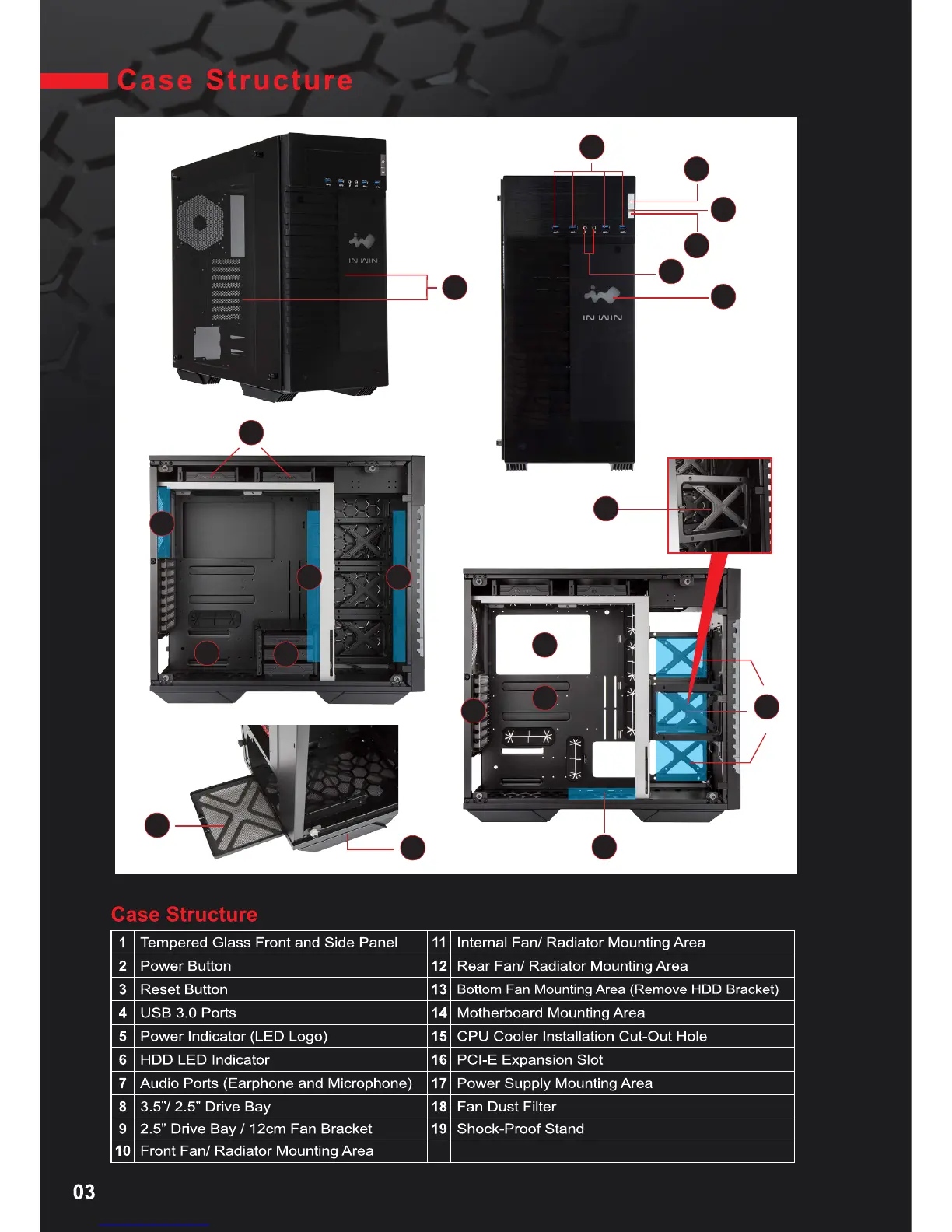
Tempered Glass Front and Side Panel
11
Internal Fan/ Radiator Mounting Area
2
Power Button
12
Rear Fan/ Radiator Mounting Area
3
Reset Button
13
Bottom Fan Mounting Area (Remove HDD Bracket)
4
USB 3.0 Ports
14
Motherboard Mounting Area
5
Power Indicator (LED Logo)
15
CPU Cooler Installation Cut-Out Hole
6
HDD LED Indicator
16
PCI-E Expansion Slot
7
Audio Ports (Earphone and Microphone)
17
Power Supply Mounting Area
8
3.5”/ 2.5” Drive Bay
18
Fan Dust Filter
9
2.5” Drive Bay / 12cm Fan Bracket
19
Shock-Proof Stand
10
Front Fan/ Radiator Mounting Area
1
14
15
13
2
5
6
4
3
7
17
18
16
8
8
19
11 10
9
9
12


 To Next Page