1
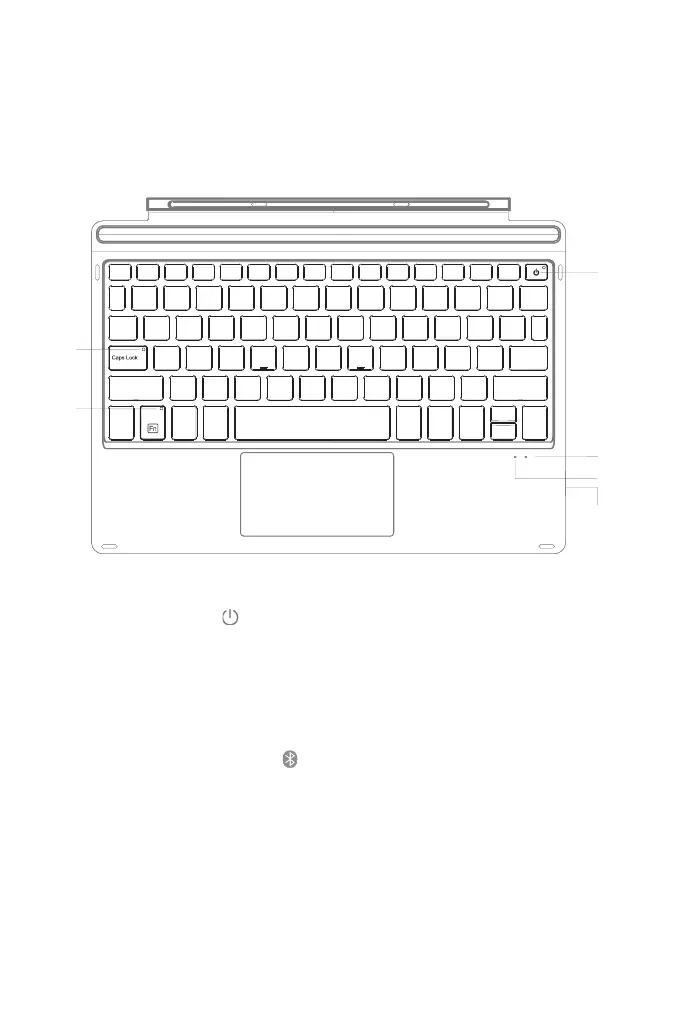
Long press for 3 seconds. The green LED indicator light stays on for 3 seconds and
then goes off when the keyboard is turned on. To turn off the keyboard, long press the button again, and
the green indicator will flash 3 times and then go off.
Red light flashes when it is time to recharge.
Red light is on when the keyboard is being charged. It turns green once the keyboard
is fully charged.
Press Fn+ simultaneously, and the blue light flashes which means the
keyboard is under Bluetooth pairing mode. The blue light will go off once Bluetooth is successfully paired.
The green indicator is on when the caps lock is enabled; otherwise, it goes off.
When the Fn Lock is enabled, the green indicator will be on. Otherwise, it will be off. Refer to “The way to
use F1-F12” for more details.
English
①
③
④
②



 To Next Page