8
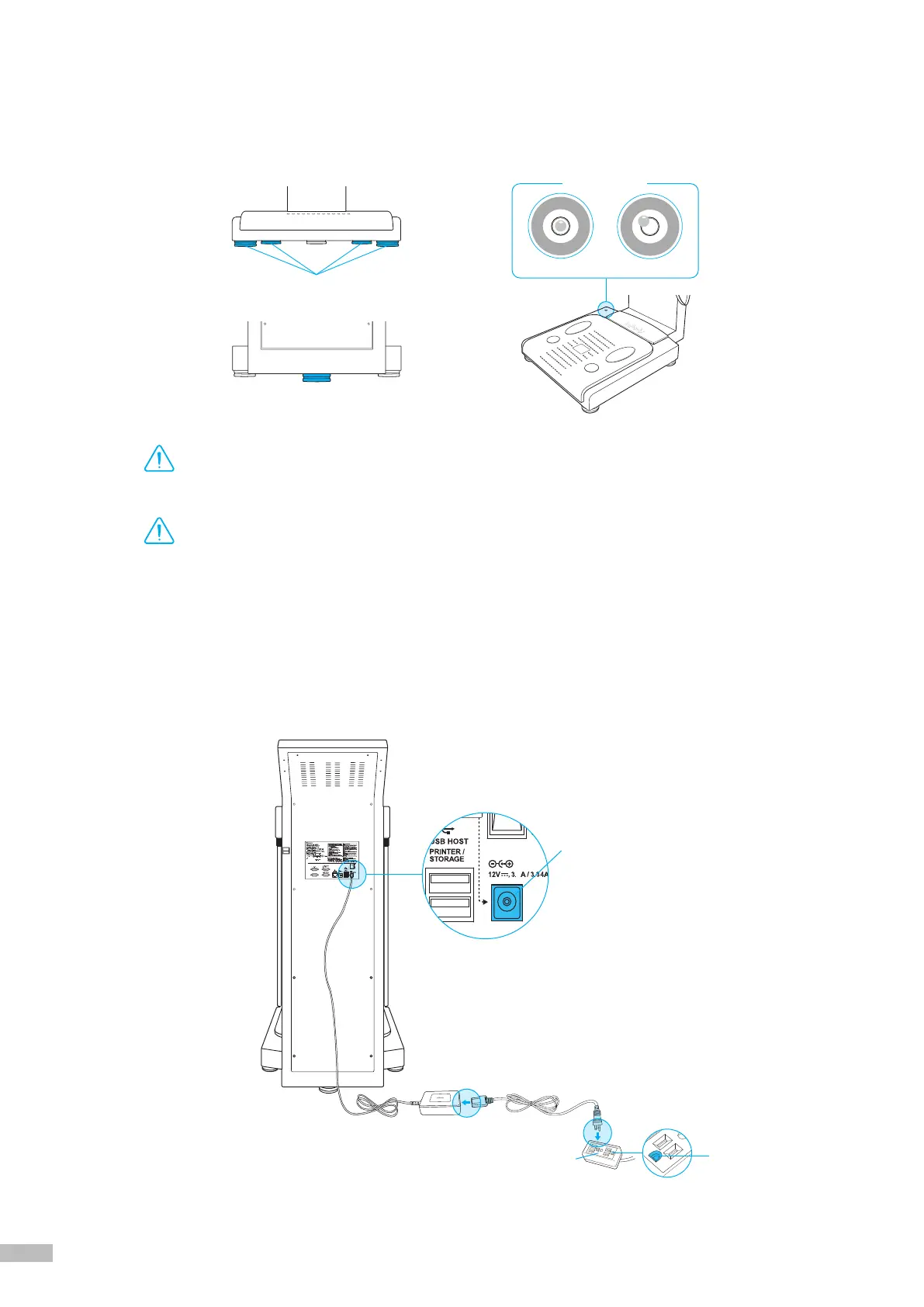
8. Level the InBody770 by rotating the leveling screws under the footplate to the left and right so that the
air bubble is centered.
*
Leveling the equipment is necessary for accurate measurement of weight. There are a total of 5 leveling screws.
Caution
•
Avoid injuring your hands when rotating the leveling screws under the footplate.
Attention
•
Faites attention de ne pas vous blesser aux mains lorsque vous serrez les vis de réglage sous le repose-pieds.
Leveling screws under the footplate
Leveling screws under the footplate
Leveled
Not leveled
Level Indicator
9. Connect the adapter (
❷
) to the power input port, which is located on the rear panel (
❶
). Connect the adapter (
❷
)
to the power cord (
❸
). Plug the power cord (
❸
) into a grounded 3-socket outlet.
*
The InBody770 can be used in connection with other test equipment such as a stadiometer, a blood pressure monitor, or data management
software called Lookin’Body120. For more information, please refer to ‘A. Exterior and Functions 3. Rear Panel’ in section ‘V. Others’ in
this User’s Manual.
4
Power input port
❶
Rear panel
❸
❷
Grounded outlet
3-socket outlet


 To Next Page