11
(1) For “Switch Mode”, Please press the up and down keys to view all different modes of switching your pictures, and
then select one by pressing the OK key on your remote. The types of modes include: “Default” “Persian blinds H”
“Persian blind V” “Slide up” “Slide down” “Slide left” “Slide right” “Stretch up” “Stretch down” “Stretch left” “Stretch
right” “Mosaic” “Zoom in” “Zoom out”
(2) For “Play Interval”, Please press the up and down keys to view the interval of switching your pictures, and then
select one by pressing the OK key on your remote. You have the following interval choices: 1s, 3s, 5s, 10s and 30s.
(3) For “Background Music”, press up and down keys to choose background music on or off.
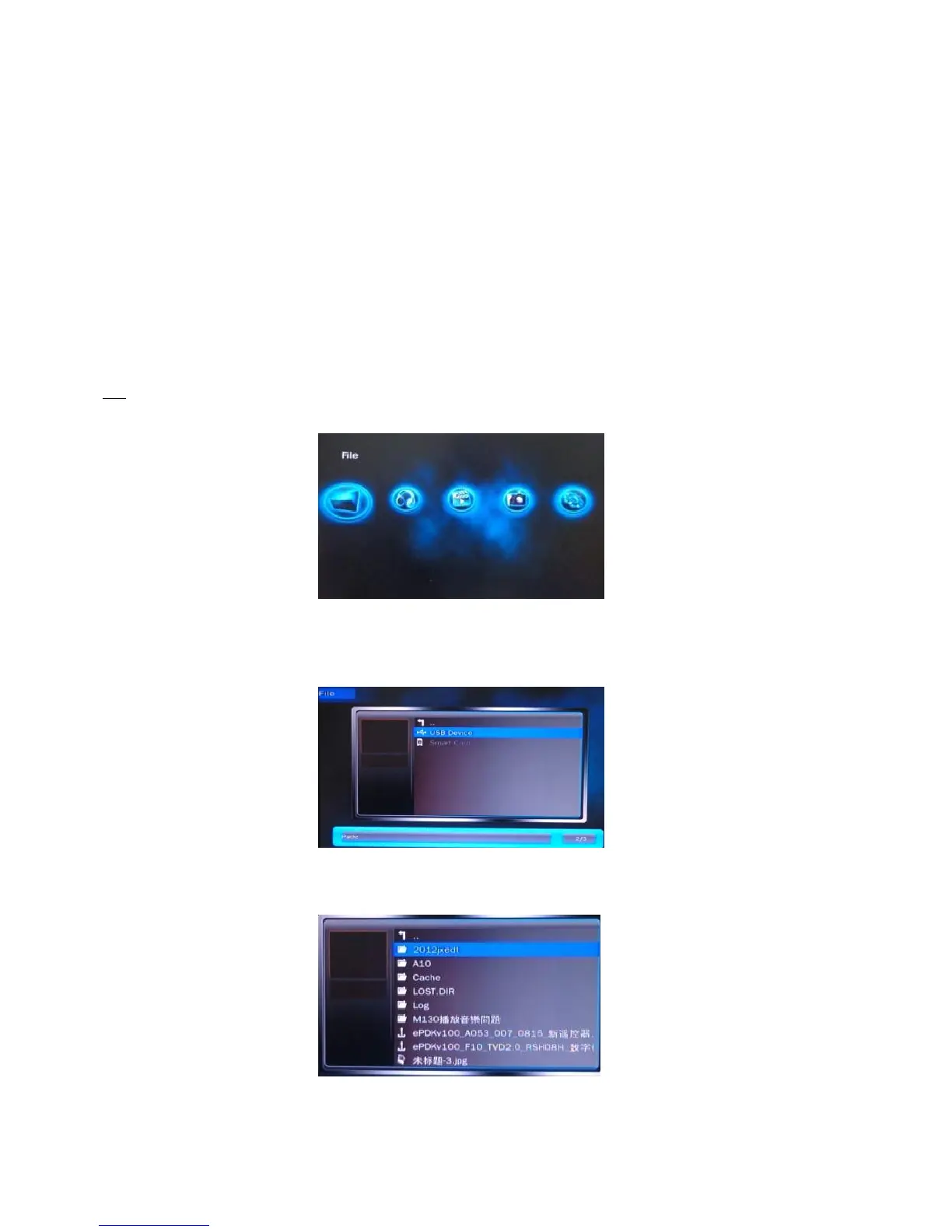
File
1. Use the arrow keys to select “File” on the main menu, and press Enter key to enter.
2. After entering, use the arrow keys to select the required input device. Press OK key to enter.
3. After choosing the device, you will see all files show here.


 To Next Page