ZM622: INSTALLATION & OPERATION MANUAL
PAGE 4
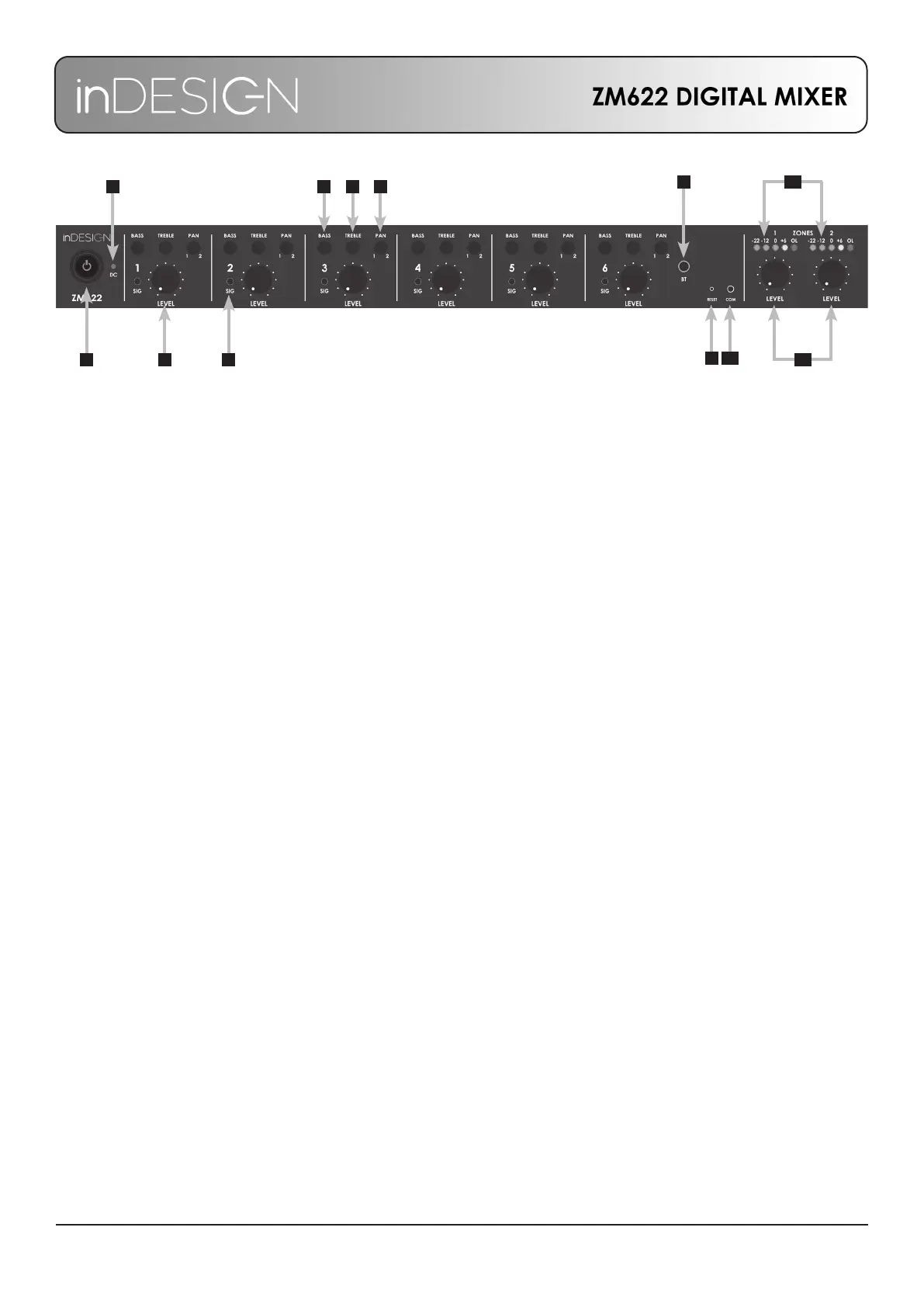
FRONT PANEL
1. Power Switch: Turns mains power on and off. The 24V DC backup power bypasses the power switch and
is always active while connected.
2. 24V DC Backup Power Indicator: Red Indicates if DC backup power is connected and available.
Orange indicates DC backup power is currently being used.
3. Input Volume: Adjusts the associated channels Microphone, Line or Bluetooth® input level.
4. Input Volume Indicator: Shows if channel signal is present. To set for optimum working level, normal signal
should be kept under 0dB. The LED will illuminate red when signal is in excess of +6dB.
5. Bass: Adjusts the Bass level on the associated channel. Increasing Bass may make music sound fuller,
reducing the Bass in reverberant spaces may improve speech intelligibility.
6. Treble: Adjusts the treble on the associated channel. Increasing the treble may improve intelligibility,
decreasing the treble may reduce the onset of high frequency feedback.
7. Pan: Adjusts how much signal will be sent to the two output zones from the associated channel.
8. Bluetooth Pairing: Press and hold the button to put the device into pairing mode, the button will ash
to indicate pairing mode is active. On your device pair with ‘ZM622’. When successful the button will
remain illuminated to show connection is active. Using Bluetooth will disable the mic and line inputs
for channel 6.
9. Reset: Press and hold to perform a soft reset of the mixer. This is required to reactivate front panel control
after RS232 has been disconnected.
10. RS232 Communication: Blue light indicates RS232 control is active. See page 6 for settings and a list of
RS232 commands.
11. Output Level Indicator: Shows output levels for Zones 1 and 2.
12. Output Level: Independently adjust the overall system volume for the two Zones to suit the environment
and use of the system.
2
41 3
5 6 7
8
9 10
11
12


 To Next Page
 Loading...