Instructions for installation and use
mode select
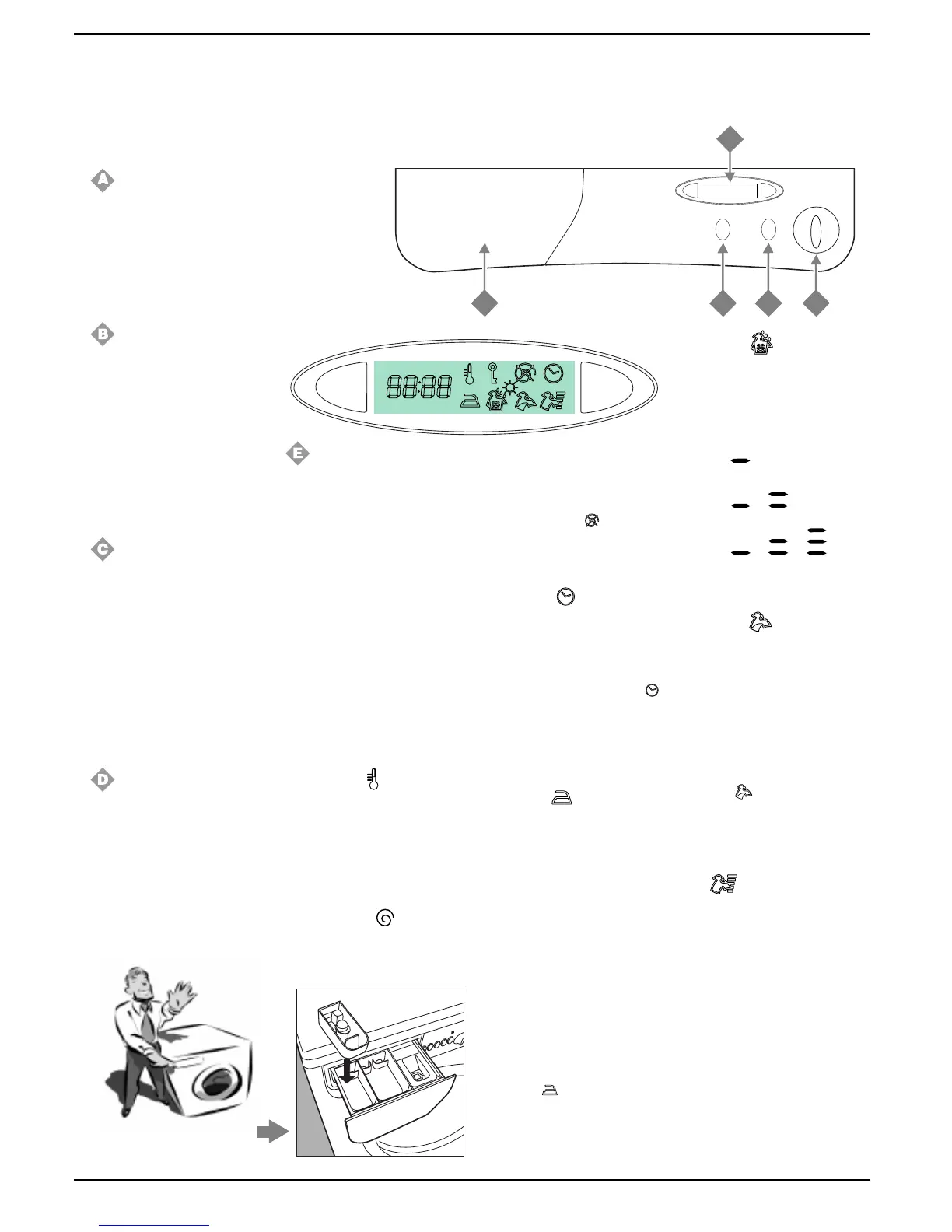
A
D
B
C
E
1
2
3
4
Here I’m in command
Understanding the control panel
Making the right choice is important. And it’s easy.
Programme selector knob
Use this knob to select the wash
programme.
To select a programme, you
should turn the knob so that the
symbol/number of the desired
programme is in line with the
pointer on the knob.
Start /Reset
This button allows you to start
the selected wash programme
or to interrupt it.
If you press it briefly, the button
functions as Start, if you press
it for at least 3 seconds, then it
functions as Reset.
After the Start of the appliance,
moving the programme
selector knob will have no effect
whatsoever.
On-off
When button C is pressed, the
washing machine is switched
on, when it is not the machine
is switched off.
Turning the appliance off
does not cancel the selected
programme.
When the appliance is switched
on, all the symbols on the display
light up for at least 8 seconds,
after which only the ones that can
be selected will flash.
Detergent dispenser
It is divided into three
compartments:
1.Detergent for pre-wash;
2. Detergent for the main cycle wash;
3. Fabric conditioner.
The washing machine is
equipped with an extra
compartment 4 (provided as an
accessory) for the bleach, to be
inserted in compartment 1.
Display
All the options available are
displayed on the right-hand side.
Use the mode button to select the
desired option, and the relative
symbol will begin flashing.
On the left-hand side, the value or
the status (On-Off) of the selected
option is displayed, and you can
modify it using the select button.
To access the subsequent option,
press the mode button, otherwise
press button B to start the wash
cycle.
All the options available are listed
below.
Only options relevant to the
selected programme will be
displayed.
Temperature
The display indicates the maximum
temperature relating to the
programme set, which can be
reduced by pressing the select
button right down to cold wash (Off).
This option is available on all
wash programmes.
Spin Variation
The display indicates the maximum
speed relating to the programme
set, which can be reduced by
The detergent dispenser with the
additional bleach compartment
is here.
3
pressing the select button right
down to its total exclusion (Off).
During a wash cycle, the selection
of the spin cycle exclusion is
indicated by symbol coming on.
This option is available on all wash
programmes except for number 6
and Drain.
Delay Timer
This allows you to delay the start
of the wash cycle by a minimum
of 1 to a maximum of 24 hours by
pressing the select button.
The enabling of the delayed start
is indicated by the symbol
coming on and staying on until the
wash cycle begins.
This option is not available on the
Draining and Spin cycle
programmes.
Rinse Hold
This button allows you to
interrupt a programme keeping
the washing soaking in water
before the spin cycle. It is a very
useful button in particular
because it can be used for
delicates and synthetics. It is only
to be used with wash
programmes for synthetic
fabrics, silk and curtains when it
is impossible for you to take the
washing out immediately.
This option is available on
programmes 2-3-6-7.
To complete the cycle, press the
select button.
During a wash cycle, the
enabling of this option is indicated
by symbol
coming on.
Extra Rinse
This increases the efficiency of
the rinse. We recommend that you
use it when dealing with a full load
and a great amount of detergent.
There are three levels; press the
select button to select them.
Low
Medium
High
This option is available on
programmes 1-2-3-7.
Stain Erase (see page 7)
Thanks to this command, the
washing machine will carry out a
more intensive wash that
optimises the effectiveness of the
liquid additives, thus allowing more
resistant stains to be removed.
To use this, press the select
button until the On sign comes on.
During a wash cycle, the
selectionof this option is indicated
by symbol
coming on.
This option is available on
programmes 1-2-3-7.
Note: It must not be used with the
Soak option.
Soak
With this button, you can leave
your washing to soak, which
lasts approximately 12 hours,
after which the appliance will
carry out the wash cycle set.
Should you wish to interrupt the
soaking, press button select
once more.
This option is available on
programmes 1-2-3-4.
Note: It must not be used with the
Stain Erase option.


 To Next Page
 Loading...