

EasyManua.ls Logo

Infineon MERUS MA12070P - User Manual

Infineon MERUS MA12070P
24 pages
Print Icon
To Next Page IconTo Next Page
Loading...
User Manual Please read the Important Notice and Warnings at the end of this document V 1.6
www.infineon.com/kit-40w-amp-hat-zw page 1 of 24 2021-11-09
UM_1911_PL88_1912_152704
MERUS audio amp HAT ZW
User manual - KIT_40W_AMP_HAT_ZW
About this document
Scope and purpose
This document describes the MERUS
TM
audio amp HAT for Raspberry Pi Zero W equipped with the Infineon
MA12070P proprietary multilevel class D amplifier. Detailed information is provided on the board’s content,
layout and use. A Raspberry Pi Zero W is mandatory for operation.
Intended audience
This document is intended for anyone working with the MERUS
TM
audio amp HAT, such as makers and audio
engineers.
Attention: Read through this user manual before operating the board.
Attention: Observe proper volume and limiter settings handling procedures. Failure to do so may result
in damage to components on the board.
Table of contents
About this document ....................................................................................................................... 1
Table of contents ............................................................................................................................ 1
1 MERUS
audio amp HAT overview ........................................................................................... 3
1.1 Key features ............................................................................................................................................. 3
1.2 Application and block diagram ............................................................................................................... 4
2 MERUS™ audio amp HAT description ........................................................................................ 5
2.1 Features and specifications .................................................................................................................... 5
2.2 Audio performance.................................................................................................................................. 5
2.3 Hardware description ............................................................................................................................. 5
2.3.1 Board description and pin functions ................................................................................................. 5
2.3.2 Schematics ......................................................................................................................................... 7
2.3.3 Required input power ...................................................................................................................... 10
2.3.4 I
2
S digital audio interface configuration ......................................................................................... 10
2.3.5 GPIO controls ................................................................................................................................... 10
2.3.6 Short-circuit protection ................................................................................................................... 10
3 Hardware setup .................................................................................................................... 11
4 Software setup ..................................................................................................................... 12
4.1 Raspberry Pi OS (previously called Raspbian) ..................................................................................... 12
4.1.1 Official Raspberry Pi OS method ..................................................................................................... 12
4.1.2 MERUS
TM
custom kernel building (optional for advanced users) ................................................... 14
4.2 moOde audio player .............................................................................................................................. 14
4.2.1 Official moOde audio player method .............................................................................................. 14
4.3 Volumio .................................................................................................................................................. 16
4.3.1 Official Volumio method .................................................................................................................. 16
Question and Answer IconNeed help?

Do you have a question about the Infineon MERUS MA12070P and is the answer not in the manual?

Summary

About this document

Scope and Purpose

Defines the document's objective and the product's scope for users and engineers.

Intended Audience

Identifies the target readers, including makers and audio engineers, for this user manual.

MERUS Audio Amp HAT Overview

Key Features

Lists the primary capabilities and specifications of the MERUS™ audio amplifier HAT.

Application and Block Diagram

Illustrates how the audio HAT connects and functions within a Raspberry Pi system.

MERUS Audio Amp HAT Description

Features and Specifications

Details the technical capabilities and performance metrics of the audio amplifier HAT.

Audio Performance

Outlines the sound quality and output characteristics of the amplifier.

Hardware Description

Provides details on the physical and functional aspects of the audio HAT's hardware.

Required Input Power

Specifies the power supply requirements for the audio HAT operation.

I2 S Digital Audio Interface Configuration

Details the setup for the I2S digital audio input interface.

GPIO Controls

Explains the use of GPIO pins for device control and operation.

Short-Circuit Protection

Describes the built-in protection mechanisms against short circuits.

Hardware Setup

Software Setup

Raspberry Pi OS Installation

Guide for installing Raspberry Pi OS and drivers for the audio HAT.

Official Raspberry Pi OS Method

Step-by-step instructions for setting up Raspberry Pi OS.

MERUS Custom Kernel Building

Optional procedure for advanced users to build a custom kernel.

moOde Audio Player Installation

Guide for installing the moOde audio player with HAT drivers.

Official moOde Audio Player Method

Step-by-step instructions for setting up moOde audio player.

Volumio Installation

Guide for installing the Volumio player with HAT drivers.

Official Volumio Method

Step-by-step instructions for setting up Volumio.

AirPlay (shairport-sync)

Instructions for enabling AirPlay wireless streaming.

Alsamixer and Volume;Limiter Settings

How to use alsamixer for audio controls and setting limits.

Alsamixer Controls

Details the specific controls available within the alsamixer interface.

Volume and Limiter Settings

Procedure for setting volume and limiter thresholds for optimal performance.

Setting the Amplifier in PBTL Mode

Configuration steps for Parallel Bridge-Tied Load (PBTL) mode.

References

Revision History

Overview

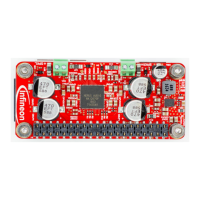
The MERUS™ audio amp HAT ZW is a hardware-attached-on-top (HAT) audio power amplifier board designed for Raspberry Pi users and makers, aiming to provide high-quality audio in a compact, power-efficient package. It is specifically designed for loudspeaker building and wireless music streaming applications.

Function Description

The core function of the MERUS™ audio amp HAT is to amplify audio signals for loudspeakers, leveraging Infineon's proprietary multilevel class D amplifier technology. It integrates seamlessly with Raspberry Pi Zero and Raspberry Pi Zero W, acting as a complete audio solution without the need for external power supplies. The board receives digital audio input via an I²S interface from the Raspberry Pi and converts it into amplified analog audio for loudspeakers. Control and communication with the amplifier are handled by the Raspberry Pi through an I²C interface, with software drivers managing all aspects of its operation. The HAT also incorporates a built-in boost converter to supply the necessary voltage to the amplifier, ensuring optimal performance. It supports various audio streaming applications and can function as an AirPlay client or Bluetooth audio receiver when used with Raspbian.

Important Technical Specifications

  • Amplifier: Equipped with the MERUS™ MA12070P proprietary multilevel class D amplifier.
  • Compatibility: Compatible with Raspberry Pi Zero and Raspberry Pi Zero W.
  • Power Input: 5 V/2.5 A, sourced directly from the Raspberry Pi's single supply (no external or extra power supplies needed).
  • Output Power: Up to 40 W instantaneous peak output power with the official Raspberry Pi 5 V/2.5 A supply.
  • Audio Playback: Supports up to 48 kHz sample rate and 24 bits of music playback.
  • Total Harmonic Distortion + Noise (THD + N):
    • 0.077 percent at 7 W/4 Ω/1 kHz (average with sine waves).
    • 0.014 percent at 1 kHz, 1 W/4 Ω.
  • Idle Power Consumption:
    • HAT only: 390 mW.
    • HAT + Raspberry Pi: 970 mW.
  • Overall Efficiency: 66 percent (1 W/ch at 4 Ω).
  • Digital Audio Input: I²S digital audio input.
  • Control Interface: I²C communication for full register map control.
  • Speaker Configuration:
    • Default: 2 x bridge-tied load (BTL) channels.
    • Optional: 1 x parallel bridge-tied load (PBTL) configuration for high-power true wireless stereo applications.
  • Protection Mechanisms: Built-in undervoltage lockout (UVLO), overtemperature warning/error, short-circuit/over-load protection, power stage pin-to-pin short-circuit, DC protection, and external protection diodes at the output to prevent inrush currents.

Usage Features

  • Direct Mounting: Designed to mount directly on top of a Raspberry Pi Zero, similar to other HATs, using a female header on the board.
  • Software Control: Full hardware control, customization, and error monitoring are available through Linux alsamixer, providing direct access to the MA12070P amplifier registers and digital audio processor.
  • Automatic Enable Control: Features automatic enable control for both the booster and amplifier, ensuring secure boot-up and shut-down sequences.
  • Digital Limiter: Includes a digital limiter for loudspeaker protection, with configurable threshold values to prevent damage.
  • Mute Control: The amplifier remains muted until PCM streaming is present, preventing pop-noises during non-playback, boot-up, and shut-down sequences.
  • Operating System Support: Compatible with major streaming applications for Raspberry Pi, such as Volumio, moOde audio player, Max2Play, and JustBoom. It can also be used with Raspbian as an AirPlay client or Bluetooth audio receiver.
  • I²S Slave Mode: The I²S interface operates in slave three-wire communication, with the serial clock line PI_BCLK wired to the MA12070P master clock.
  • Flexible Audio Formats: Major wireless audio streaming applications can decode and/or convert various audio formats (MP3, AAC, WAV, FLAC) to 32 bits.
  • PBTL Mode: Easily configurable into Parallel Bridge-Tied Load (PBTL) mode by pulling down Raspberry Pi's GPIO 8, connected to the MSEL0 pin of the MA12070P amplifier.

Maintenance Features

  • Software Updates: Users are advised to keep their Raspberry Pi system updated using sudo apt update and sudo apt full-upgrade commands to ensure the latest drivers and system stability.
  • Limiter Settings: Detailed procedures are provided for setting correct limiter thresholds based on loudspeaker impedance to prevent damage to components and ensure optimal performance. This involves adjusting the "Lim thresh Volume" and "Mstr Volume" controls in alsamixer.
  • Hardware Assembly: Recommendations for using 4 mm 2.5 M hex spacers to safely separate the HAT from the Raspberry Pi board, ensuring good airflow and preventing overheating.
  • Cable Length: Supports loudspeaker cable lengths up to 60 cm for radiated emission tests, and up to 5 m for general applications where such tests are not critical.
  • Error Monitoring: Alsasound card driver mixer provides error status indicators (e.g., Err flycap, Err overcurr, Err pllerr, Err pvddunder, Err overtempw, Err overtempe) for diagnostic purposes.

Infineon MERUS MA12070P Specifications

General IconGeneral
BrandInfineon
ModelMERUS MA12070P
CategoryAmplifier
LanguageEnglish