(1,2,3,4)
(1,2,3,4)
Relie f
Renew
Refresh
Energy
Revive
Active
Relax
Whole
Point
1
2
3
4
1
2
3
4
Full Bo dy
Upper B od y
Arms & Se at
Legs & Fe et
Heati ng
Heati ng
Heati ng
Heati ng
Heati ng
Heati ng
Heati ng
Press “on/off” button. When the chair powers up you will hear a short
beep. The LCD screen will display the Infinity Logo and after 2-3
seconds it will display the main interface then enter standby mode.
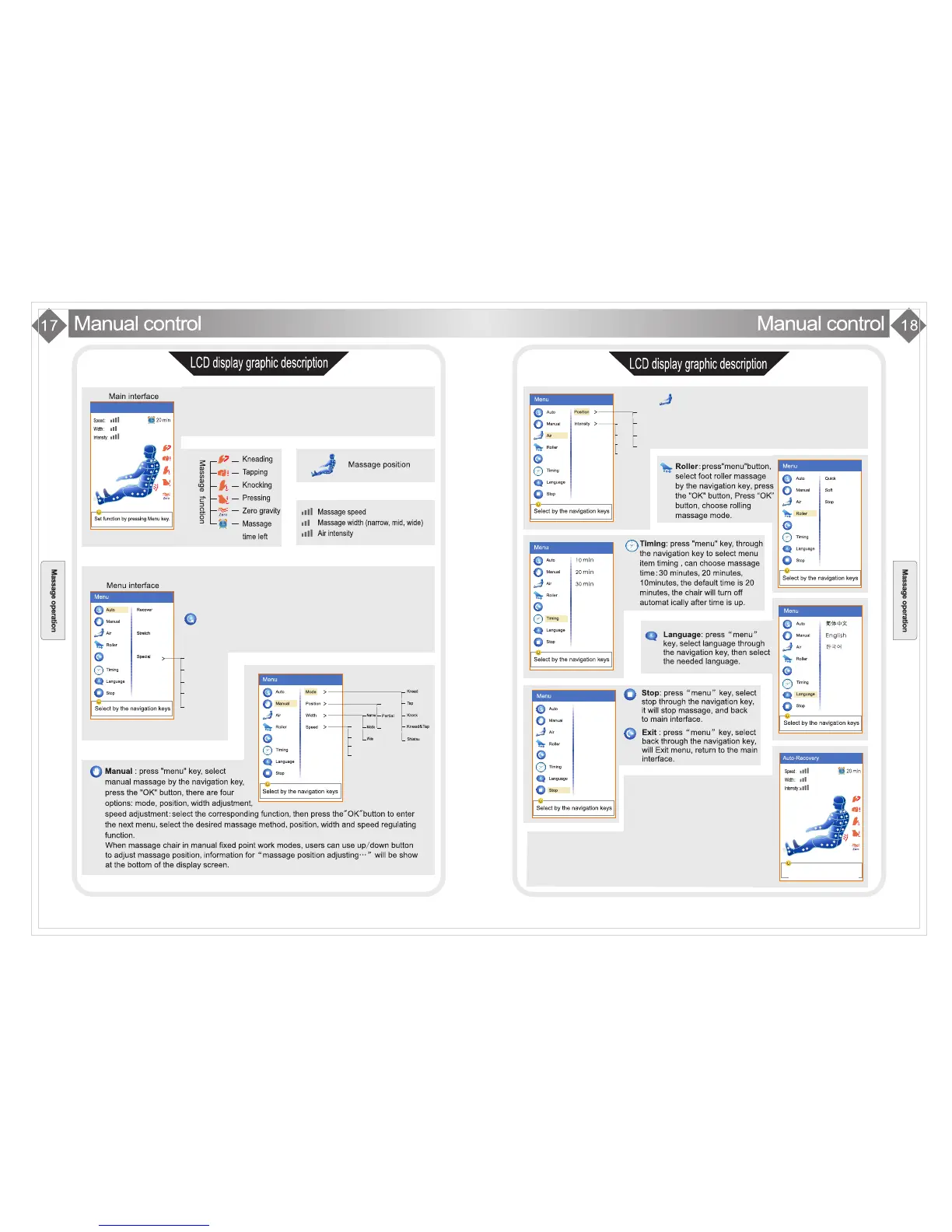
The main interface shows the massage position, method, time,
heat, massage status, etc. All info is updated live.
Press the “menu” button in the main interface and you will enter the
menu interface. From here you can set the massage function. Press
menu again to exit and return to the main menu interface.
Auto Massage: press the “menu” button and the cursor will stop
on the auto massage program menu item by default. Press the
“ok” button and you can choose the auto massage mode you like
from a choice of five special auto programs.
n
Air: After pressing the Menu button choose
“air pressure” through navigation key, then
choose “OK”. There are two kinds of air
pressure related function: Position and
Intensity. Choose the function you desire
then press “OK”.
Body Scanning....
After powering on the chair and using an
auto program, the chair will begin the
computer controlled body scanning
procedure. The screen will show “Body
Scanning” until it finishes, when the
chair will let out 5 tones in 5 seconds to
let you know it is complete. At this time
the massage rollers will be located in the position they determined
is your shoulder position. If you think the position is not correct, you
can press the “up” and “down” buttons to adjust the position. Default
massage time is 20 minutes. The INFINITY Escape will turn off and
return to its default position when the massage is over.










 To Next Page