[ Edit: 2016/ 8/ 1 Model: 2017MY INFINITI Q70(Y51) OM17E00Y51U0 ]
SAA1896
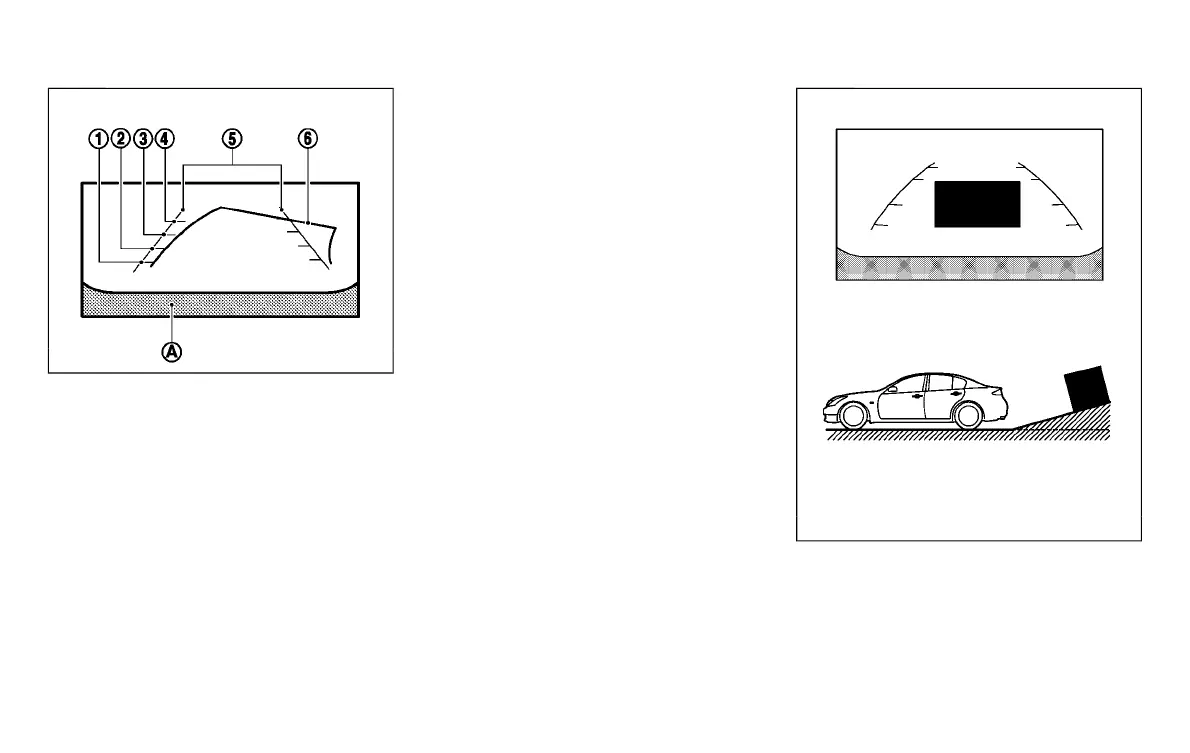
HOW TO READ DISPLAYED LINES
Y51D-V-E01-7F4CB6FC-2AD6-419E-B463-6CDB1B5A5DE6
Guiding lines which indicate the vehicle
width and distances to objects with refer-
ence to the bumper line
*
A
are displayed
on the monitor.
Distance guide lines:
Indicate distances from the bumper.
. Red line
*
1
: approx. 1.5 ft (0.5 m)
. Yellow line
*
2
: approx. 3 ft (1 m)
. Green line
*
3
: approx. 7 ft (2 m)
. Green line
*
4
: approx. 10 ft (3 m)
Vehicle width guide lines
*
5
:
Indicate the vehicle width when backing
up.
Predictive course lines
*
6
:
Indicate the predictive course when back-
ing up. The predictive course lines will be
displayed on the monitor when the shift
lever is in the “R” (Reverse) position and
the steering wheel is turned. The predictive
course lines will move depending on how
much the steering wheel is turned and will
not be displayed while the steering wheel
is in the neutral position.
The vehicle width guide lines and the width
of the predictive course lines are wider
than the actual width and course.
DIFFERENCE BETWEEN PREDICTIVE
AND ACTUAL DISTANCES
Y51D-V-E01-4A307EEF-D4F7-4A89-B785-67DA239C1C53
The displayed guide lines and their loca-
tions on the ground are for approximate
reference only. Objects on uphill or down-
hill surfaces or projecting objects will be
actually located at distances different from
those displayed in the monitor relative to
the guide lines (refer to illustrations). When
in doubt, turn around and view the objects
as you are backing up, or park and exit the
vehicle to view the positioning of objects
behind the vehicle.
JVH1268X
Backing up on a steep uphill
GUID-CC8946C9-BC88-48B2-9A99-0389DCB44AFA
When backing up the vehicle up a hill, the
distance guide lines and the vehicle width
guide lines are shown closer than the
actual distance. Note that any object on the
hill is further than it appears on the
monitor.
Monitor, climate, audio, phone and voice recognition systems 4-27
Condition:


 To Next Page
 Loading...
