<
m
>(models without Around View Monitor
system)
Push for brightnesscontrol. Push and hold to
turn the display on/off.
STEERING WHEEL MOUNTED
CONTROLS
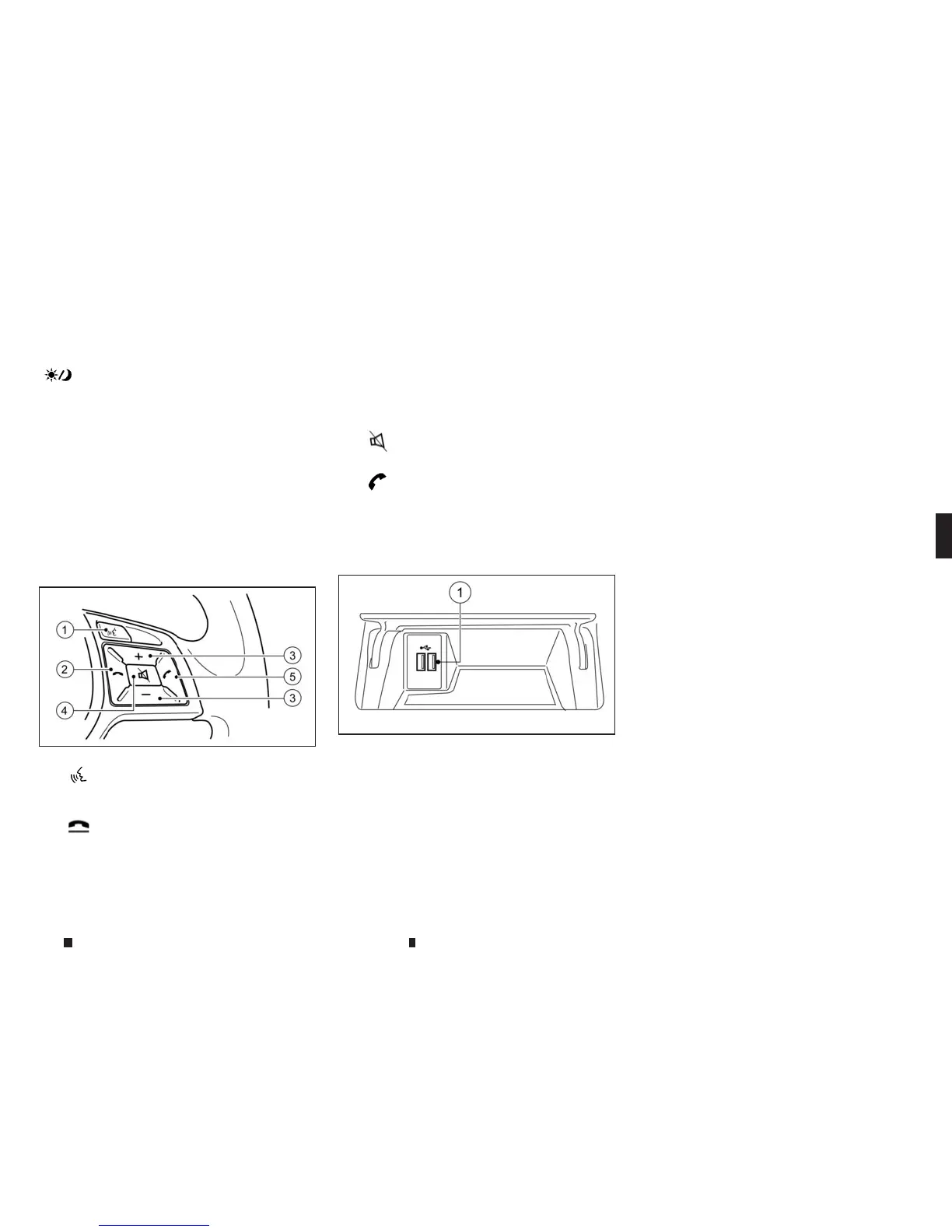
Thesteering wheel switch controls the volume,
voicerecognition,or Bluetooth® Hands-Free
Phone, or selectsamenu.
It canalso control audio and hands-free text
messagingassistant features that areshown on
the display.
j
1
<
m
> (TALK):
Push to enter the voicerecognition mode.
“Giving voicecommands” page4-95
j
2
<
m
> (Phone End):
End an active call and reject an incoming
call.
j
3
Volume control switch:
The volume control switch allows youto
adjust the volume of the speakersbypush-
ing the +or−button.
j
4
<
m
> (Mute):
Push to turn on/off the audio system.
j
5
<
m
> (Phone Send):
Make acalland accept an incoming call.
USB CONNECTION PORTS
The front console compartment containsthe
USBconnection ports.
j
1
USB/iPod connection port:
Connect to play media from an iPod,
iPhone or aUSB memorydevice. When
using INFINITI InTouchAppswith an
iPhone,connect viaaUSB cable. Refer to
the devicemanufacturer’s owner informa-
tion re
ga
rding the proper
us
ea
nd
ca
re of
thedevice.
CAUTION
•
Depending on the size and shape of USB device,
theconsole lidmaynot fullyclose. Donot forcethe
console lid closed as thismay damagethe USB
device.
NOTE
•
Even when iPods or iPhones are connected to both
of thetwo USB/iPod connection ports, the system
recognises only one of the connected iPods or iP-
hones at atime.
•
Only one of the two connected USB devices canbe
operated by the voicerecognition system.
SD CARDPORT
TheSDcard slot canbefound inside the centre
console box.
NOTE
Models with navigation system:
Do not remove the SD card containing mapdata. If the
SD card containing mapdataisaccidentally removed,
re-insertthe SDcard containing mapdatainto the slot
and placethe ignition switch in the OFF position.
ST ARTING SYSTEM
The system starts when the ignition switch is
placed in the ACCorONposition.
NAA1624
NAA1628
Display screen, heater and air conditioner,and audio system 4-3


 To Next Page
 Loading...