Front and rear views:
Guidinglines, whichindicate the vehicle width
anddistances to objects with referencetothe
vehicle bodyline
j
A,are displayed onthe moni-
tor.
Distanceguide lines:
Indicate distances from the vehicle body.
•
Redline j1:approx. 0.5m(1.5 ft)
•
Yellow line j2:approx.1m(3ft)
•
Green line j3:approx.2m(7ft)
•
Green line j4:approx. 3m(10 ft)
Vehicle width guide lines
j
5:
Indicate the vehicle width when reversing.
Predictive course lines
j
6:
Indicate the predictive course when operating
thevehicle. The predictive course lines will be
displayed onthe monitor when the steering
wheel is turned. The predictive course lines will
move depending on howmuchthe steering
wheel is turned and will not be displayed while
the steering wheel is in the straight ahead posi-
tion.
The front view will not be displayed when the
vehiclespeed is above 10 km/h (6 MPH).
NOTE
When the monitor displaysthe front view and the
steering wheel turnsabout 90 degrees or lessfrom
theneutral position, both the right and left predictive
course lines
j6are displayed. When the steering
wheelturnsabout 90 degrees or more, aline is dis-
played only on theoppositeside of the turn.
Bird’s-eye view:
WARNING
•
Objectsinthe bird’s-eye view will appear further
than theactual distance.
•
Tall objects, suchasakerb or avehicle, maybe
misaligned or not displayed at the seam of the
views.
•
Objects that are above the cameracannot be dis-
played.
•
Theview for thebird’s-eye view maybemisaligned
when the cameraposition alters.
•
Aline on the ground maybemisaligned and is not
seen as being straight at the seam of the views.
The misalignment will increaseasthe line pro-
ceeds away from the vehicle.
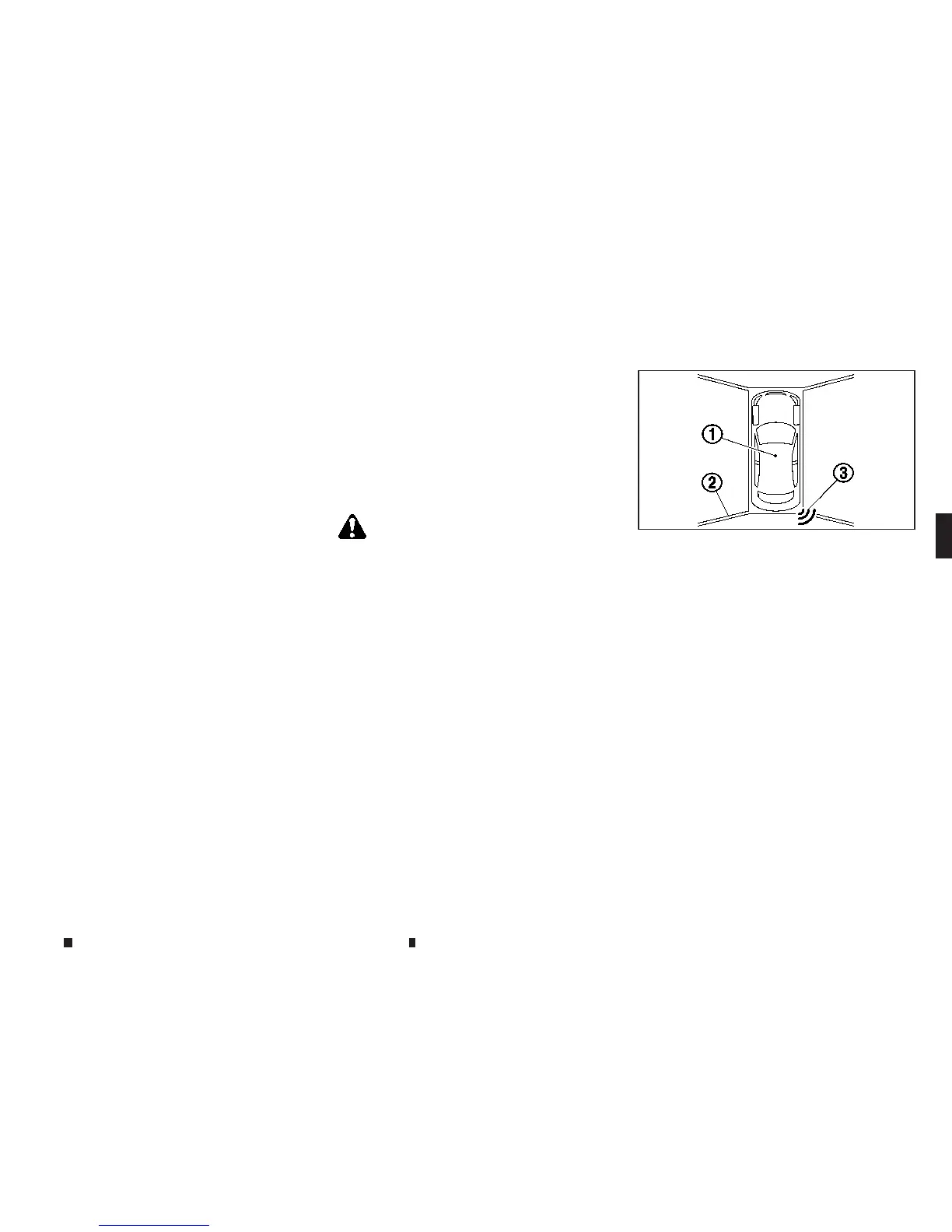
The bird’s-eyeview shows the overhead view of
the vehicle, whichhelpsconfirm the vehicle po-
sition.
Thevehicle icon
j
1shows the position of the
vehicle.
NOTE
The size of the vehicle iconon the bird’s-eye view may
differ somewhat from the actual vehicle.
The areas that the cameras cannot cover
j
2are
indicated in black.
The non-viewable area
j
2ishighlighted in yel-
low forseveral secondsafter the bird’s-eye view
is displayed. It will be shown only the first time
afterthe ignition switch is placed in the ON po-
sition.
When the corner of the vehicle moves closer to
an object
,t
he
co
rner sensor indicators
j
3ap-
pears.
NAA1681
Displayscreen, heater and air conditioner,and audio system 4-23


 To Next Page
 Loading...