COMPACT DISC (CD) PLAYER
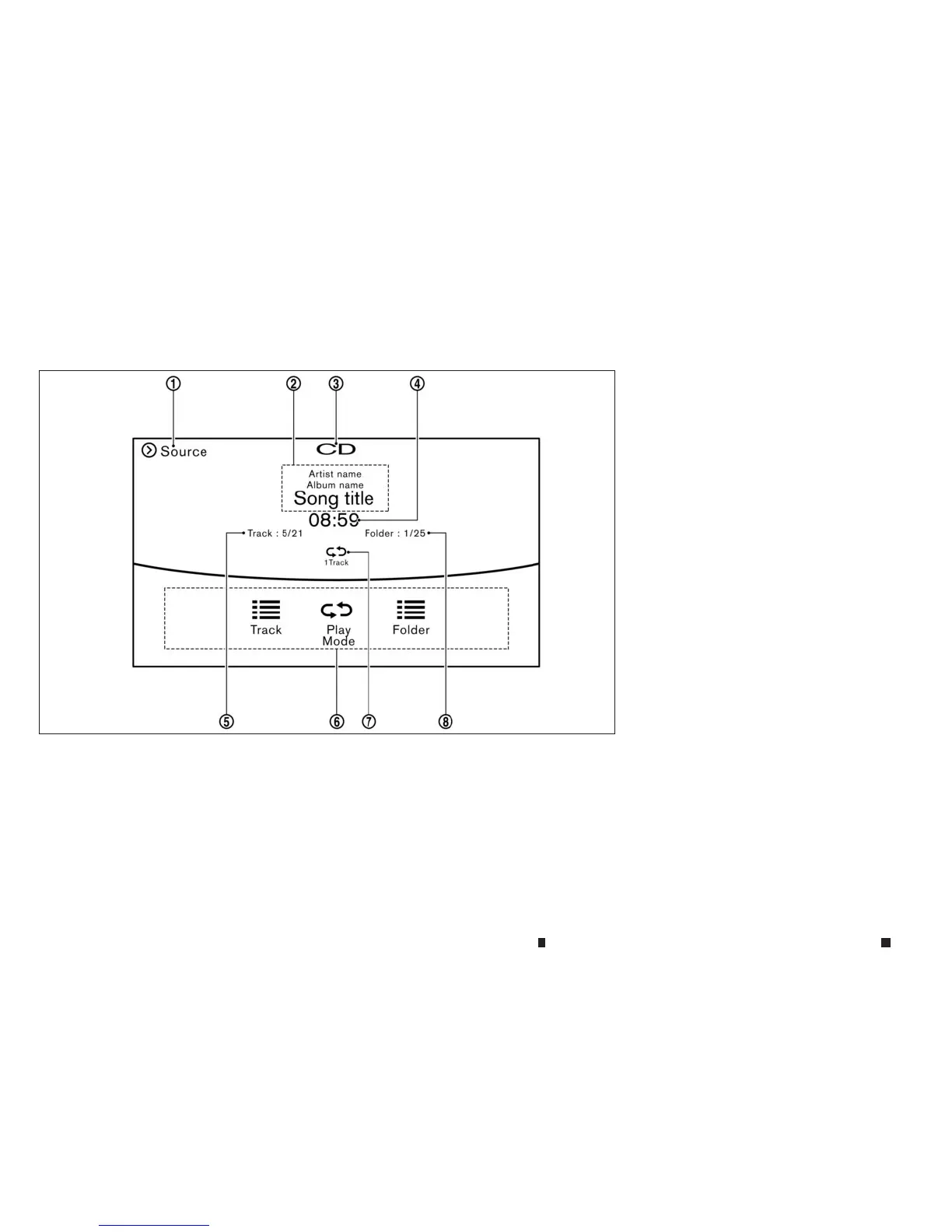
Howtoview CD operation screen
j
1
[Source]:
Touchtoswitchtothe sourcelistscreen.
Fordetails, see
“Selecting audio source” later
in this section
j
2Track information:
Trackinformation suchasthe song title,
artist name, and album name is displayed.
j
3
Audiosourceindicator:
IndicatesthatCDiscurrently selected.
j
4
Play time:
The play timeofthe trackisdisplayed.
j
5
Tracknumber:
This indicates the current tracknumber and
the total number of tracks.
j
6
CD menu:
CD menu items are displayed. Touchan
icon to display the list or to changethe set-
ting.
-[Track]
-[Folder] (for MP3, WMA, AAC)
-[Play Mode]
j
7
Play Mode Indicator:
Thisindicates the current play mode. Touch
to changethe play mode.
j
8
Folder number (for MP3, WMA, AAC):
Thisindicates the folder number when aCD
with compressed audio files is loaded.
5GA0110XZ
4-62 Displayscreen, heater and air conditioner,and audio system



 To Next Page