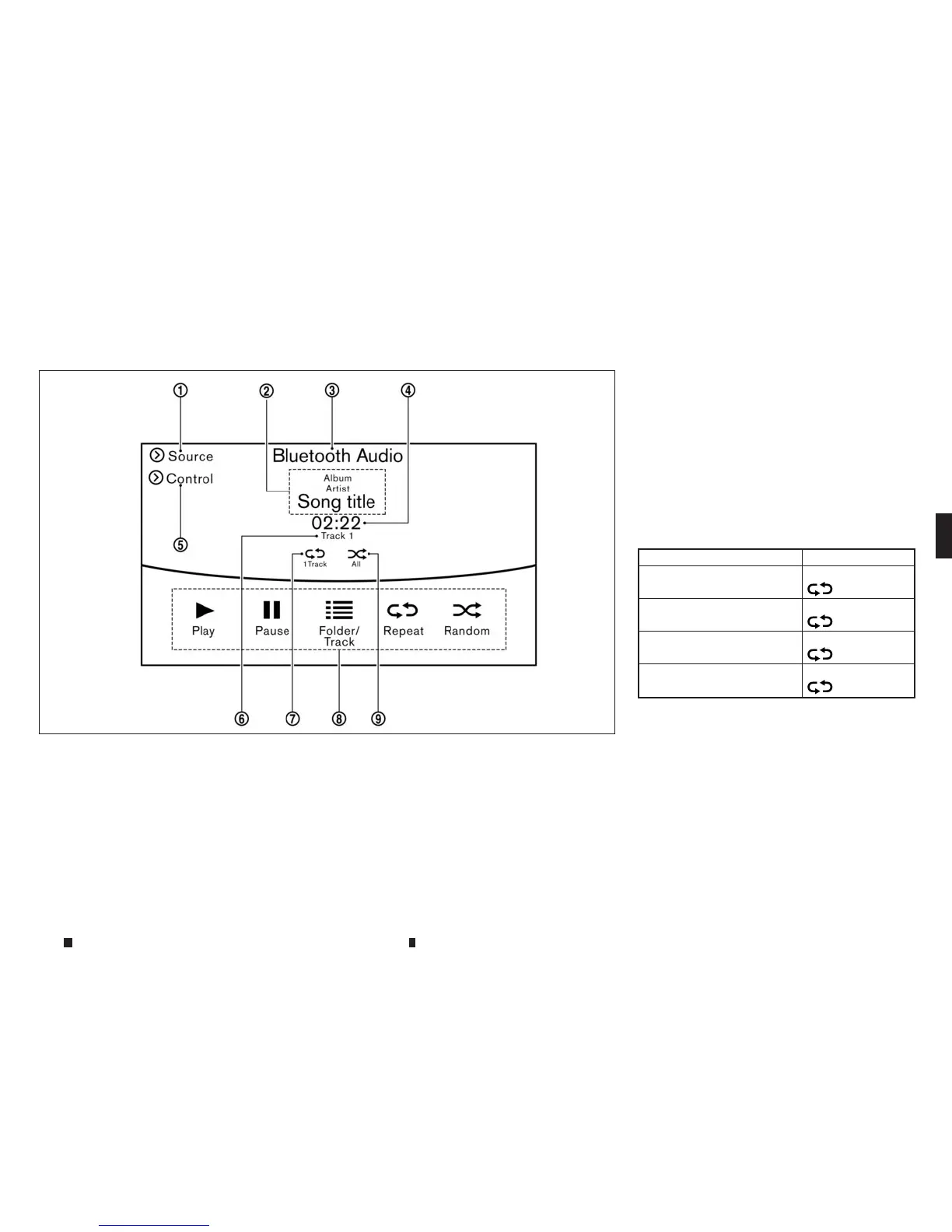
How to view Bluetooth® streaming
audiooperation screen
j
1
[Source]:
Touchtoswitchtothe sourcelistscreen.
“Selectingaudio source” page 4-58
j
2Track information:
Trackinformation suchasthe song title,
artist name and folder name is displayed.
j
3
Audiosourceindicator:
This indicates that Bluetooth® streaming
audioiscurrently selected among other
sources.
j
4
Play time:
The play timeofthe trackisdisplayed.
j
5
[Control]:
Touchtodisplay the control screen.
“Bluetooth® streamingaudio operation” page
44-70
j
6
Tracknumber
This indicates the tracknumber.
j
7
Repeat mode indicator:
Touchtochangethe repeat mode.
Mode Screen display
Allrepeat
m
All
1Folder Repeat
m
1F
older
1Track Repeat
m
1Track
Repeat Off
m
OFF
j
8
Bluetooth® streaming audio menu:
-[Play]
-[Pause]
-[Folder/Track]
-[Repeat]
-[Random]
j
9
Random mode indicator:
Touchtochangethe random mode.
NAA1634
Displayscreen, heater and air conditioner,and audio system 4-69



 To Next Page