j
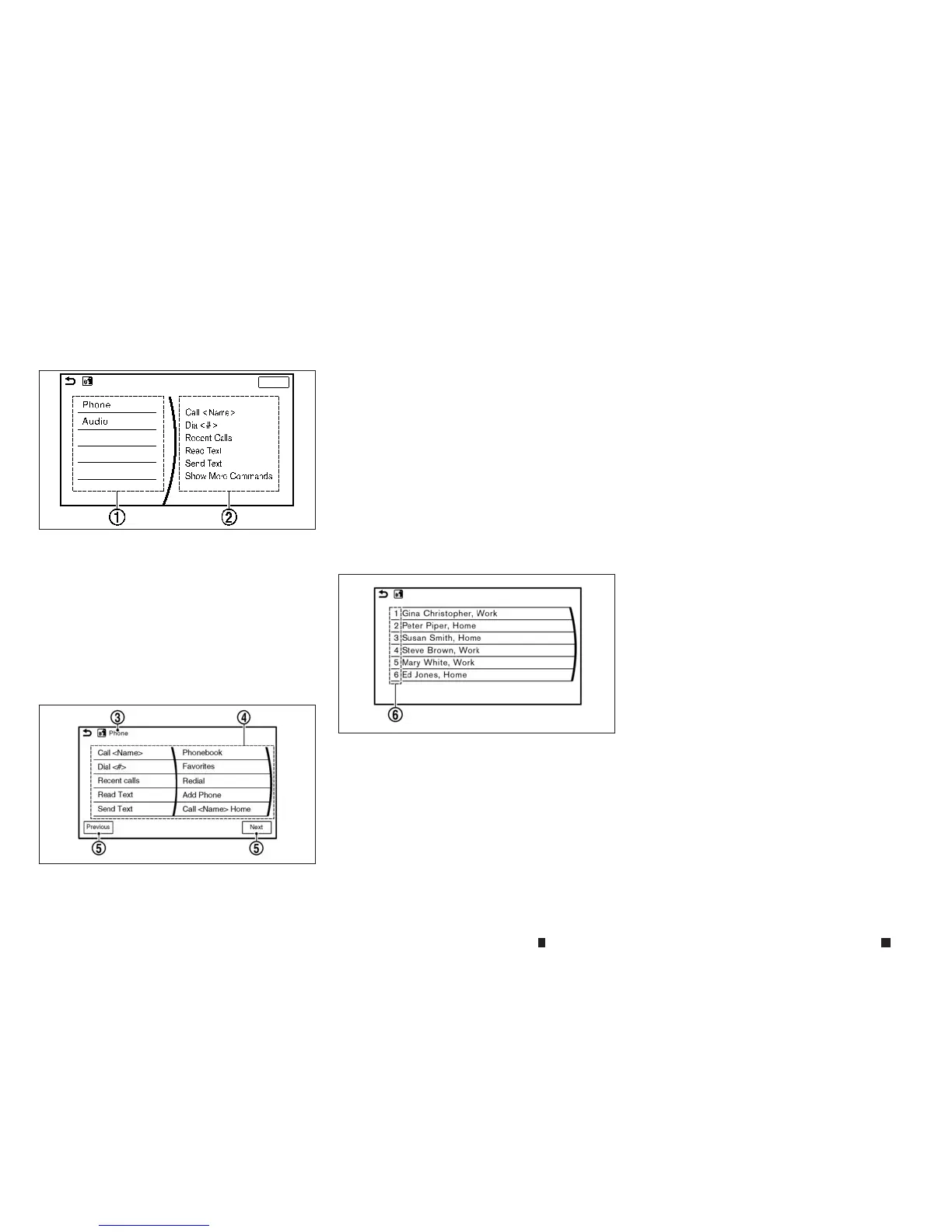
1
Left side of the screen:
The item
sonthe list canbespoken,
touched, or selected using the steering-
wheel switches or the INFINITI controller.
j
2
Right side of the screen:
The items on the list canbespoken. You
cansay acommand on the left side of the
screen andthen the right side of the screen
oneafter the other.
j
3
Previouscommand:
Acommand previously spoken or selected
is displayed.
j
4
Command list:
The items on the list canbespoken,
touched, or selected the INFINITI controller.
Preferred numbersorwords canbespoken
within <>inthe displayedcommand.
j
5
[Previous]/[Next]:
Sayasacommand or touchtogotothe
previous/next screen. Thiscannot be
selected using the INFINITI controller.
j
6
Command numbers:
To select acommand, speak anumber (1 to
6) on thelist. The command canalso be
touched or selected using the INFINITI
controller.
How to speaknumbers
VoiceRecognition requires the user speak num-
bers in acertain waywhen giving voicecom-
mands.
General rule:
Only single digits 0(zero) to 9can be used. (For
example, if speaking 500, “five zero zero” can
be used, but “five hundred” cannot.)
Examples:
1-800-662-6200
“One eight zero zero six six two six two zero
zero”
•
“1-800” as the first digits of the phone number can
be pronounced “One eight hundred”.
•
When the languagesetting is English (where fit-
ted), speak “zero” forthe number “0” and speak
“oh” for the letter “o” for the best recognition.
Voicecommand examples
As examples,some additional basicoperations
that canbeperformed by voicecommands are
described here.
NAA1674
First screen
5GE0019XZ
Second screen
5GE0020XZ
List screen
4-96 Displayscreen, heater and air conditioner,and audio system


 To Next Page
 Loading...