– The vehicle engine bonnet is open.
When any of the above conditionscontinues for
over 3minutes the Stop/StartSystem buzzer
will sound in 5-minute intervals as areminder to
preventthe possibility of adeadbattery. Use
the ignition switch to turn off the engine.
Close the bonnet or the driver’s door,orfasten
the seat beltthen restartthe engine using the
ignition switch.
Formore information, see
“ECOStop/StartSystem
(where fitted)” in the “5.Starting and driving” section
.
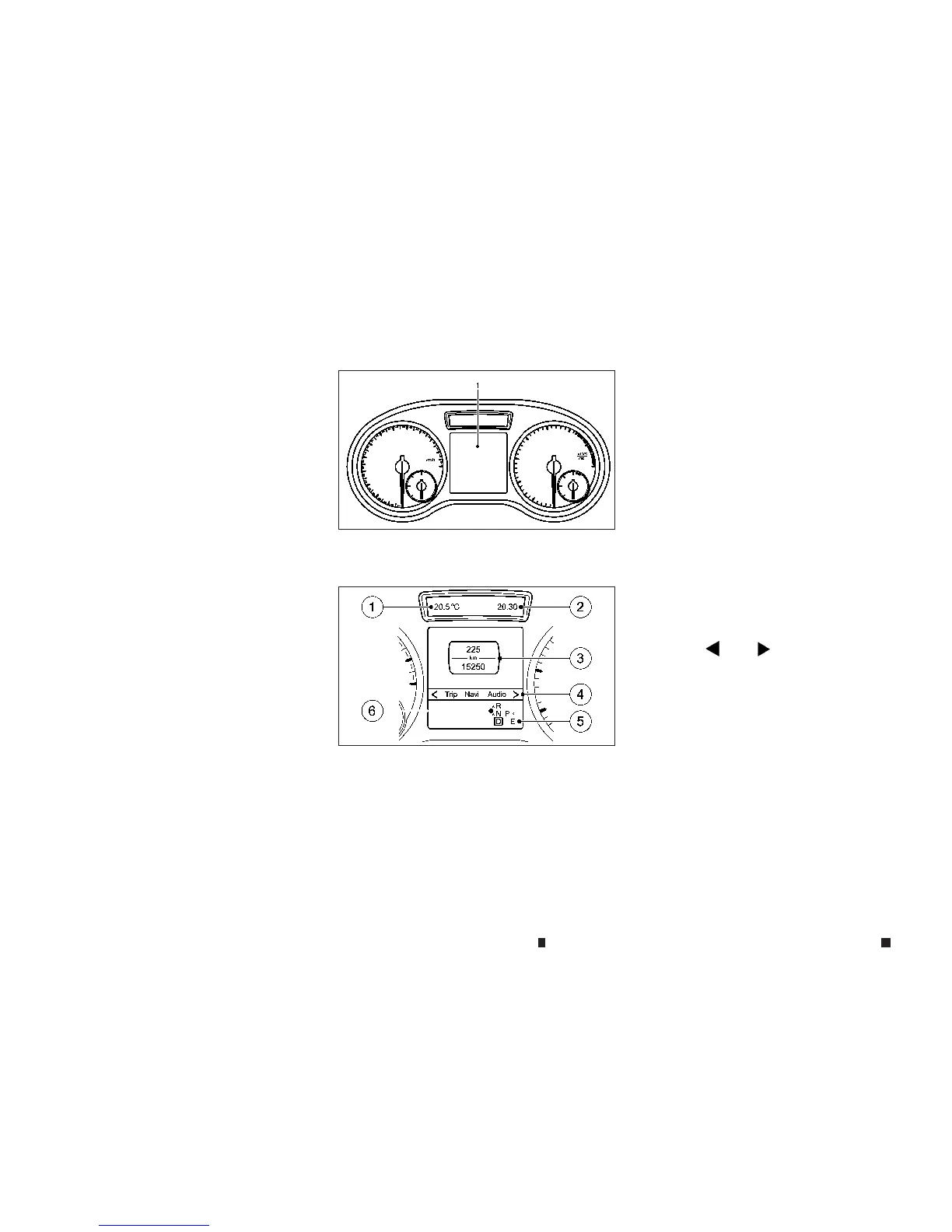
Thevehicle information display
j
1islocated
between the tachometer and the speedometer.
j
1
Permanent display: depending onvehicle
specification: outsidetemperature or
speed
j
2
Time
j
3
Text field
j
4
Menu bar
j
5
Drive program
j
6
Shift lever position
Vehicles with manual transmission: the indica-
torsinthe lower part of thevehicle information
display differ from thos
eshown here
Text field
j
3shows the selected menu or sub-
menuaswellasdisplay messages.
NOTE
Set thetimeusing the INFINITI controller and the [Set-
tings] menuavailable in thecentral display (see
“Clocksettings” in the “4. Display screen, heater and
airconditioner,and audio system” section).
MENUS AND SUBMENUS
To call up the menu bar
j
4and select amenu,
pressthe
m
or
m
buttononthe steering
wheel.Menu bar
j
4disappears after afew sec-
onds.
Depending on the equipment fitted in the ve-
hicle, youcan call up the followingmenus:
•
[Trip] menu
•
[Navi] menu (navigation instructions)
•
[Audio] menu
•
[Assist.] menu
•
[Serv.] menu
•
[Settings] menu
NIC2751
NIC2752
VEHICLEINFORMATION DISPLAY
2-12 Instrumentsand controls


 To Next Page
 Loading...