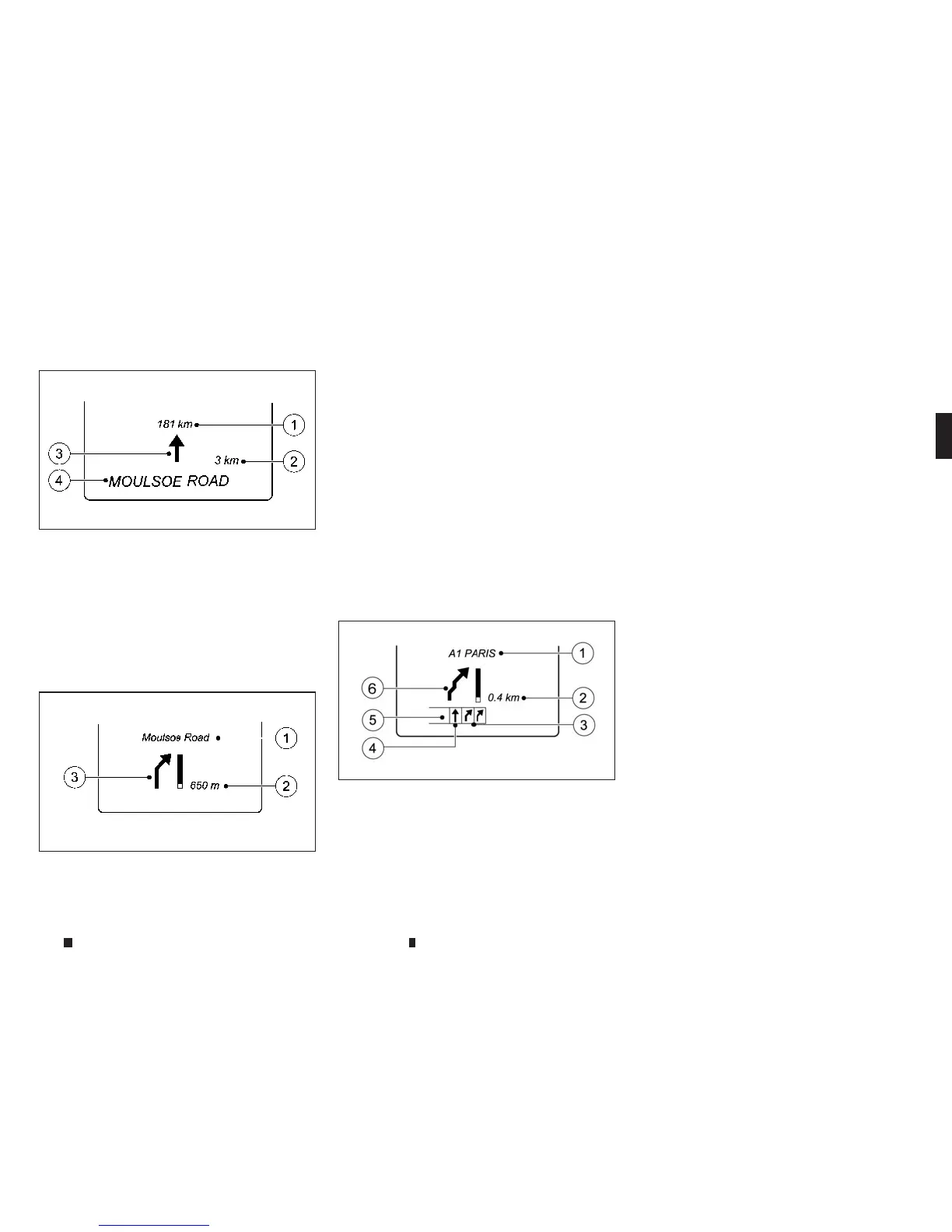
Route guidanceactive — No changeof
direction announced:
j
1
Distance to the destination
j
2
Distancetothe next changeofdirection
j
3
Symbol indicating “follow the road’s
course”.
j
4
Current road
Route guidanceactive — Changeofdirection
without lane recommendation:
j
1
Road to whichthe changeofdirection
leads
j
2
Distancetochangeofdirection and visual
distancedisplay
j
3
Changeofdirection symbol
Whenachangeofdirection is to be made, you
will see symbol
j
3for the changeofdirection
and distancegraphic
j
2.Thisshortenstowards
thetop of the display as youapproachthe point
ofthe announced changeofdirection. The
changeofdirection starts oncethe distancedis-
play reaches zero.
Route guidanceactive — Changeofdirection
announced with alane recommendation:
j
1
Road to whichthe changeofdirection
leads
j
2
Distancetochangeofdirection and visual
distancedisplay
j
3
Recommended lane and new lane during a
changeofdirection
j
4
Recommended lane
j
5
Lanesnot recommended
j
6
Changeofdirection symbol
On multi-lane roads, new lane recommenda-
tionscan be displayed forthe next changeof
direction if the digital
mapsupports thisdata.
During thechangeofdirection, new lanes may
be added.
Lane notrecommended
j
5:youwillnot be able
to complete the next changeofdirection if you
stay in thislane.
Recommended lane and new lane during a
changeofdirection
j
3:in thislane youwillbe
able to complete the next two changesofdirec-
tion without changing lane.
Recommended lane
j
4:in thislane youwillbe
only able to complete the next changeofdirec -
tion without changing lane.
NIC2720
NIC2721
NIC2838
Instrumentsand controls 2-15


 To Next Page
 Loading...