3.3 Restore factory Setting
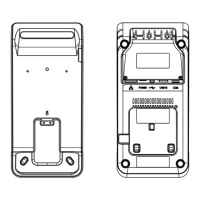
Use paperclip to click the RESET button 3 seconds to restore the factory setting of the base.
The position of RESET button is below.
User can update the firmware
of base, save and reload the
settings, change the password
on the Manage page.
4. Pairing connection
If DX8000 want to use the USB ports or RJ22 serial port on the base, it should be
paired to the base.
4.1 Prepare for Base Pairing
Only one DX8000 can use the USB ports and RJ22 serial port of the base at the same
time.
If the red indicator light is on, it indicates the base is available for pairing.
If the green indicator light is on, it indicates the base is successfully paired. If the base
8
AXIUM DX8000-BASE-W1
07/25
Copyright© 2023 Ingenico –
Banks and Acquirers International Holding SAS
All rights reserved


 To Next Page
 Loading...