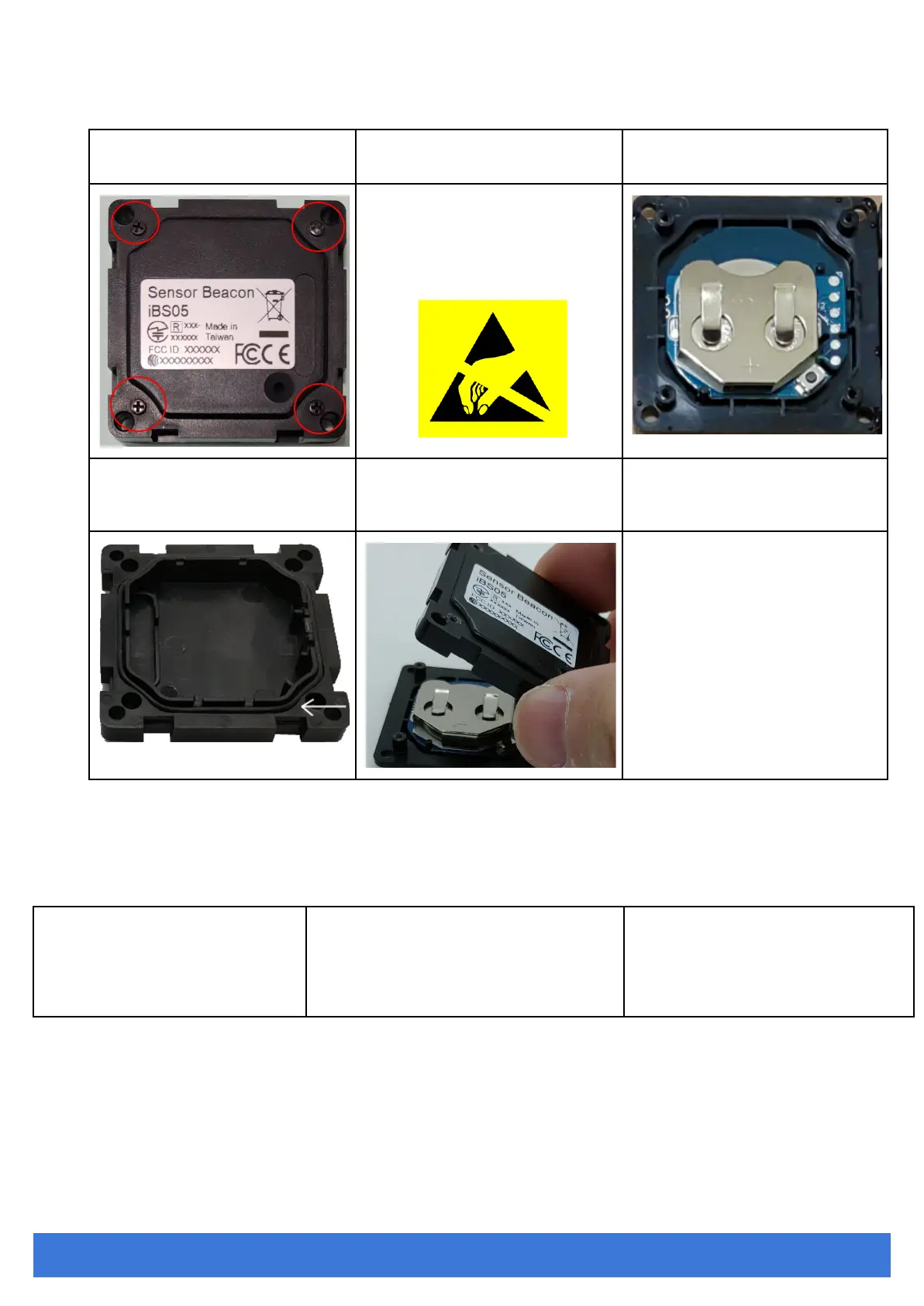
1. Remove the 4 screws and open
the bottom case.
It is very important that without the
enclosure protection
2. You can now remove the battery
and change a new battery
The internal of iBS05 is sensitive
to electrostatics. Before opening
the bottom cover, please make sure
the proper procedure is executed to
avoid any electrostatic damage to
iBS05
3. Before closing the bottom cover,
please make sure the O-ring is in the
proper position
4. Close the bottom cover
Configuration
When powered on, iBS05 will be in configuration mode for 20 sec. Users can use iBS01 Tag Utility to scan and connect iBS05
to configure the transmit power and ADV(advertising) interval.
Steps
1. Power on iBS05
(if iBS05 is already powered on,
please power off it first then power
on again)
2. Press the CONFIG icon on the up-right
corner of the utility within 20 secs. Select
iBS05 for configuration.
3. In the SETTING page, you can
configure TX power and ADV interval.
After configuring, press SAVE and
DISCONNECT for the parameters to
take effect.
INGICS TECHNOLOGY CO., LTD. • SUPPORT@INGICS.COM • WWW.INGICS.COM


 To Next Page