3
Installation Manual SmartLAN
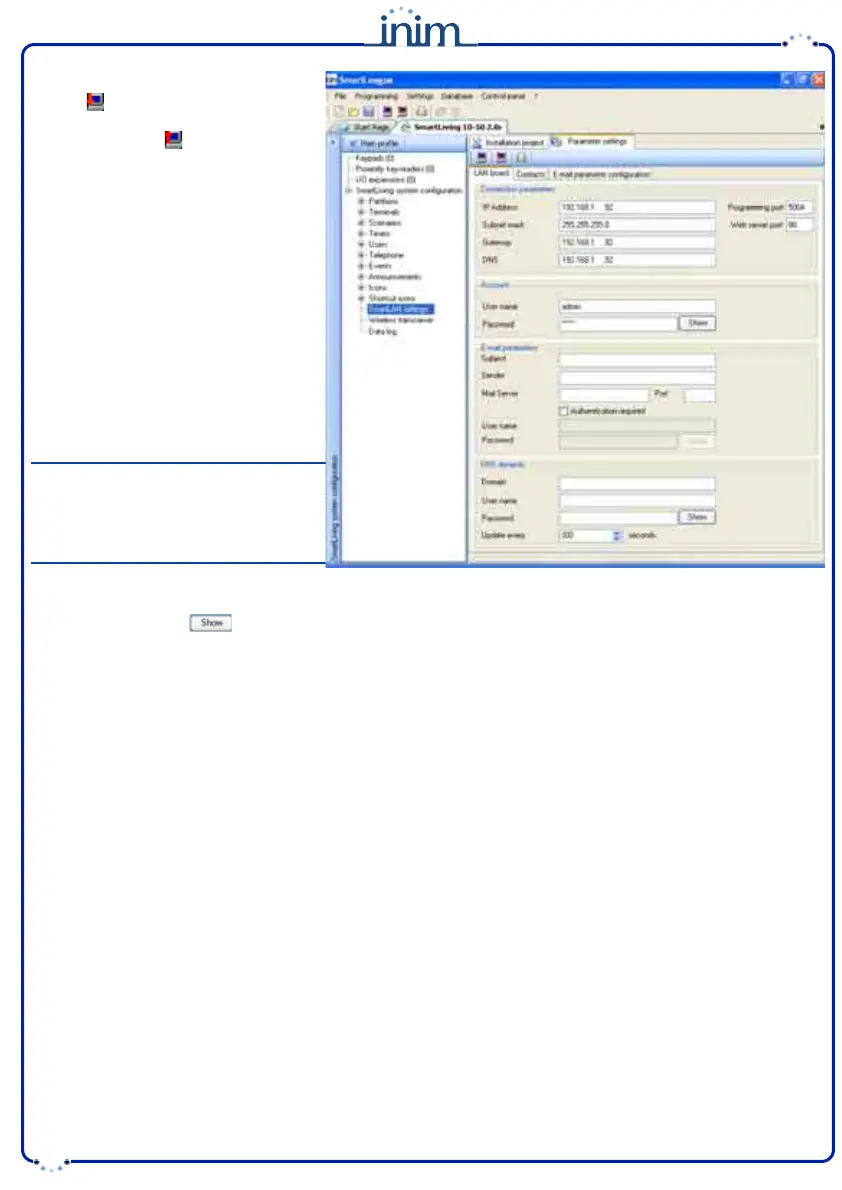
7. Click SmartLAN settings (on the
left side of the screen).
Press to view the SmartLAN
parameters and, if necessary, change
the values. Press to save any new
values.
8. Click the Parameters settings
option. Three sub-options will be
provided (tags at the top of the
screen):
LAN board -
this programming
section will allow you to configure the
LAN board.
• Connection parameters:
••
IP Addres
s
••
Programming port
••
Web server port
••
Subnet mask
••
Gateway
••
DNS
Note
If you change an IP address on this
screen, you must go back to Settings -
Application settings and type-in the
new IP Address in the respective field.
• Account:
••
User name
••
Password
- the
button will allow you to mask/unmask the entered password.
•E-mail parameters:
••
Subject
- this field is the e-mail header. Each e-mail, sent via the SmartLAN/G board, will include this header and
a description of the event type. For example, if "SmartLiving 1050 panel Ellis Bell" is typed in the "Subject" field and
a zone alarm occurs, the "Subject" field of the e-mail will show "SmartLiving 1050 panel Ellis Bell [Alarm zone]".
••
Sender
- this field is for the e-mail address of the sender.
••
Mail Server
- this field is for the SMTP address of the outgoing mail server.
••
Port
- this field is for the output port of the mail server (SMTP).
If the STP server requires authentication, enable the
Autentication required
programming field and enter:
•• User name
•• Password
•DNS dynamic:
If you are dealing with a dynamic DNS with a public IP address, it is useful to have a domain name which will
allow direct connection to the SmartLAN/G in question at all times. The SmartLAN/G supports DynDns.org
services, such as mailhost with dynamic DNS.
Registering with DynDns.org (http://www.dyndns.org) will provide you with a personal third-level Internet name
(for example. myhouse.dyndns.org) and access data (user name, password). The SmartLAN/G will use this data
to link the public IP address with a static Internet name. In this way, access via Internet will be direct as by way
of the distinctive domain you choose.
••
Domain
- this is the domain chosen @ DynDns.org (for example. myhouse.dyndns.org).
••
User name
- this is the user name chosen during DynDns.org. registration.
••
Password
- this is the password chosen during DynDns.org.registration.
••
Update every
- this is the interval (in seconds) the SmartLAN/G allows between link updates with the public IP
address.


 To Next Page
 Loading...