Need help?
Do you have a question about the Initial IDM-9520 and is the answer not in the manual?
Details on using AC adaptor, car adaptor, and batteries, including voltage and handling guidelines.
Guidelines for selecting appropriate locations for the unit, avoiding direct sunlight, heat, moisture, and strong magnetism.
Safety warnings regarding laser exposure, disassembly, and servicing by qualified personnel.
Instructions for cleaning the pickup lens and handling condensation to prevent malfunction.
Recommendations for headphone usage, including volume adjustment and safety during activities.
Details the unit's MPEG2 coding format and horizontal resolution capabilities.
Highlights multi-angle, multi-language support and parental lock features.
Explains the zoom capability for multi-media playback, allowing enlargement or shrinking.
Lists various playback functions like fast forward, reverse, slow play, and program play.
Describes the ability to search specific parts of a disc for playback.
Mentions the 4.2" TFT LCD and English OSD for clear disc content viewing.
Details analog and optical digital audio outputs for amplifier connection.
Notes the TFT color LCD, headphone output for enjoyable media experience.
Defines a 'Title' as the largest unit of division for images or music on a DVD.
Defines a 'Chapter' as a smaller division within a DVD title, allowing for search.
Defines a 'Track' as a unit of music on a CD, numbered for search purposes.
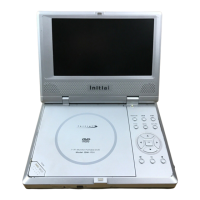
Identifies and lists the various components and buttons of the main DVD player unit.
Details and labels all the buttons and features of the remote control unit.
General instructions and precautions to take before connecting external equipment.
Instructions for connecting the unit to a power source using the AC adaptor.
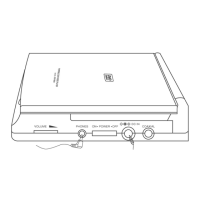
Guidance on connecting headphones to the unit for audio output.
Step-by-step guide for connecting the player to a television using AV cables.
Instructions for connecting the player to both a TV and an amplifier for enhanced audio.
Instructions on removing the shipping strap, operating the remote, and replacing batteries.
Information on the types of discs (DVD, CD, MP3) supported and their playing times.
Steps to power up the unit, adjust screen position, and set volume.
Procedure for opening the disc tray and correctly loading a disc onto the spindle.
Instructions for loading, playing, stopping, and removing discs.
How to use the On-Screen Display (OSD) to access and control playback features.
Guide on how to select a specific title from a DVD with multiple titles.
Instructions for navigating and selecting specific chapters within a DVD title.
How to change the audio track language for DVDs with multiple language options.
Guide to selecting different subtitle languages available on a DVD.
How to select different camera angles for scenes on a DVD that support them.
Instructions for skipping to a specific time within a DVD title.
Guide on how to skip to a specific time within a DVD chapter.
Details on setting repeat modes (All, Title, Chapter) for DVD playback.
Steps to disable the repeat playback function.
How to change the time display format during playback (elapsed, remain, etc.).
Specific operations and features applicable when playing CDs.
Guide to selecting individual tracks on a CD using the OSD menu.
Instructions for skipping to a specific time on a CD.
Guide on how to skip to a specific time within a CD track.
Details on setting repeat modes (All, Track) for CD playback.
How to navigate and select options within DVD title and chapter menus.
Using number buttons to select tracks or navigate menus on discs.
Overview of the setup menu structure and navigation for various player settings.
Configuration options for TV display aspect ratio, SPDIF output, and captions.
Settings for screen aspect ratios (Normal/PS, Normal/LB, Wide) for TV output.
Options for controlling digital audio output (SPDIF OFF, RAW, PCM) for sound systems.
Enabling or disabling hidden subtitles for DVD playback.
Activating or deactivating the screen saver feature to protect the display.
Accessing audio configuration options including speaker setup and equalizer.
Configuration for audio output modes like Downmix, Stereo, and Lt/Rt channels.
Selecting graphic equalizer presets based on music genre for optimal sound.
Settings for Dolby Digital audio output, including Dual Mono and DRC options.
Options for virtual surround sound (V SURR) and reverb modes.
Managing parental lock settings and changing the security password.
Adjusting the brightness and color settings of the unit's LCD screen.
Setting audio language, subtitle language, disc menu language, and parental controls.
Choosing preferred audio and subtitle languages for media playback.
Setting playback restrictions based on media rating and requiring a password.
Selecting audio output modes like Mono Left, Mono Right, Mix-Mono, or Stereo.
Enables fast forwarding or reversing playback at various speed multiples.
Allows playback at slow motion speeds for detailed viewing.
Function to repeatedly play a title, chapter, or the entire disc.
Allows repeating specific sections (A-B) of a disc.
How to choose from multiple subtitle languages available on a DVD.
Switching between multiple camera angles for scenes on DVDs that support them.
Function to jump to a specific time, title, or chapter on a disc.
Saving and recalling specific playback points on a disc.
Enlarging the playback image by 2X, 3X, or 4X the original size.
Creating a custom playback sequence of titles, chapters, or tracks.
Playing tracks or chapters in a randomized order.
Previewing content by displaying brief segments of titles or chapters.
Instructions for selecting and playing MP3 tracks from a disc.
Mentions other playback functions like mute, volume control, and repeat for MP3s.
List of included accessories provided with the unit.
Guidelines for handling, cleaning, and storing discs to prevent damage.
Solutions for common problems like no sound, no image, bad sound, and remote issues.
Detailed specifications including laser, video system, frequency response, and dimensions.
Instructions for charging, using, and maintaining the rechargeable battery pack.
 General
| Display Size | 9 inches |
|---|---|
| Headphone Jack | Yes |
| Screen Size | 9 inches |
| Playable Media Format | DVD, CD, MP3, JPEG |
| Power Source | AC adapter, rechargeable battery |
| Battery Life | 2.5 hours |
| Region Code | 1 |
| Audio Output | Stereo speakers |
| Power Supply | AC 100-240V, 50/60Hz |


 To Next Page