Need help?
Do you have a question about the Inkbird IPT-2CH and is the answer not in the manual?
Important safety precautions to follow before using the device.
Key capabilities and functionalities of the temperature controller.
Specifications and technical details of the device, including power and probe types.
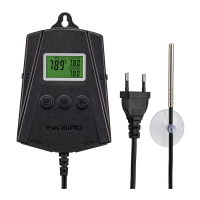
Diagram and explanation of the device's physical components and display elements.
Instructions on how to find and download the Inkbird Pro mobile application.
Steps for creating an account and connecting the device to your smartphone.
Guide for connecting the device to Wi-Fi using the SmartConfig network setup.
Instructions for connecting the device to Wi-Fi using the Access Point (AP) mode.
Procedure to restore the controller to its default factory settings.
How to view the configured start heating temperatures for probes P1 and P2.
Step-by-step guide to setting the start and stop heating temperatures.
Instructions on how to switch between Celsius (°C) and Fahrenheit (°F) units.
Detailed steps to set the start heating temperature for probe P1.
Detailed steps to set the stop heating temperature for probe P1.
Configuration for the high temperature alarm threshold for probe P1.
Configuration for the low temperature alarm threshold for probe P1.
Procedure to adjust the temperature calibration value for probe P1.
Detailed steps to set the start heating temperature for probe P2.
Detailed steps to set the stop heating temperature for probe P2.
Configuration for the high temperature alarm threshold for probe P2.
Configuration for the low temperature alarm threshold for probe P2.
Procedure to adjust the temperature calibration value for probe P2.
How to enable or disable the audible alarm buzzer.
Explanation of different screen displays based on probe connection status.
Information on obtaining support and the product's warranty terms.
The Inkbird Smart Temperature Controller, model IPT-2CH, is a user-friendly device designed for precise temperature management in various environments. It offers a plug-and-play setup, making it easy to use for both beginners and experienced users.
The IPT-2CH operates as a dual relay temperature controller, capable of managing two independent sets of outputs. This allows users to set different target temperatures for two distinct environments or applications simultaneously. The device is designed to control heating elements, ensuring that the desired temperatures are maintained within specified ranges.
The controller features an LCD display that provides real-time information. It shows the current temperature being tested by the probes, the target temperatures set for each output (WORK1 and WORK2), and the current output state, indicating whether the heating function is active for each channel.
One of the key functionalities is its ability to support both Celsius and Fahrenheit units, offering flexibility based on user preference. It also includes temperature calibration, which allows for fine-tuning the temperature readings to ensure accuracy.
For safety and monitoring, the IPT-2CH incorporates high and low temperature limit alarms. These alarms notify users if the temperature deviates beyond the set thresholds, helping to prevent damage to equipment or products. Additionally, it supports a probe abnormal alarm, which alerts users to any issues with the temperature probes themselves, ensuring continuous and reliable operation.
The device can be controlled both manually through its physical buttons and remotely via a dedicated mobile application. The app control enhances convenience, allowing users to monitor and adjust settings from their smartphones.
The IPT-2CH is designed for straightforward operation. For initial setup, users can download the "Inkbird Pro" app, create an account, and then pair the device with their phone. The app supports two modes for adding devices: SmartConfig Mode and AP Mode. In SmartConfig Mode, the device's Wi-Fi symbol flashes rapidly, indicating it's ready for connection. Users confirm this in the app, select their Wi-Fi network, enter the password, and the device connects. AP Mode is used if SmartConfig fails, where the device's Wi-Fi symbol flashes slowly, and users connect their phone directly to the device's Wi-Fi hotspot before returning to the app to complete the connection.
Once connected, the app provides a comprehensive interface to manage the controller. Users can view the current temperature for each probe, set start and stop heating temperatures, and access a setting menu for each probe. The app also displays temperature trends, offering a visual representation of temperature changes over time.
Manual operation is also intuitive. The device has three buttons: a menu/confirm button, a down arrow, and an up arrow. These buttons are used for quick queries of start and stop heating temperatures, as well as for quick setup of controlling temperatures. For instance, pressing the menu button allows users to cycle through settings like start heating temperature (ST1/ST2), stop heating temperature (SP1/SP2), high temperature alarm (AH1/AH2), low temperature alarm (AL1/AL2), and calibration value (CA1/CA2). The up and down arrows are used to adjust these values. Holding the menu button for a few seconds typically enters the setting menu, and a short press cycles through options, while the up/down arrows modify values.
The device automatically saves settings after a period of inactivity (e.g., 30 or 60 seconds) or users can manually exit the settings menu by holding the menu button. This ensures that configurations are preserved.
The heating function for each output (WORK1 and WORK2) is activated when the current temperature falls below or equals the set start heating temperature and deactivated when it rises above or equals the stop heating temperature. A heating symbol on the LCD display indicates when the output is active.
The IPT-2CH includes a factory reset function, which can be performed by holding the down arrow button while plugging in the power cord. This restores all parameters to their default settings, which is useful for troubleshooting or reconfiguring the device. A short beep from the buzzer confirms that the reset has been successful.
The device also features a buzzer sound for alarms, which can be manually turned on or off. If the alarm sound (ALM) is set to ON, the buzzer will sound a "Bi-Bi-Biii" alert when a high or low temperature alarm is triggered. The alarm will stop once the temperature returns to normal, or it can be manually canceled by pressing any button. This audible alert is crucial for drawing immediate attention to critical temperature deviations.
The temperature calibration feature (CA1/CA2) allows users to adjust the temperature readings if there is a known discrepancy between the controller's reading and an accurate reference thermometer. This ensures that the device provides precise temperature control.
The product is designed for indoor use in dry locations, and users are cautioned to keep children away and avoid plugging it into other relocatable power taps or extension cords to reduce the risk of electric shock. These guidelines contribute to the longevity and safe operation of the device.
The warranty information provided indicates a 2-year warranty for the controller and 1 year for the probes, covering defects in manufacturing, materials, and workmanship. This provides assurance regarding the product's quality and offers support in case of issues not caused by misuse or improper maintenance. Technical assistance is available via email and through the Inkbird website, offering support for installation, usage, and troubleshooting.
 General
| Display | LCD |
|---|---|
| Probe Type | Stainless Steel |
| Number of Probes | 2 |
| Temperature Range | -58°F to 572°F (-50°C to 300°C) |
| Accuracy | ±1.8°F (±1°C) |
| Resolution | 0.1°F/0.1°C |
| Power Source | 2 x AAA batteries |
| Wireless Range | 328 feet (100 meters) |
| Waterproof | Yes |

 To Next Page