EasyManua.ls Logo

Inkel MX995 - Front Panel Controls; Mono;Stereo Selector; Input Selector

Inkel MX995
8 pages
Print Icon
To Next Page IconTo Next Page
To Previous Page IconTo Previous Page
Loading...
4)
These
input
jacks
are
to
be
connected
with
stereo
output
jacks
of
tuner,
cassette
deck
and
electronic
organ,
or
magnet-
ic
cartridge
type
turntables.
Front
Panel
Controls
9.
LINE/PHONO
STEREO
INPUTS
HT
|
es
Lh
mene
eet
eth
LL
itt
»
octet
Li
=a=e
.
tty
tte
7
wees
©
chet
peep
i
tH
TT]
pees
z
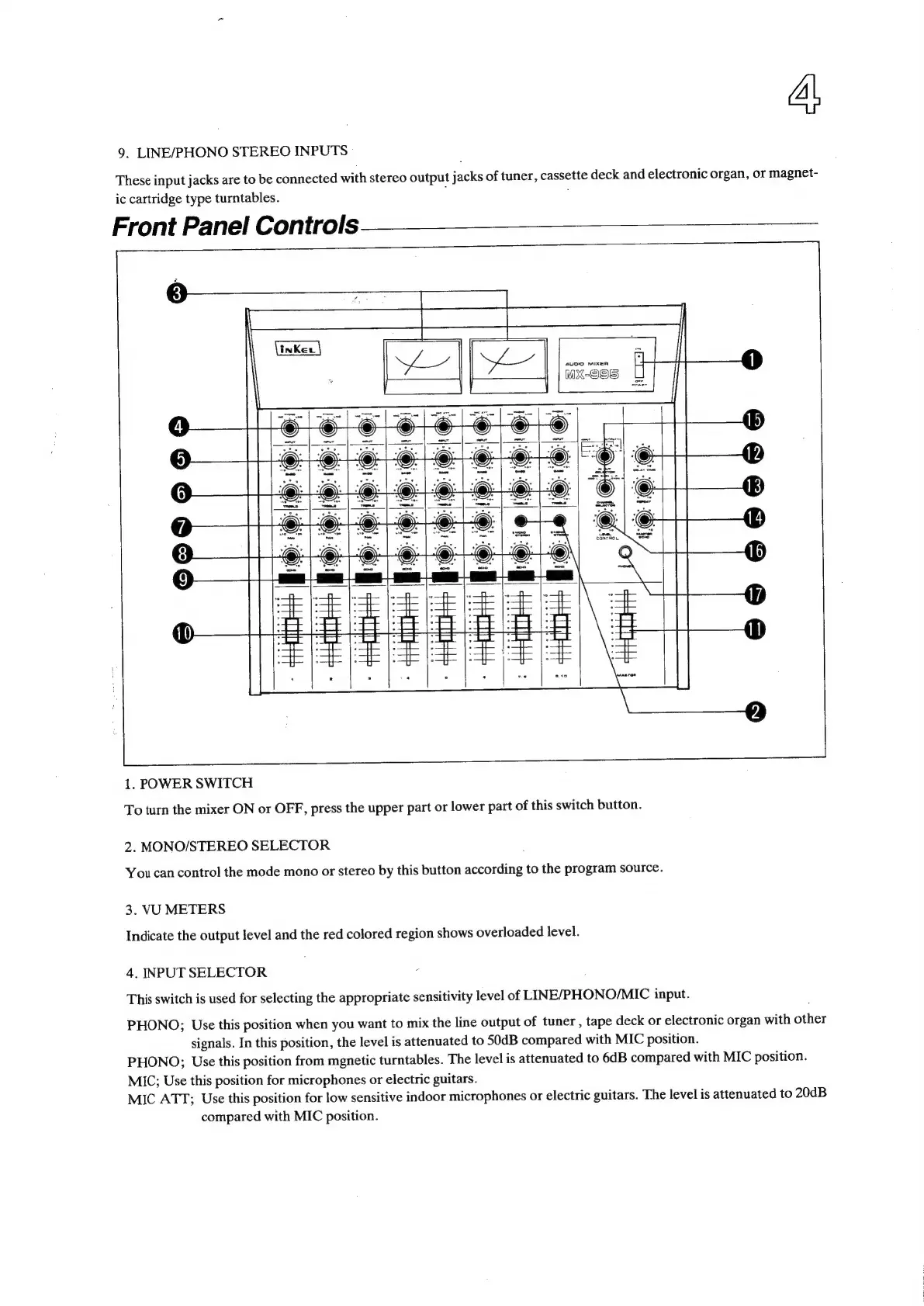
1.
POWER
SWITCH
To
turn
the
mixer
ON
or
OFF,
press
the
upper
part
or
lower
part
of
this
switch
button.
2.
MONO/STEREO
SELECTOR
You
can
control
the
mode
mono
or
stereo
by
this
button
according
to
the
program
source.
3.
VU
METERS
Indicate
the
output
level
and
the
red
colored
region
shows
overloaded
level.
4.
INPUT
SELECTOR
This
switch
is
used
for
selecting
the
appropriate
sensitivity
level
of
LINE/PHONO/MIC
input.
PHONO;
Use
this
position
when
you
want
to
mix
the
line
output
of
tuner
,
tape
deck
or
electronic
organ
with
sthigs
signals.
In
this
position,
the
level
is
attenuated
to
SOdB
compared
with
MIC
position.
PHONO;
Use
this
position
from
mgnetic
turntables.
The
level
is
attenuated
to
6dB
compared
with
MIC
position.
MIC;
Use
this
position
for
microphones
or
electric
guitars.
MIC
ATT;
Use
this
position
for
low
sensitive
indoor
microphones
or
electric
guitars.
The
level
is
attenuated
to
20dB
compared
with
MIC
position.