4
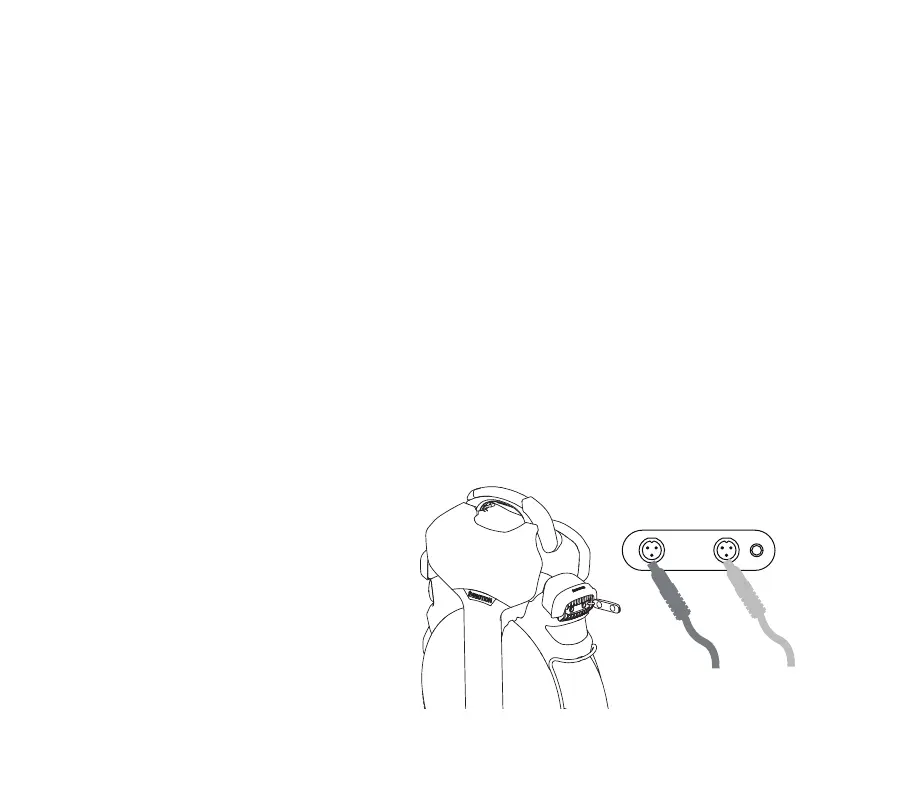
Charging: Use the original charger (output voltage:
84VDC/2.5A). The charger indicator will be red
during charging and green when fully charged. It
supports dual charger usage for faster charging
times.
Charge cable 1 Charge cable 2
PRODUCT FEATURES INTRODUCTION
Power On/Off: Long press the power button to turn on the device, and in the powered-on state, long press the power button
to turn it off.
Front Headlight: In the powered-on state, short press the power button to turn on the front headlight. Daytime running light
(DRL): By default, the DRL is enabled when the device is powered on and can be disabled in the app or by simultaneously holding
the anti-tilt button and the power button. When the main headlight is turned on, the DRL will also be activated simultaneously.
Taillight: The taillight will flash brightly when the brake is applied. When the front headlight is on, the taillight will remain
constantly lit.
Anti-Tilt Button: When the vehicle is stopped, gripping the handle and pressing the button below it will cause the vehicle to
lose balance, accompanied by an audible prompt.
Power Assist: Enabling this mode helps you achieve a more comfortable acceleration and braking experience.
(1) Acceleration Assist: Adjust the value to obtain a smoother and quicker acceleration experience. A higher value results in
faster acceleration.
(2) Brake Assist: Adjust the value to obtain a smoother and quicker braking experience. A higher value leads to a shorter
braking distance.



 To Next Page