Need help?
Do you have a question about the InMotion Adventure and is the answer not in the manual?
Wear protective gear like helmets and pads to prevent injuries and ensure safe riding.
Carefully check all components inside the packaging to ensure none are missing.
Keep packaging materials for at least 30 days for future transportation use.
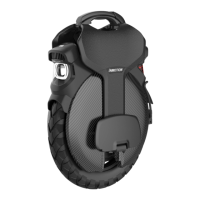
Illustrates and labels the various parts of the electric unicycle.
Explains how to turn the device on/off and control front/tail lights.
Details acceleration and braking assist modes for a customizable riding experience.
Provides guidance on using the charger, charge status indicators, and charging time reduction.
Lists critical warnings such as avoiding water, using original adapters, and charging frequency.
Indicates the damper size, a key specification for suspension performance.
Guides users on how to adjust the pedal angle for improved riding control.
Explains how to unfold and fold the push rod for portability and convenience.
Details the dashboard display elements, including speed, battery, and riding modes.
Elaborates on speed units, battery level, gear modes, lock, Bluetooth, fault, and headlight icons.
Presents the physical dimensions of the electric unicycle for reference.
Emphasizes checking the unicycle and selecting a suitable practice area before riding.
Advises on battery charge, practice area awareness, assistant, attire, and protective gear.
Guides users on downloading and connecting the INMOTION App for enhanced functionality.
Provides sequential instructions for learning to balance and ride the electric unicycle.
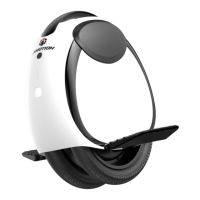
The INMOTION Adventure Electric Unicycle is an intelligent, high-tech entertainment product designed for personal mobility. It is intended for users between 14 and 50 years old, with a height range of 120-200cm. The unicycle is designed with user safety in mind, emphasizing the importance of reading the user manual thoroughly and wearing protective gear such as a helmet, knee pads, elbow pads, and wrist guards during operation.
The INMOTION Adventure Electric Unicycle provides a unique mode of transportation and recreation. It features a self-balancing mechanism that allows riders to control movement by shifting their body weight. The unicycle is equipped with a power button for turning the device on and off, and a short press of the power button in the powered-on state toggles the front light. The front light, by default, functions as a daytime running light. The tail light remains constantly lit when the front light is on and flashes brightly during braking, enhancing visibility and safety.
A notable feature is the "Anti-spin Button," activated by double-pressing the power button. This engages "P mode," where the vehicle loses balance, accompanied by an audible prompt, likely for safety or specific operational scenarios. The unicycle also includes "Power Assist" mode, which allows users to customize acceleration and braking experiences. "Acceleration Assist" can be adjusted for a more comfortable or rapid acceleration, with higher values leading to faster acceleration. Similarly, "Braking Assist" can be adjusted for a more comfortable or rapid braking experience, resulting in shorter braking distances.
The device incorporates a push rod for easy transport and maneuvering when not being ridden. The push rod can be unfolded by pressing a lock button, causing it to spring up automatically, and folded back down by pressing the button again and pushing the rod.
The unicycle's dashboard provides essential information at a glance, including:
The INMOTION App (available on iOS 12.1+ and Android 7.0+) connects via Bluetooth 5.0 BLE (ID: Adventure-XXXXXXXX, where XXXXXXXX are the last 8 digits of the SN). The app allows users to switch display units, view detailed fault information, switch between D/S modes, and lock the vehicle.
Pedal angle adjustment is possible by aligning an M3 countersunk screw and washer with the screw hole below the pedal and tightening it with an L-shaped wrench. The damper size is 200mm.
The Smart BMS (Battery Management System) provides comprehensive protection for the battery, including overcharging, over-temperature, over-discharge, overcurrent, short circuit, and overvoltage protection.
The original charger is 134V-3A. A blue light indicates power status, green for full charge, and red for charging. Simultaneous use of both charging ports (maximum input 16A) can reduce charging time by 50%.


 To Next Page
 General