Power on/off: Long press the button to power on/off. User is allowed to set the access code for Touch Screen via Inmotion App.
Head-light: Under the status of power on, one more click the button to light on/off. The head-light could be light off on Touch Screen or
INMOTION App.
Tail-light: Always on while riding, and blink when braking.
Anti-spinning button: At the static status, the motor stops running when hold the Anti-spinning button.
Voice Prompt: V12 provide the High-quality voice prompt while operating the vehicle or the vehicle works abnormally. On Inmotion App, user is
allowed to customize the voice prompt, change the , Volume up/down, Switch on/off. If the voice prompt lost or with noise, please re-download
via Inmotion App.
•
•
•
•
•
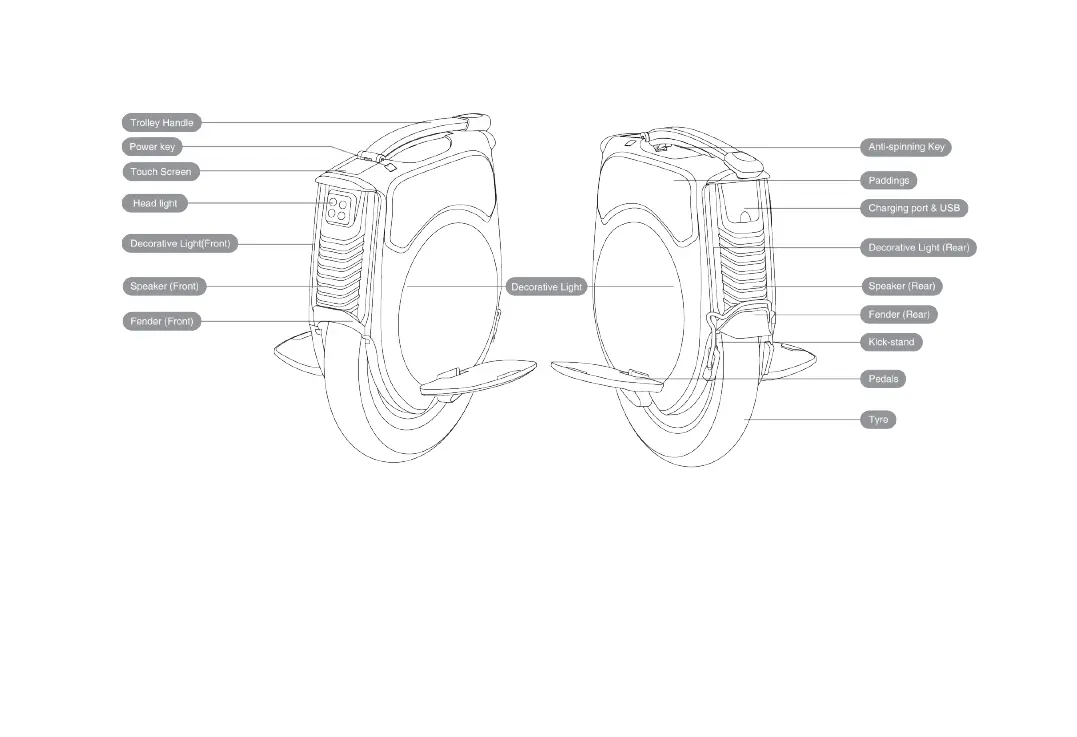
2.3 Components
2.4.Features and Functions
2


 To Next Page