Global Leader in Integrated Room Automation Systems
Confidential Copyright © 2010 INNCOM
e528 Smart Digital Thermostat
Product Guide
Overview
INNCOM's e4 Smart Digital Thermostat is a powerful, multi-purpose Direct Digital Control (DDC) device that
can control virtually any HVAC system found in hotel guestrooms.
The three e4 models meet different application requirements. The e528 and e527 are
wired and are typically used for new installation. The e529 is battery-powered and is
designed to meet the needs of existing properties where rewiring is not practicable.
This document describes Model e528; information on the e529 and e527 can be found
in their respective product guides.
Application
In its most basic form, the e528 functions as a programmable DDC thermostat,
automatically adjusting fan speeds and valves to achieve set temperature (Note:
Guests can manually select heat or cool by pressing the OFF/AUTO button and
cycling through OFF, AUTO, HEAT and COOL). The e528 is also an “intelligent”
device capable of linking ancillary sensors and serving as an information gateway.
For example, coupled with a magnetic door switch (wired or wireless), motion detectors, and other devices, the
e528 becomes the brain of a highly effective Energy Management System (EMS) application, communicating EMS
information requirements to central servers. It comes standard with five relays and can be equipped with an on-
board Infrared (IR) or radio frequency (RF) transceiver and Passive Infrared (PIR) motion detector.
The e528 interfaces with all common HVAC unit voltage configurations (24 volt to 277 volt). The e528 can be
installed in a wired or wireless INNCOM guestroom control system, which makes installation feasible and
affordable in either new construction or retrofit installations.
Through interfaces with other devices and sensors, the e528 supports the following functions:
• Remote HVAC control
• Guestroom HVAC diagnostics
• Remote room occupancy indication
• Automatic lighting control
• Remote mini-bar access reporting
• Remote smoke detector annunciation
• Central Electronic Lock control
• Humidity control
• Remote drape control
• Outside temperature display
• Peak demand load shedding
• Property/Building Management System (PMS/BMS) interface
Figure 1 e528 Digital Thermostat

 Need help?
 General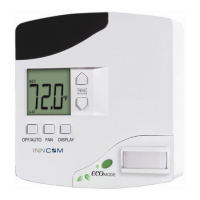

 To Next Page
