Need help?
Do you have a question about the InnovaPrep Select and is the answer not in the manual?
Details the CP Select's use of CPTs and Wet Foam Elution Canisters for concentrating biological particles from large liquid volumes.
The CP Select allows the user to store up to 15 preset protocols for various CPT types and applications.
Factory set protocols are provided for Flat CPTs, Hollow Fiber CPTs, and Ultrafiltration CPTs as a starting point.
Standard and Advanced Set Points are provided; Standard Set Points offer needed performance for most applications.
Procedures using Storage Fluid maintain instrument performance and should be used daily.
The instrument can concentrate and elute with the Fluidics Head in any position.
Never run alcohol stronger than 15% through the instrument as it may damage internal components.
Use the Arm Tension Knob to adjust how tightly the Fluidics Head is held in place.
Use Up/Down arrows to highlight, Enter to select. Adjust settings by pressing Enter, using arrows, then Enter again.
Sample volume is controlled by the elution fluid Valve Open Time and the number of pulses performed.
Ensure CPT is firmly clicked into position; used CPTs cannot be reused.
Protect the 'Can Interface Port' from contaminants using the provided cover or keeping adapter/canister in place.
Keep custom foam packaging for use in the event a return shipment is necessary.
Prior to transporting or shipping, refer to Section 6 of the User Guide for instructions.
Refer to the chemical compatibility chart in the User Guide for material compatibility information.
Plug the 12V DC power supply into a wall receptacle and then into the instrument's 12V DC Jack.
Attach the Permeate Line to the Permeate Line Port and insert the other end into a waste container.
Insert the Reusable Storage Fluid Adapter into fluid and stow with Maintenance Tip in the bracket.
Use this procedure the first time or after Shut-Down. Turn on the power switch and wait for the unit to power up.
Press Enter to advance from the Welcome Screen to the Main Menu.
Select Maintenance > Start-up and follow menu prompts to complete the procedure.
The selected Protocol is displayed in all-caps above 'Start Run' on the Run Protocol screen.
Use Arrow and Enter keys to select a different Protocol from the list on the Run Protocol screen.
Select the CPT of your choice and insert it into the Tip Interface Port.
Check that the displayed Protocol matches the CPT type; select a new protocol if necessary.
Place sample container, lower CPT to bottom, and select 'Start Run' to begin sample processing.
After run completion, select 'Elute' and follow prompts. Additional elutions can be performed by selecting 'Elute Again'.
Remove the used CPT by pushing up on the Fluidics Head bottom while pulling the CPT down.
From the Select Protocol menu, select FLAT (or current protocol) to advance to the Protocol Setup menu.
Select 'Create Protocol', then use Arrow Keys to cycle through characters and Enter to select/advance.
Configure standard or advanced settings for the protocol. Descriptions are in Section 8 of the User Guide.
From the Main Menu, select Maintenance > Start-up to access the Shut-Down Procedure.
Follow the menu prompts to be guided through the Shut-Down Procedure.
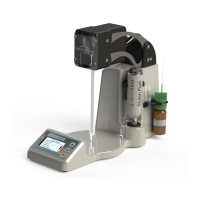
The Innovaprep Concentrating Pipette Select (CP Select) is an instrument designed for the rapid and efficient concentration of biological particles from large liquid volumes (up to 5 L) into small volumes (as small as 150 µL). It achieves this using Single-use Concentrating Pipette Tips (CPT) and Wet Foam Elution Canisters.
The CP Select operates by drawing a liquid sample through a CPT, which captures biological particles. Once the entire sample has been processed, the instrument automatically concludes the run. The concentrated particles are then eluted from the CPT into a small volume, ready for downstream analysis. The instrument is versatile, capable of concentrating various types of biological particles, and supports different CPT types, including Flat, Hollow Fiber, and Ultrafiltration CPTs.
 General
| Brand | InnovaPrep |
|---|---|
| Model | Select |
| Category | Laboratory Equipment |
| Language | English |

 To Next Page