9
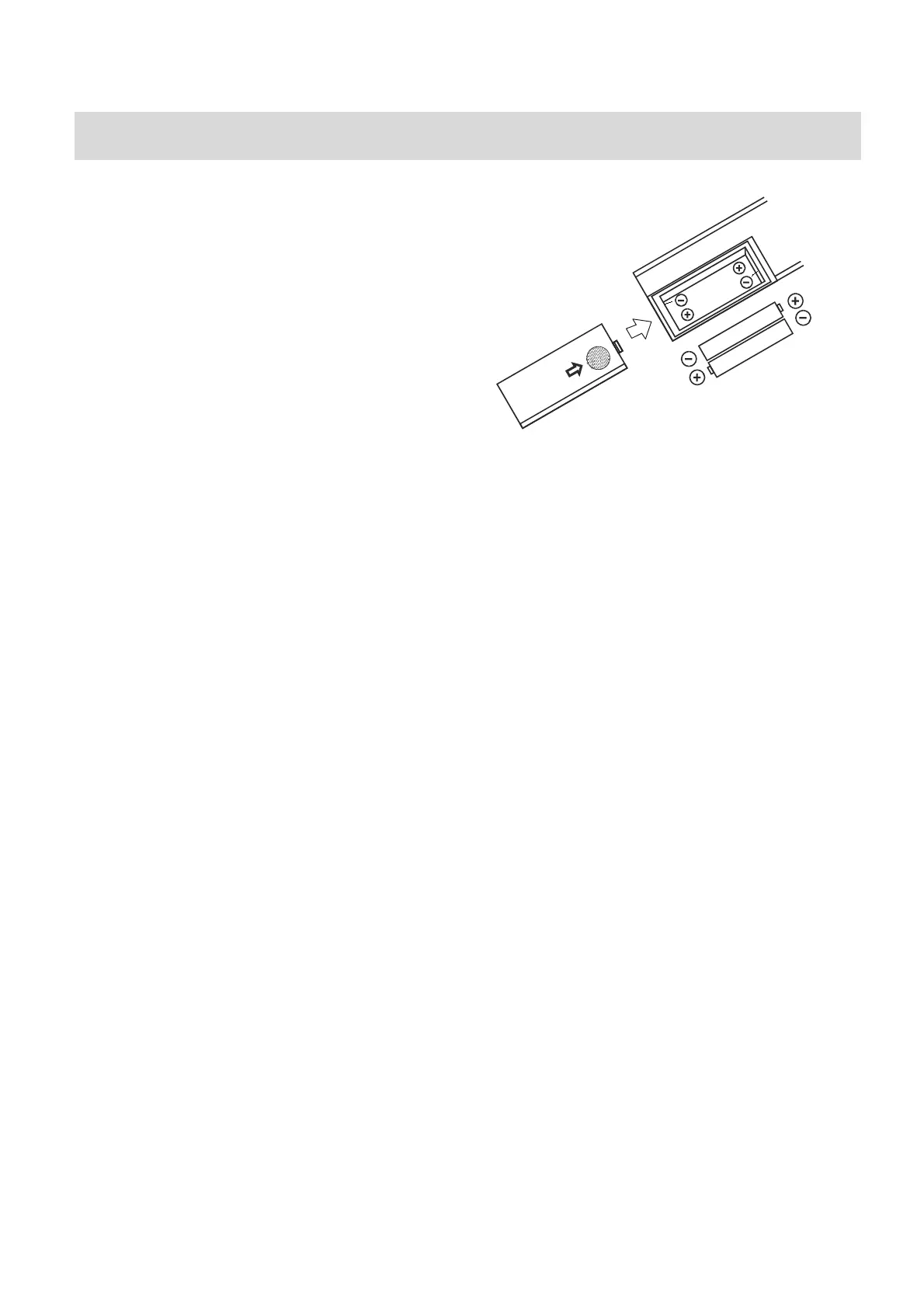
BATTERYINSTALLATIONREMOTECONTROL
Methodforinstallingthebatteriesoftheremotecontrol.
1. Turntothebacksideoftheremotecontrolandremove
thesmallcover
2. Install2xAAAbatteries(notincluded)properly
3. Fitonthesmallcover.
Notes:
1. Pleasedonotusetherechargeablebattery
2. Doesnotmixusethebatterywithdifferentbrandandtypefortheremotecontrol.
Pleasedonotusethenewandoldbatteriestogether.
3. When the remote control’s function is not so strong or the control range becomes
smaller,pleasechangethe2pcsxAAAbatteriestogether.
4.
If the unit will not be used for a long time, please take out the batteries from the
remotecontrolsoasnotleadtobatteryliquidleak,corrosionandunitdamaged.
5. Donotputtheremotecontrolonthehightemperaturehighhumidityplace.
6. Pleasedonot
disassembletheremotecontrol.
7. Please do not let the remote control or the infrared reception head of the panel
glaredbythestronglight.Otherwiseitwillinterferetheremotecontrol’ssignals.
Theeffectwillbeexcellentwhentheremotecontrolisoperatedwithin5mdistanceand
withintheangle
of30°.


 To Next Page