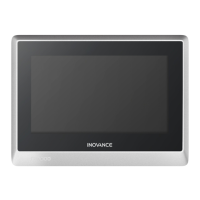
The IT7000 Series HMI (Human Machine Interface) is a high-performance industrial control device designed for user-friendly interaction and efficient data processing. It operates on an Android-style Linux system, offering a modern and intuitive user experience.
Function Description
The IT7000 HMI serves as a central interface for controlling and monitoring industrial processes. It facilitates communication between the operator and various external devices such as PLCs (Programmable Logic Controllers), AC drives, printers, and other intelligent equipment. The HMI acts as a communication master, accessing data from these external devices using multiple built-in communication protocols.
Key functionalities include:
- Data Processing and Response: High-performance processor ensures quick data processing and fast response times.
- User Interface: Android-style Linux system provides a user-friendly interactive experience with custom styles, VNC remote desktop, vector format icons, and scripting capabilities.
- Communication: Supports automatic and efficient PLC communication using the Modbus protocol. It can connect to a PC via USB or Ethernet for program download and commissioning.
- Updates: Firmware, screen programs, and recipe data can be updated via a USB drive.
- Simulation: For commissioning and system setup, online and offline simulation features are available, particularly in IT7150E HMIs.
- Data Storage: Equipped with a Micro SD card interface for data read/write and project file download (not available in IT7070S/IT7070T models).
- Peripherals: USB type-A port allows connection of U-disks, USB mice, and USB keypads. A USB mini interface is used for connecting to a PC for configuration programs and system parameter settings.
Important Technical Specifications
The IT7000 series offers various models with different display sizes and processor configurations.
Display Specifications:
- Screen Size: Available in 7-inch (IT7070S, IT7070S-BG1, IT7070T, IT7070E, IT7070E-BG1) and 10.1-inch (IT7100E-BG1).
- Resolution: 800 x 480 for 7-inch models, 1024 x 600 for 10.1-inch models.
- Brightness: 350 cd/m² for 7-inch models, 250 cd/m² for 10.1-inch models.
- Display Color: 24-bit true color.
- Backlight: LED, with a life of 35000 hours for 7-inch models and 30000 hours for 10.1-inch models.
System Specifications:
- Processor:
- IT7070S, IT7070S-BG1, IT7070T, IT7070E: Cortex A8 600 MHz.
- IT7070E-BG1, IT7100E-BG1: Cortex A7 1.2 GHz.
- RTC (Real-Time Clock): Supported.
- DRAM: 128M DDR3 for 7-inch models, 256M DDR3 for 10.1-inch models.
- Flash: 128M for 7-inch models, 256M for 10.1-inch models.
Electrical Specifications:
- Input Voltage: 24 VDC ±20%.
- Rated Input Current: 250 mA.
Interface Specifications:
- SD Card Interface: 1x Micro SD interface (push-push type), supports Micro SD card (not available in IT7070S/IT7070T).
- Serial Port (DB9 male):
- IT7070S: COM1 (RS422/RS485).
- IT7070T: COM1 (RS422/RS485), COM2 (RS232).
- IT7070E, IT7070E-BG1, IT7100E-BG1: COM1 (RS422/RS485), COM2 (RS232), COM3 (RS485).
- Ethernet: 1x RJ45 10M/100M self-adaptive Ethernet interface (not available in IT7070S/IT7070T). Cable length ≤ 100 m, Cat5/Cat5e.
- Mini USB type-B port: 1x USB type-B port.
- USB type-A port: 1x USB type-A port, provides a maximum current of 200 mA.
Structure Specifications:
- Housing Color: Black (IT7070S), Silver (other models).
- Housing Material: Engineering plastic.
- Mounting-hole Dimensions:
- 7-inch models: 191 mm x 137 mm.
- 10.1-inch models: 258 mm x 200 mm.
Environment Specifications:
- Operating Temperature: -10°C to +55°C (0°C to 50°C for IT7070S).
- Storage Temperature: -20°C to +70°C.
- Operating Humidity: 10% to 90% RH (without condensation).
- Cooling Method: Natural cooling.
- Panel IP Rating: Front panel: IP65; Rear cover: IP20.
Usage Features
- Installation: Designed for through-hole mounting. Requires a cabinet depth of over 100 mm and at least 25 mm clearance around the equipment. The front panel meets IP65, ensuring protection against dust and water spray when properly installed in an IP65-rated cabinet.
- Power Connection: Requires a 24 VDC ±20% power supply. It is crucial to use a dedicated power supply, isolated from inductive load circuits, to prevent electromagnetic interference.
- Communication Cables: Different cables are required for various external devices. Communication cables should not be laid near AC power cables or strong electrical noise sources. Maximum cable lengths are 150 m for RS485/RS422 and 15 m for RS232. Shielded cables are recommended for long runs or noisy environments.
- Touchscreen Calibration: A built-in calibration program is available through the system setup menu to address unresponsive or inaccurate touch screen issues. The process involves tapping specific points on the screen.
- Reset Key: A dedicated RESET key is available to restore default settings.
- Firmware Upgrade Port: A dedicated port for firmware upgrades (not available in -BG1 models).
- Power Supply Indicator: Indicates the status of the power supply (ON for normal, Blinking for unstable, OFF for no power). Note: Power indicators are not available in IT7070S.
Maintenance Features
- Safety Precautions: Emphasizes reading safety information before installation, use, and maintenance. Users must comply with all safety signs and instructions. Warnings are provided against improper use, disassembly, excessive torque during fastening, and operating outside designated environmental conditions.
- Environmental Considerations: Must be used indoors in environments free from strong magnetic fields, direct sunlight, high temperatures, inflammable gases, vapors, and dust. Avoid drastic temperature changes or high humidity to prevent condensation.
- Battery Life: The built-in button battery has a design life of 5 years, with actual service life varying based on temperature and humidity conditions.
- Disposal: Retired lithium batteries, LCD screens, capacitors, and other hazardous components must be disposed of as industrial waste according to local laws and regulations.
- Cable Management: Proper routing of power and communication cables is essential. A minimum spacing of 30 cm is required between 24 V power supply/communication cables and strong interference cables (AC power, motor drive).
- Troubleshooting: In case of communication failure, the screen will display an error message ("Connection failed: connection_1, station 1. err:10001") until communication is re-established.
- Authorized Personnel: Modifications to the program while the system is running should only be performed by authorized personnel using lock functions or other protective measures.

 Need help?
 General

 To Next Page