© Inovonics, 2011 - www.inovonics.com
EN1210 EchoStream® Single Input
Universal Transmitter
Installation Instructions - 05177D
1 Overview
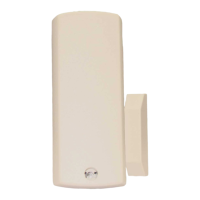
The EN1210 is a universal security transmitter.
1.1 Inovonics Wireless Contact Information
If you have any problems with this procedure, contact Inovonics
Wireless technical services:
• E-mail: support@inovonics.com
• Phone: (800) 782-2709
1.2 EN1210 Components
Figure 1 EN1210 components
2 Installation and Startup
2.1 Install/Replace the Battery
1. Pry the top lip of the mounting bracket up, and lift the bracket
off of the transmitter.
2. Use your thumb to depress the housing release tab on the
bottom of the transmitter; separate the housing.
3. If replacing a battery, use the hole in the back of the housing
to push the old battery out of the battery holder.
4. Install the new battery.
5. Press the Reset button to initialize the transmitter.
2.2 Select the Frequency Band
EchoStream products are able to use a range of radio
frequencies, and must be configured for your geographic area.
To configure the transmitter:
1. Place a selection jumper on the appropriate frequency band
selection pins.
• Place the jumper on the right two pins, marked NZ, to set
the frequency range to 921-928 MHz for New Zealand.
• Place the jumper on the left two pins, marked AU, to set the
frequency range to 915-928 MHz for Australia.
• Leave the jumper off the pins to set the frequency range to
902-928 MHz for North America.
2. Press the Reset button to complete configuration.
Caution: When pressing the Reset button, make sure you don’t
also touch the frequency band selection pins. Touching the
frequency band selection pins while pressing the Reset button
can inadvertently set the EN1210 to the wrong frequency band.
3 Select Input Type
The N/O-N/C selection pins allow the choice of a normally open
or normally closed state for the contact circuit wired to the input
terminal.
The transmitter is shipped set for normally closed, with no
selection jumper on the N/O selections pins.
1. Place a selection jumper on the selection pins to select
normally open; remove the selection jumper from the
selection pins to select normally closed.
2. Press the Reset button to complete configuration.
4 Register the EN1210
Transmitters must be registered with the system in order to be
monitored and supervised. Transmitters send a check-in
message every three minutes. Each transmitter has a unique
factory-programmed identification number.
Refer to the receiver installation instructions for details on
registering a transmitter.
1. When prompted by the receiver to reset transmitter, press
the Reset button.
2. Replace the cover.
3. Test the EN1210 by activating each of the conditions and
ensuring an appropriate response.
4.1 Mount the EN1210
1. Mount the bracket on the wall with the screws provided.
2. Clip the transmitter onto the bracket. Hook the bottom catch
first, then press the top into place.
3. The housing may be secured with a third mounting screw,
located beneath the battery.
Note: Accessing this screw on an active transmitter requires
opening the housing and removing the battery, causing a tamper
condition.
4. To dismount the EN1210, pull the transmitter housing
carefully out of the mounting bracket from the top.
5 Specifications
External contacts: NO or NC
Distance, external contact to EN1210: 3 meters (10 feet)
maximum
Typical battery life: 3-5 years
Battery type (BAT604): Panasonic CR123A or equivalent
Operating environment: -20° to 60°C (-4° to 140°F),
noncondensing
Note: Specifications and data are subject to change without
notice.
6 Television and Radio Interference
This equipment has been tested and found to comply with the
limits for a Class B digital device, pursuant to Part 15 of the FCC
Rules. These limits are designed to provide reasonable
protection against harmful interference in a residential
installation. This equipment generates, uses and can radiate
radio frequency energy and, if not installed and used in
accordance with the instructions, may cause harmful
interference to radio communications. However, there is no
guarantee that interference will not occur in a particular
installation. If this equipment does cause harmful interference to
radio or television reception, which can be determined by turning
the equipment off and on, the user is encouraged to try to correct
the interference by one or more of the following measures:
• Reorient or relocate the receiving antenna.
• Increase the separation between the equipment and
receiver.
• Connect the equipment into an outlet on a circuit different
from that to which the receiver is connected.
• Consult the dealer or an experienced radio/TV technician
for help.
7 FCC Part 15 Compliance
This device complies with part 15 of the FCC Rules. Operation is
subject to the following two conditions:
1. This device may not cause harmful interference, and
2. this device must accept any interference received, including
interference that may cause undesired operation.
8 Warranty and Disclaimer
Note: Changes or modifications not expressly approved by the
party responsible for compliance could void the user's authority
to operate the equipment.
Inovonics Wireless Corporation ("Inovonics") warrants its
products ("Product" or "Products") to conform to its own
specifications and to be free of defects in materials and
workmanship under normal use for a period of twenty-four (24)
months from the date of manufacture. Within the warranty
period, Inovonics will repair or replace, at its option, all or any
part of the warranted Product. Inovonics will not be responsible
for dismantling and/or reinstallation charges. To exercise the
warranty, the User ("User", "Installer" or "Consumer") must work
directly through their authorized distributor who will be given a
Return Material Authorization ("RMA") number by Inovonics.
Details of shipment will be arranged directly through the
authorized distributor.
This warranty is void in cases of improper installation, misuse,
failure to follow installation and operating instructions, alteration,
accident or tampering, and repair by anyone other than
Inovonics.
This warranty is exclusive and expressly in lieu of all other
warranties, obligations or liabilities, whether written, oral,
express, or implied. There is no warranty by Inovonics that
Inovonics product will be merchantable or fit for any particular
purpose, nor is there any other warranty, expressed or implied,
except as such is expressly set forth herein. In no event shall
Inovonics be liable for an incidental, consequential, indirect,
special, or exemplary damages, including but not limited to loss
of profit, revenue, or contract, loss of use, cost of down time, or
interruption of business, nor any claim made by distributor's
customers or any other person or entity.
A Frequency band
selection pins
B Reset button
C Antenna D Input terminal
E N/O - N/C selection pinsF Tamper button and spring

 Need help?
 General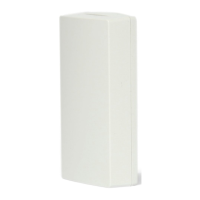

 To Next Page