6
EN
4.1 STARTING OF THE OVEN
Switch on the water interception valves and the protection electric switch, installed upstream.
Press the ON/OFF key and wait few seconds for the lighting of the display.
ATTENTION! Turning the oven o through the button ON/OFF does not interrupt the power supply
to the electronic boards.
If the oven is not used we advise you to switch o electric power supply using the protection switch upstream.
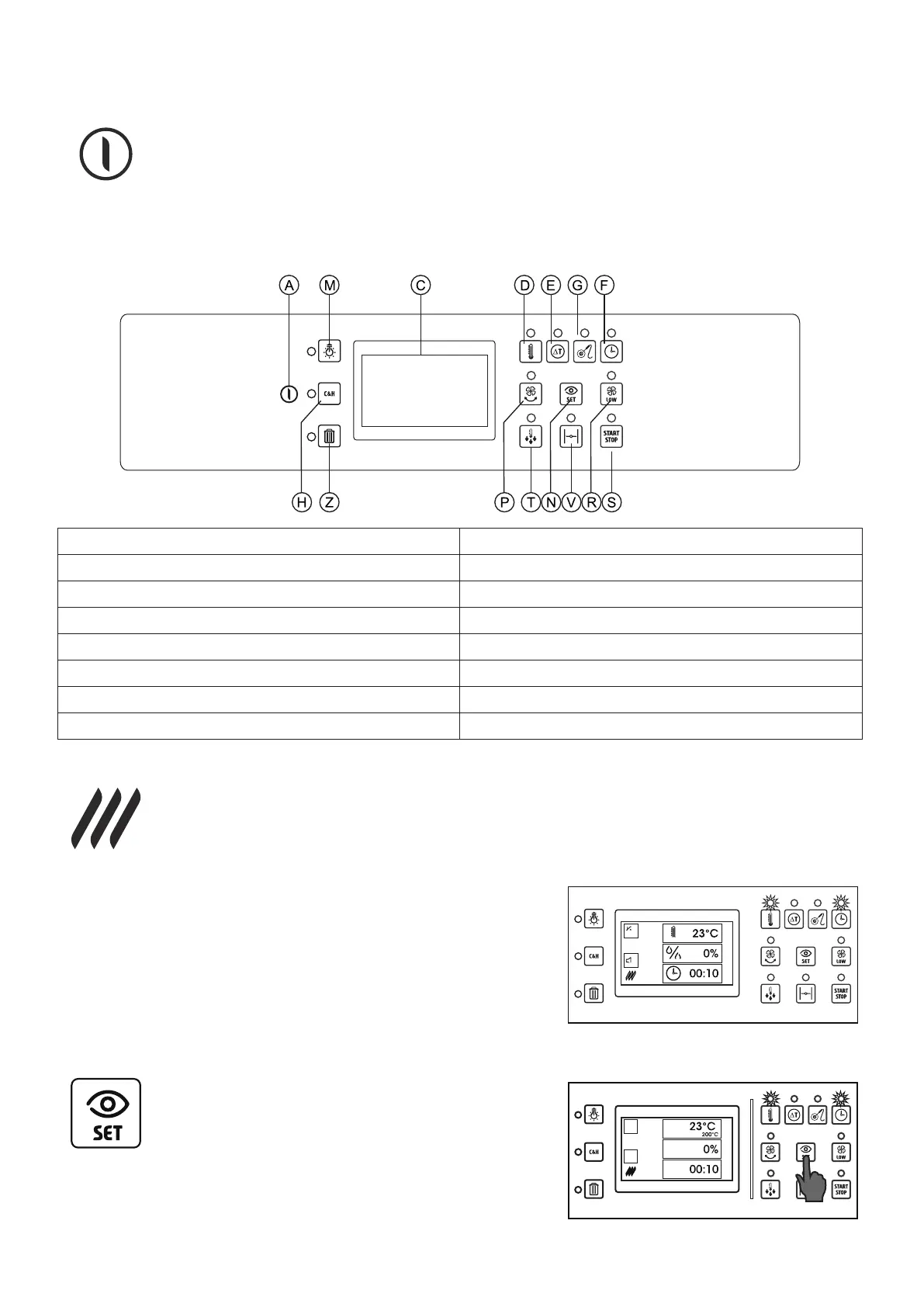
4.2 DESCRIPTION OF PROGRAMMABLE CONTROL PANEL COMPONENTS
A ON/OFF button N Display set button
C 5” touch screen display P Autoreverse button
D Cooking chamber temperature button R Reduced ventilation button
E Delta T function button S Cooking /programs starting button
F Cooking time button T Fast cooling button
G Temperature core probe button V Release valve on/o button
H Cook & Hold function button Z Program cancellation button
M Chamber lighting button
4.3 SELECTION OF A MANUAL COOKING IN CONVECTION MODE
To congure a manual cooking in convection mode, in the home page press the icon with the symbol
on the side. The display and the buttons on the control panel visualize the following info.
3 rectangular icons indicate the parameters used to control cooking process.
In the example shown on the side these parameters are the following:
• Cooking chamber temperature (the value shown indicates the real
temperature inside the cooking chamber).
• Humidication percentage (this value is by default 0).
• Cooking time (this value is by default 10 minutes).
The lighted leds next to the buttons cooking chamber temperature and
cooking time conrm the parameters used to manage cooking.
The switched o leds of the buttons autoreverse and low speed indi-
cate that these functions have not been activated. The switched o led
of the release valve button indicates that the release valve is closed.
Pressing the set button, the display will show the select-
ed values until the button is pressed.
In the example on the side the cooking time icon
shows the real temperature (23°C) and the selected
one (200°C).
The leds of the selected parameters (cooking chamber temperature
and cooking time) and of the activated additional functions (autorev-
erse, low speed and release valve) ash until the button “see set” is
pressed.


 To Next Page