6
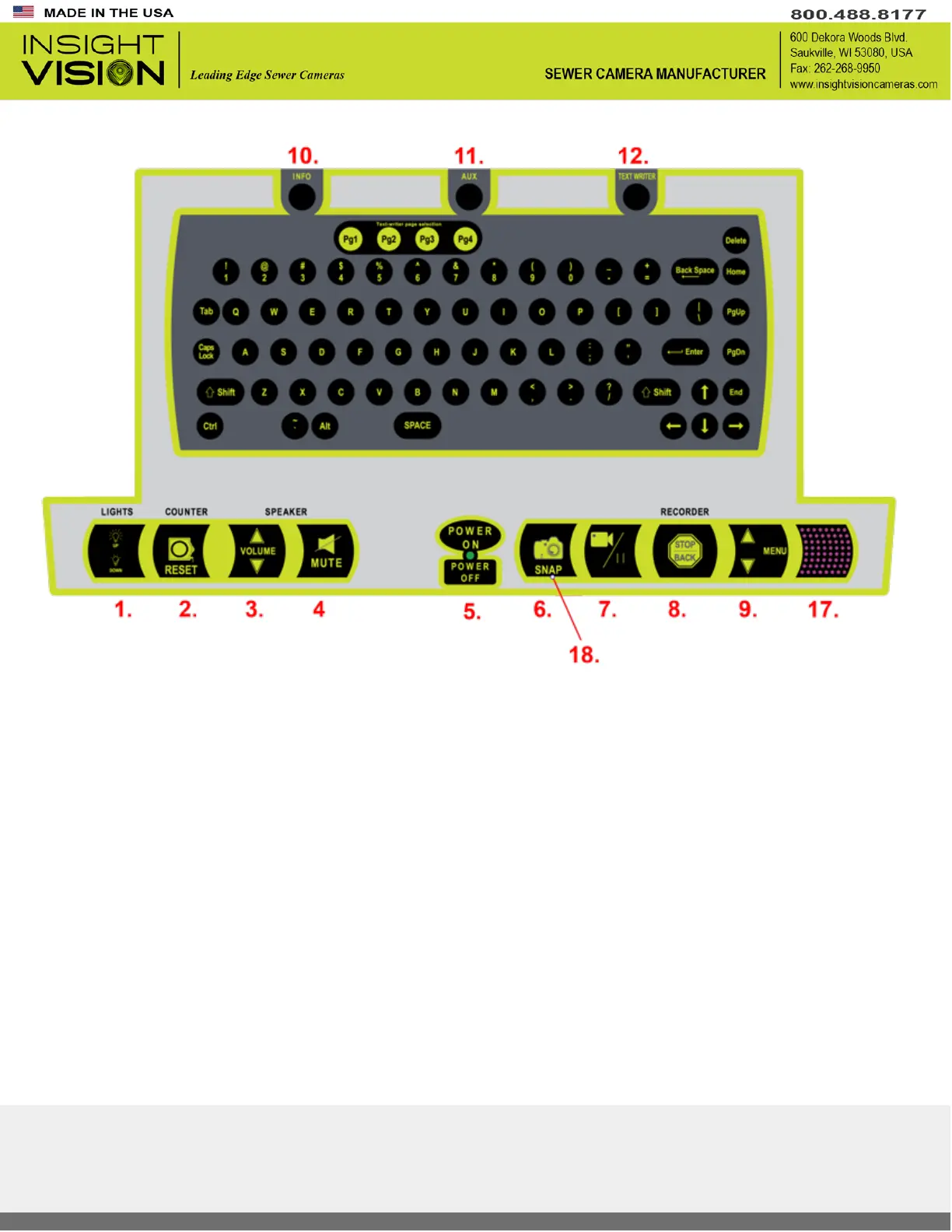
Main System Controls
1. Light Up/Down – Up will increase and down will decrease brightness on the camera head light ring.
▪ Recommended to keep light level at maximum for most pipe conditions
2. On-Screen Distance Counter Reset Button - The button will reset distance counter to zero.
▪ If you are doing underground constructions, we highly suggest that you use a 512 Hz locator for
more accurate reading of location. The counter only read distance pushed through bends and 90’s,
does not pin point area.
3. Volume Increase/Decrease – Adjust volume for video playback. (Use for audio playback only!)
4. Mute – Mute/unmute audio during video playback. (Use for audio playback only!)
5. System Power ON/OFF button - GREEN LED indicates the system is ON.
6. Snapshot – allows for JPG picture capture during live inspection
7. Record/Pause - Allows for recording of live video. Pressing the button during recording will pause current
recording until the button is pressed.
8. Stop/Back – Pressing during recording will end the current recording.



 To Next Page