EasyManua.ls Logo

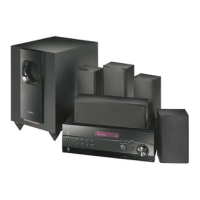
Insignia NS-HT511 - User Manual

Insignia NS-HT511
42 pages
Print Icon
To Next Page IconTo Next Page
Loading...
Home Theater System
NS-HT511
User Guide
NS-HT511_11-0310_MAN_.book Page 0 Wednesday, April 13, 2011 11:12 PM

Table of Contents

Other manuals for Insignia NS-HT511

Questions and Answers

  • K
    Kevin JordanAug 4, 2025
    What to do if noise can be heard on Insignia Home Theater System?
    • J
      jennifer77Aug 4, 2025
      If you're hearing unwanted noise from your Insignia Home Theater System, avoid bundling audio cables with power cords or speaker cables using cable ties, as this can degrade audio performance. Try repositioning your cables to see if that helps.
  • A
    andrew41Aug 9, 2025
    What to do if Insignia NS-HT511 Home Theater System remote control does not work?
    • R
      Rhonda BurnsAug 9, 2025
      If your Insignia Home Theater System remote control isn't working, try these steps: * Ensure the batteries are correctly installed, paying attention to polarity. * Replace the batteries with new ones, avoiding mixing old and new types. * Make sure you're not too far from the receiver and there are no obstructions between the remote and the receiver's sensor. * Ensure the receiver isn't exposed to direct sunlight or inverter-type fluorescent lights. * Verify you've selected the correct remote control mode. * Set the same ID on both the receiver and remote control.
  • J
    Jesse EllisAug 14, 2025
    How to troubleshoot no power on Insignia Home Theater System?
    • F
      Frank BryantAug 14, 2025
      If your Insignia Home Theater System isn't powering on, make sure the power cord is securely connected. Also, test the outlet with a lamp or another appliance to ensure it's working.
  • Y
    ypettyAug 19, 2025
    Why Insignia NS-HT511 Home Theater System cannot connect to Rocketboost network?
    • B
      batescarolSep 12, 2025
      If you're having trouble connecting your Insignia Home Theater System to the Rocketboost network: * Ensure only one Rocketboost wireless device has the Hub switch enabled. * Confirm you've installed the RF-RBCARD (sold separately). * Make sure the link is established through the Rocketboost setup menu. * Try removing (powering down) one of your devices and try again.
  • A
    Antonio EatonAug 25, 2025
    Why the Late Night function does not work on Insignia NS-HT511 Home Theater System?
    • R
      Robert RichardsonAug 25, 2025
      The Late Night function on your Insignia Home Theater System only works with Dolby Digital, Dolby Digital Plus, and Dolby TrueHD source material. Ensure that your source material is one of these formats.
  • T
    Timothy ThomasOct 29, 2025
    How to fix no sound on Insignia NS-HT511 Home Theater System?
    • A
      Aaron WeaverOct 29, 2025
      If you're not getting any sound from your Insignia Home Theater System, here are a few things to check: * Ensure the digital input source is correctly selected. * Confirm all audio connecting plugs are fully inserted. * Verify that the inputs and outputs of all components are properly connected. * Check the polarity of the speaker cables and ensure bare wires contact the metal part of each speaker terminal. * Make sure the speaker cables aren't shorting. * Adjust the volume. * If the MUTING indicator is flashing, press the MUTING button on the remote. * Review the DVD player's output settings, selecting a supported audio format. * Check the digital audio output setting on the connected device. * Ensure connecting cables aren't bent, twisted, or damaged. * Specify spe...

Summary

Introduction and Safety Information

Ventilation and Power Cord Safety

Guidelines for proper ventilation and safe handling of the power cord.

Important Safety Instructions and Precautions

Comprehensive safety guidelines and precautions for operating the system.

Speaker Connections and Remote Control

Remote Control Overview

Details the buttons and functions of the remote control unit.

Speaker Placement and Setup

Connecting Speakers and Devices

Connecting Speakers to the Receiver

Steps for connecting speakers, including configuration and precautions.

Rocketboost Wireless Setup and Usage

Wall Mounting Speakers and Rocketboost Setup

Instructions for wall mounting speakers and initial Rocketboost setup.

Using Rocketboost Wireless Audio

Details applications, setup, and usage of Rocketboost wireless audio.

Establishing Rocketboost Communications

Connecting to a Rocketboost Wireless Network

Instructions for connecting the receiver to a Rocketboost wireless network.

Speaker Configuration and Listening Modes

Detailed Listening Modes Explained

Explains various audio listening modes like Direct, Stereo, Dolby, and DTS.

Operating Your Receiver

Radio Presets and Listening Modes

Using Listening Modes

Transforms listening room into movie theater or concert hall.

Advanced Setup Menus

On-Screen Setup Menu Navigation

Guide to navigating and using the receiver's on-screen setup menus.

HDMI, Component, and Digital Audio Input Setup

Assigns HDMI, component, and digital audio sources to input selectors.

Audio Adjust Menu Options

HDMI Setup Menu Options

CEC Function and HDMI Through

Controls CEC components and enables HDMI signal pass-through.

Audio TV Out and Audio Return Channel (ARC)

Manages audio output to TV and ARC function for audio return.

Changing Audio Settings

A;V Sync, Input Naming, and Signal Format

Controlling Other Components

Using Remote for Other Components

Instructions on using the remote to control various AV components.

Maintaining and Troubleshooting

Troubleshooting Audio Problems

Solutions for common audio-related issues and error indicators.

Troubleshooting Common Issues

Tuner, Wireless, and Remote Control Issues

Solutions for radio reception, wireless, and remote control problems.

Video, Miscellaneous, and Connection Issues

Solutions for video, general, and connection problems.

Specifications

Amplifier and Tuner Specifications

Technical details for the receiver's amplifier and tuner sections.

One-Year Limited Warranty

Insignia NS-HT511 Specifications

General IconGeneral
BrandInsignia
ModelNS-HT511
TypeHome Theater System
Channels5.1
BluetoothYes
USB PortYes
FM RadioYes
SubwooferYes
DVD PlayerNo
HDMI Output1
Optical Digital Audio InputYes
Coaxial Digital Audio InputYes
Remote ControlYes
ConnectivityBluetooth
InputsHDMI, Optical, Coaxial

Related product manuals