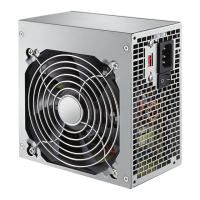
This document is a user guide for Insignia ATX 450 and ATX 550 Watt Power Supplies, models NS-PCW4508/NS-PCW4508-C and NS-PCW5508/NS-PCW5508-C.
The Insignia ATX 450 and ATX 550 Watt Power Supplies are advanced power supply units designed for desktop computers, complying with the newest Intel standard ATX 12V. These power supplies are engineered for excellent acoustic and thermal performance, featuring intelligent thermal fan control technology for virtually silent operation. They support both Intel and AMD dual-core and multi-core processors, making them versatile for a wide range of system builds. The units are built with high-performance components to ensure better reliability and come equipped with dual +12V rails, capable of handling a maximum load of 18A for enhanced system stability.
Important Technical Specifications:
General Features:
- Compliance: Complies with the newest Intel standard ATX 12V.
- Processor Support: Supports Intel and AMD dual-core and multi-core processors.
- Reliability: High-performance components designed for better reliability, including built-in protection circuits (OVP, OLP, SCP) and line input fuse protection.
- Cooling: Features a 120 mm low-noise cooling fan.
- Cable Management: 20+4 pin DC cables are mesh-sleeved and are 21.65 inches (55 cm) long.
Connector Types:
- Main Power: 20+4-PIN Main Power connector (compatible with 20 or 24 pin motherboards).
- CPU Power: 8-PIN (4+4) +12V CPU connector (compatible with 4 or 8 pin motherboards).
- Peripheral Power: 2 x 4-PIN peripheral connectors (for internal IDE drives).
- SATA Power: 4 x Serial ATA (SATA) connectors (for internal SATA drives, CD/DVD/Blu-ray, or hard drives).
- Floppy Drive Power: 1 x Floppy drive connector (for 3.25" floppy drives).
- PCI Express Power: 2 x 8-PIN (6+2) PCI-E connectors (for PCI Express graphics cards requiring 6 or 8 pin power).
Watt Power Supply (NS-PCW4508/NS-PCW4508-C):
- AC Input: 100-240V~50-60Hz, 10A.
- DC Output:
- +12V: 32A (384W max)
- +5V: 18A (115W max)
- +3.3V: 18A (115W max)
- -12V: 0.3A (3.6W max)
- +5VSB: 2.5A (12.5W max)
- Total Power: 450W.
Watt Power Supply (NS-PCW5508/NS-PCW5508-C):
- AC Input: 100-240V~50-60Hz, 10A.
- DC Output:
- +12V: 45A (540W max)
- +5V: 18A (110W max)
- +3.3V: 18A (110W max)
- -12V: 0.3A (3.6W max)
- +5VSB: 3.0A (15.0W max)
- Total Power: 550W.
Usage Features:
- Installation: The power supply is installed by positioning it in the computer case with the AC power jack and cooling fan facing out, then securing it with screws. Cables are connected to the motherboard and compatible components.
- Compatibility Check: Users are advised to check their motherboard and graphics card manuals for compatibility before connecting the power supply.
- Voltage Compatibility: The NS-PCW4508/NS-PCW5508 models are compatible with 100-240VAC, supporting various regional AC voltages (115VAC for USA, Canada, Japan; 230VAC for Europe, Southeast Asia).
- Safety Precautions:
- Avoid placing the system near heat sources, strong magnetic fields, moist or dusty environments, or areas with strong vibration or direct sunlight.
- Ensure stable AC input voltage.
- Do not open the power supply cover due to dangerous internal voltages; doing so voids the warranty.
- Do not operate with wet hands.
- Do not place items in openings or the fan of the power supply.
- Ensure all power cords and connectors are securely plugged in.
- Verify proper connections to avoid damage or system malfunction.
- Troubleshooting: The guide provides steps for troubleshooting common issues, such as checking power cord connections, surge protector status, wall outlet power, and secure connections of all power supply cables to the motherboard and peripheral devices. It also suggests unplugging unnecessary components if the power supply is overloaded and checking case fans if the unit is overheating.
Maintenance Features:
- Cleaning: While not explicitly detailed as a user-performed task, the design with a cooling fan and ventilation grating implies the need for proper airflow and potentially cleaning to prevent dust buildup, which can affect performance and longevity.
- Warranty: The product comes with a ONE-YEAR LIMITED WARRANTY, covering defects in original manufacturer material or workmanship for one year from the purchase date. This warranty is valid in the United States and Canada when purchased from a Best Buy branded retail store or website.
- Warranty Service: To obtain service, users must provide the original receipt and the product (in its original packaging) to any Best Buy store or contact customer service via phone.
- Exclusions: The warranty does not cover customer instruction/education, installation, setup adjustments, cosmetic damage, damage due to environmental factors (weather, lightning, power surges), accidental damage, misuse, abuse, negligence, commercial use, attempted repair by unauthorized persons, "as is" sales, consumables (like batteries), altered/removed serial numbers, loss/theft, display panel pixel failures (for products with displays), or damage from liquids/gels/pastes. It also excludes damage from incorrect operation, maintenance, or connection to incorrect voltage/power supply.
- Repair/Replacement: Under warranty, Insignia will, at its sole option, repair the product with new or rebuilt parts or replace it with new or rebuilt comparable products or parts. Replaced items become the property of Insignia.
The user guide emphasizes safety and proper installation to ensure the longevity and optimal performance of the power supply. It also provides clear instructions for troubleshooting and understanding the warranty terms.

 Need help?
 General

 To Next Page