EasyManua.ls Logo

Insignia NS-RGFCES2 - User Manual

Insignia NS-RGFCES2
52 pages
Print Icon
To Next Page IconTo Next Page
Loading...
Before using your new product, please read these instructions to prevent any damage.
USER GUIDE
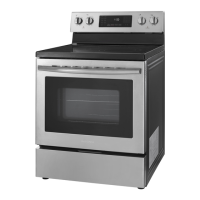
4.8 Cu. Ft. Electric
Convection Range with
Self Clean and Air Fry
NS-RGFCES2 / NS-RGFCES2-C

Table of Contents

Questions and Answers

  • J
    Jacob WhiteheadAug 5, 2025
    What to do if the Insignia Convection Oven display goes blank?
    • M
      Michael RossAug 5, 2025
      If the display on your Insignia Convection Oven goes blank, a fuse in your home may be blown or the circuit breaker tripped. Replace the fuse or reset the circuit breaker.
  • S
    Steven SmithAug 9, 2025
    How to level Insignia Convection Oven?
    • E
      Evelyn SpencerAug 10, 2025
      If your Insignia Convection Oven range is not level, it may be due to several reasons: * Incorrect installation: Place an oven rack in the center of the oven. Place a level on the oven rack. Adjust the leveling legs at the base of your range until the oven rack is level. Also, ensure the floor is level, strong, and stable enough to support your range. * Sagging or sloping floor: Contact a carpenter to correct the situation. * Misaligned kitchen cabinets: Ensure the cabinets are square and provide sufficient room for installation.
  • M
    Michelle KellyAug 15, 2025
    Why is the display flashing on my Insignia NS-RGFCES2?
    • A
      Ashley WhiteAug 15, 2025
      If the display on your Insignia Convection Oven is flashing, it indicates there was a power failure. Reset the clock.
  • B
    Brandon CollinsAug 19, 2025
    What to do if Insignia NS-RGFCES2 Convection Oven range can't be moved for servicing?
    • C
      Curtis ClarkAug 20, 2025
      If your Insignia Convection Oven range cannot be moved easily for servicing, the following could be the reasons: * The oven leg is inside the anti-tip device. Slide your range forward until the leg is out of the anti-tip device, then move your range as needed. Make sure that you reinstall the range leg into the anti-tip device when you are through. * The kitchen cabinets are not square and too close to your range. Contact a builder or installer to make your range accessible. * Carpet is interfering with movement of your range. Provide sufficient space so your range can be lifted over the carpet.
  • L
    Lisa BurkeAug 25, 2025
    How to turn on the beeper on Insignia NS-RGFCES2 Convection Oven?
    • G
      gabrielle30Aug 26, 2025
      If the beeper on your Insignia Convection Oven isn’t working, the beeper sound may have been turned off. To turn it back on, press and hold the (sound) pad for three seconds.
  • K
    Katherine PhillipsAug 29, 2025
    Why does my Insignia NS-RGFCES2 Convection Oven still beep after turning off the beeper?
    • M
      Michael JonesAug 29, 2025
      The clock and beep warning tones stay on even when you turn the beeper off on your Insignia Convection Oven. This is normal.

Summary

Safety Information

General Safety Precautions

Basic safety precautions when using electrical appliances.

Anti-Tip Device Installation

Instructions and warnings for securing the range to prevent tipping.

Appliance Usage Cautions

General cautions to follow during appliance operation and handling.

Product Features and Components

Package Contents

Lists all items included in the product package.

Main Components Overview

Identifies and illustrates the main parts of the range.

Oven Control Panel Functions

Explains the functions of each touchpad on the control panel.

Installation Guide

Location, Clearances, and Dimensions

Guidance on location, required clearances, and dimensions for installation.

Electrical Requirements and Connection

Details electrical specifications, wiring, and power cord connection.

Installing the Anti-Tip Device

Instructions for installing the anti-tip device for safety.

Leveling and Finishing Installation

Steps for leveling the range and completing the installation.

Operating Instructions

Using the Surface Burners

Instructions for operating the cooktop surface burners.

Oven Operation Modes

How to use Bake, Convection Bake, Roasting, and Air Fry functions.

Broiling, Timers, and Keep Warm

How to use Broil, Timers, Delayed Start, and Keep Warm features.

Maintenance and Cleaning

General Cleaning Procedures

Guidelines for cleaning control panel, painted, and stainless steel surfaces.

Ceramic Cooktop Care

Instructions for cleaning and protecting the ceramic cooktop.

Oven Self-Cleaning and Steam Cleaning

How to perform self-cleaning and steam cleaning cycles.

Troubleshooting and Error Codes

Troubleshooting Common Issues

Solutions for common problems with the range, cooktop, and oven.

Error Codes Guide

Lists error codes with their causes and solutions.

Specifications and Warranty

Product Specifications

Technical details including dimensions, weight, and power.

One-Year Limited Warranty

Details of the product's limited warranty coverage.

Insignia NS-RGFCES2 Specifications

General IconGeneral
BrandInsignia
Model NumberNS-RGFCES2
TypeConvection Oven
Power1500 Watts
Voltage120 Volts
TimerUp to 60 Minutes
Control TypeDigital
ColorStainless Steel
Cooking FunctionsBake, Broil
Included AccessoriesWire rack

Related product manuals