17
18
و ﮭ ى%
6.5%
5.1%
4.1%
20%
15%
10%
5%
10 0%
C( Rt)
10 0%
Rm r0Rm r
C( Rt)
Rq= 1691よm
Rz= 4.2 75よm
Ra= 1.5 98よm
** ***** ** ***** ***** *** **
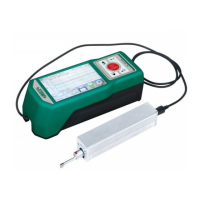
Su rface R oughn ess T est er
** ***** ** ***** ***** *** **
20 13.04 .1 8 11:05 :08
Ln = 0. 8mmX5
Ra nge = 40um
Fi lter = GA USS
Ra = 1. 598um
Rz = 4. 275um
Rq = 1. 691um
Rt = 5. 113um
Rp = 1. 966um
Rv = 2. 309um
Rs = 0. 08mm
R3 z = 3 .853u m
R3 y = 4 .059u m
Rz JIS = 3.90 1um
Rs k = - 0.16
Rk u = 1 .18
Rs m = 0 .08mm
10 0%
Rm r0
10 0% C(R t)
C( Rt) Rmr
1 0% 7. 2%
2 0% 41. 8%
3 0% 49. 8%
4 0% 52. 1%
5 0% 54. 2%
6 0% 55. 9%
7 0% 58. 6%
8 0% 66. 5%
9 0% 96. 6%
15
Data output to Excel
Data can be output to Excel by connecting with computer via bluetooth.
set up Communication port, baud rate, data bit, parity check, stop bit,
traffic control and other data.
1. The roughness meter is set to print mode, the baud rate is set to
115.2k, and bluetooth pairing is turned on Connect the instrument to
the computer via bluetooth receiver.
2. Inset bluetooth receiver receiver to the computer , When the green
light shows two flashes at the interval, the pairing is successful, the
data can be directly transmitted to Excel by press “Enter” key .
16
Mobile APP
This instrument supports the wireless Bluetooth function, such as in the
high altitude or pipeline operation is inconvenient to directly operate the
instrument keys, Bluetooth remote operation function can be used.
This mobile phone APP currently supports Android version 6 or more.
Use mobile phone APP to control the instrument, please set the
Bluetooth mode to data transmission mode, and turn on the Bluetooth
power ,the connection password is 1234, It can be used when connect
with mobile phone via bluetooth.
Note: please note that the parameters of "result" is selected in "print
details set", otherwise there will be no data output to Excel


 To Next Page
 Loading...