EasyManua.ls Logo

Inspiration Mini Rythmic PN+ - User Manual

Inspiration Mini Rythmic PN+
12 pages
Print Icon
To Next Page IconTo Next Page
Loading...
Training videos are also available:
please contact your hospital for further information.
Mini Rythmic
PN+
Set-up Guide
Question and Answer IconNeed help?

Do you have a question about the Inspiration Mini Rythmic PN+ and is the answer not in the manual?

Summary

Pump Modes and Operation

Volume Over Time Mode

Selects the 'Volume Over Time' infusion mode for the pump.

Intermittent Mode

Selects the 'Intermittent' infusion mode for the pump.

Auto Ramp Mode

Selects the 'Auto Ramp' infusion mode for the pump.

Continuous Mode

Selects the 'Continuous' infusion mode for the pump.

25 Steps Mode

Selects the '25 Steps' infusion mode for the pump.

Pump Controls Overview

Details the function of each button on the Mini Rythmic PN+ pump interface.

Programming the Pump

New Patient Programme: Volume Over Time

Steps to set up a new patient program using the Volume Over Time mode.

New Patient Programme: Auto - Ramp

Steps to set up a new patient program using the Auto-Ramp mode.

New Patient Programme: Continuous

Steps to set up a new patient program using the Continuous mode.

New Patient Programme: 25 Steps

Steps to set up a new patient program using the 25 Steps mode.

New Bag Setup

Procedure for setting up a new drug bag for infusion.

Resume after Power Off

Instructions for restarting the pump after a power interruption.

Priming Procedures

Manual Priming

Step-by-step guide for manually priming the infusion giving set.

Pump Priming

Instructions for priming the pump with the giving set loaded.

Battery Management

Internal Battery Life

Details on the life expectancy of the internal 9v battery at different infusion rates.

External Battery Pack

Information on the use and life expectancy of the external battery pack.

IP Connect and Alarms

IP Connect Pack Usage

Explanation of the IP Connect pack and its battery life.

Specific Alarm Conditions

Covers Near End of Infusion, Low External Battery, and Low Internal Battery alerts.

Pump Alarms and Error Handling

Keep Vein Open Mode Alarm

Explains the alarm behavior when the pump enters Keep Vein Open mode.

Pump Unattended Alarm

Describes the intermittent alarm for an unattended or paused pump.

Occlusion and Air in Line Alarms

Covers alarms for downstream/upstream occlusions and air in the line.

Depleted Internal Battery Alarm

Indicates an alarm for a depleted internal battery and replacement steps.

Depleted External Battery Alarm

Details the alert for a depleted external battery and charging options.

End of Infusion and Door Open Alarms

Covers alarms for completed infusions and improperly closed pump doors.

Overview

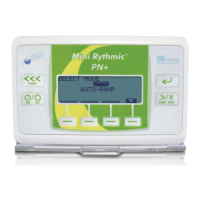
The Mini Rythmic™ PN+ is a portable infusion pump designed for various modes of parenteral nutrition delivery, including Volume Over Time, Intermittent, Auto Ramp, and 25 Steps. It is manufactured by Micrel Medical Devices and distributed by Inspiration Healthcare.

Function Description

The Mini Rythmic™ PN+ pump is used to administer fluids, such as parenteral nutrition, to patients. It features a user-friendly interface with a clear display and soft-touch buttons for programming and operation. The pump supports multiple infusion modes, allowing healthcare providers to tailor the delivery to specific patient needs. It incorporates various safety features, including alarms for potential issues like near end of infusion, low battery, air in line, downstream occlusion, upstream occlusion, and an open door. The pump can be powered by an internal 9V alkaline battery or an external battery pack, offering flexibility for both hospital and homecare settings.

Usage Features

Programming the Pump

To program the pump, first turn it on by pressing and holding button (2). Enter code 0111 and then press the enter button (4) to confirm. Ensure the pump is in the correct mode for the desired infusion.

New Patient Programme (Volume Over Time)

  1. Set bag volume: Press enter button (4).
  2. Set volume to be infused (VTBI): Press enter button (4).
  3. Set infusion time: Press enter button (4).
  4. Delay time: Insert time if required, or press enter button (4).
  5. The screen will confirm all entered details. Press enter button (4).
  6. The pump will go on Hold. If details are correct, double-press the start/stop button (5) to begin the infusion.

New Patient Programme (Auto – Ramp)

  1. Set bag volume: Press enter button (4).
  2. Set volume to be infused (VTBI): Press enter button (4).
  3. Set ramp up time: Press enter button (4).
  4. Set taper down time: Press enter button (4).
  5. Set infusion time: Press enter button (4).
  6. Delay time: Insert time if required, or press enter button (4).
  7. The screen will confirm all entered details. Press enter button (4).
  8. The pump will go on Hold. If details are correct, double-press the start/stop button (5) to begin the infusion.

New Patient Programme (Continuous)

  1. Set required rate: Press enter button (4).
  2. Set volume: Press enter button (4).
  3. The screen will confirm all entered details. Press enter button (4).
  4. The pump will go on Hold. If details are correct, double-press the start/stop button (5) to begin the infusion.

New Patient Programme (25 Steps)

This mode is designed for dose cycle infusions associated with HPN.

  1. Set bag volume: Press enter button (4).
  2. Set number of periods: Press enter button (4).
  3. Set infusion time for each period: Press enter button (4).
  4. Set total volume for each period: Press enter button (4).
  5. Delay time: Insert time if required, or press enter button (4).
  6. The screen will confirm all entered details. Press enter button (4).
  7. The pump will go on Hold. If details are correct, double-press the start/stop button (5) to begin the infusion.

New Bag

When starting a new bag, a confirmation screen will display information from the previous bag. If this information is correct, press the enter button (4). If a delay time is required, insert it or press enter button (4). The pump will then go on Hold; double-press the start/stop button (5) to start the pump.

Resume after Power Off

If the pump was powered off during an infusion, it will go on Hold upon restart. Double-press the start/stop button (5) to restart the pump and resume the infusion.

Priming the Giving Set

Manual Priming:

  1. Spike the bag, keeping the filter vertical to eliminate air.
  2. Press the priming button (do not use a sharp object) until the filter is saturated.
  3. Turn the priming button upside down and continue pressing until the giving set is fully primed.

Pump Priming:

  1. Close the clamp on the giving set before spiking the bag.
  2. Load the giving set into the pump.
  3. Follow the pump programming until the pump is on Hold.
  4. Hold the pump in a vertical position with the blue clamp at the bottom.
  5. Press the purge button (1) to start priming.
  6. Once the giving set is fully primed, press the purge button (1) to stop priming. Priming automatically stops at 6ml.

Placing the Pump in the Rucksack

Specific instructions for placing the pump in the rucksack are provided during training and are also included with every new rucksack.

Maintenance Features

Battery Management

The Mini Rythmic™ PN+ uses a non-rechargeable 9V alkaline internal battery. A low battery warning will appear when replacement is needed. The battery life varies depending on the infusion rate:

  • 8.5 hours minimum at 150ml/hr
  • 8.5 hours minimum at 200ml/hr
  • 8 hours minimum at 250ml/hr
  • 7.5 hours minimum at 300ml/hr

External Battery Pack

The External Battery Pack should always be connected to the pump during use, including when priming the giving set. A fully charged external battery pack provides extended operation:

  • 21 hours minimum at 150ml/hr
  • 20 hours minimum at 200ml/hr
  • 19 hours minimum at 250ml/hr
  • 18 hours minimum at 300ml/hr

If a low external battery warning appears, plug the External Battery Pack into the mains supply. The pump can continue infusing while the external battery pack is charging.

IP Connect Pack

The IP Connect pack is used in conjunction with the discharging hospital. It charges similarly to the External Battery Pack and has comparable battery life. Full training on its use is provided. An on-screen icon confirms connection.

Alarms and Warnings

The pump is equipped with several alarms to ensure patient safety and proper operation:

  • Warnings: The pump continues to function, but an alarm sounds intermittently. Press the soft key below the bell sign to silence it.
  • Near End of Infusion: The pump alarms when nearing the end of the VTBI (preset at 20 minutes, configurable to volume remaining, time remaining, or off).
  • Low External Battery Pack: An alarm sounds 40 minutes before the external battery is depleted. The internal battery automatically takes over. Press the bell sign twice to silence the alarm. Replace with a charged external battery pack or connect to mains supply.
  • Low Internal Battery: An alarm sounds 40 minutes before the internal battery is depleted. Press the bell sign twice to silence the alarm. Connect to an External Battery Pack or mains supply and replace the internal battery when available. Ensure the internal battery indicator shows 2 or more blocks.
  • Keep Vein Open (KVO): An alarm sounds when the pump enters KVO mode. Press enter button (4) to silence. KVO only functions if the bag volume is greater than the VTBI.
  • Pump Unattended: An intermittent alarm sounds if the pump is on hold or no button has been pressed for 1 hour. Press enter button (4) to confirm settings and start infusion.
  • Downstream Occlusion: Indicates a problem between the pump and the patient. The pump alarms and stops. Press enter button (4) to silence. Rectify the problem, and the pump will automatically restart.
  • Upstream Occlusion or Air in Line: Indicates a problem between the bag and the pump. The pump alarms and stops. Press enter button (4) to silence. Rectify the problem, then restart by pressing the stop/start button twice (5).
  • Depleted Internal Battery (Immediate Problem): Indicates the internal battery requires renewing. The pump alarms and stops. Press enter button (4) to silence. Turn the pump off using the on/off button (2) and replace the internal battery. Turn the pump on using the on/off button (2) and restart by selecting "resume after power off programme" and pressing the stop/start button twice (5).
  • Depleted External Battery (Immediate Problem): The pump alarms and stops. Press the key below the bell sign twice to silence. Change to a fully charged External Battery pack or connect to mains power supply.
  • Air in Line (Immediate Problem): The pump alarms and stops. Press button (4) to silence. The message "Air in line detection" will show. Turn the pump off and follow hospital protocol.
  • End of Infusion: VTBI has been reached or KVO is complete. Press the start/stop button (5) to turn the pump off.
  • Door Open: Indicates either the internal door or external casing is not properly closed, or an attempt was made to start the pump without a giving set. The pump alarms and stops. Press enter button (4) to silence. Ensure doors are closed and the giving set is loaded. Press the start/stop button (5) twice to start the pump.

Some features can be disabled in the configuration menu, and the pump may be customized from factory settings. Inspiration Healthcare provides 24/7 support for this device through your Homecare Company.

Inspiration Mini Rythmic PN+ Specifications

General IconGeneral
CategoryMedical Equipment
PortabilityPortable
ModelMini Rythmic PN+
TypeNebulizer
UsageRespiratory therapy
Power SourceAC Adapter

Related product manuals