17
STEP 6
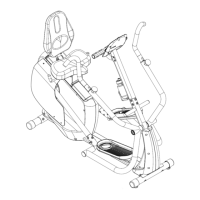
a) Connect Computer Console connector (b) to Upper Mast Cable (#34) and secure the
Computer Console (#26) to the Console Mast (#33) using qty 4 – M4 screws (#35).
b) Connect Upper Mast Cable (#41) to Main Console Cable (#34) and attach Console Mast
(#33) to Front Frame Assembly (#43) using qty 3 – M8x16 screws (#32) and qty 3 – M8
Washers (#17).
c) Connect the Power Adapter (#1) to the back of the Main Unit (#25). Connect to a 120VAC
power source.


 To Next Page