3
Get started
USING YOUR VORTEX PLUS
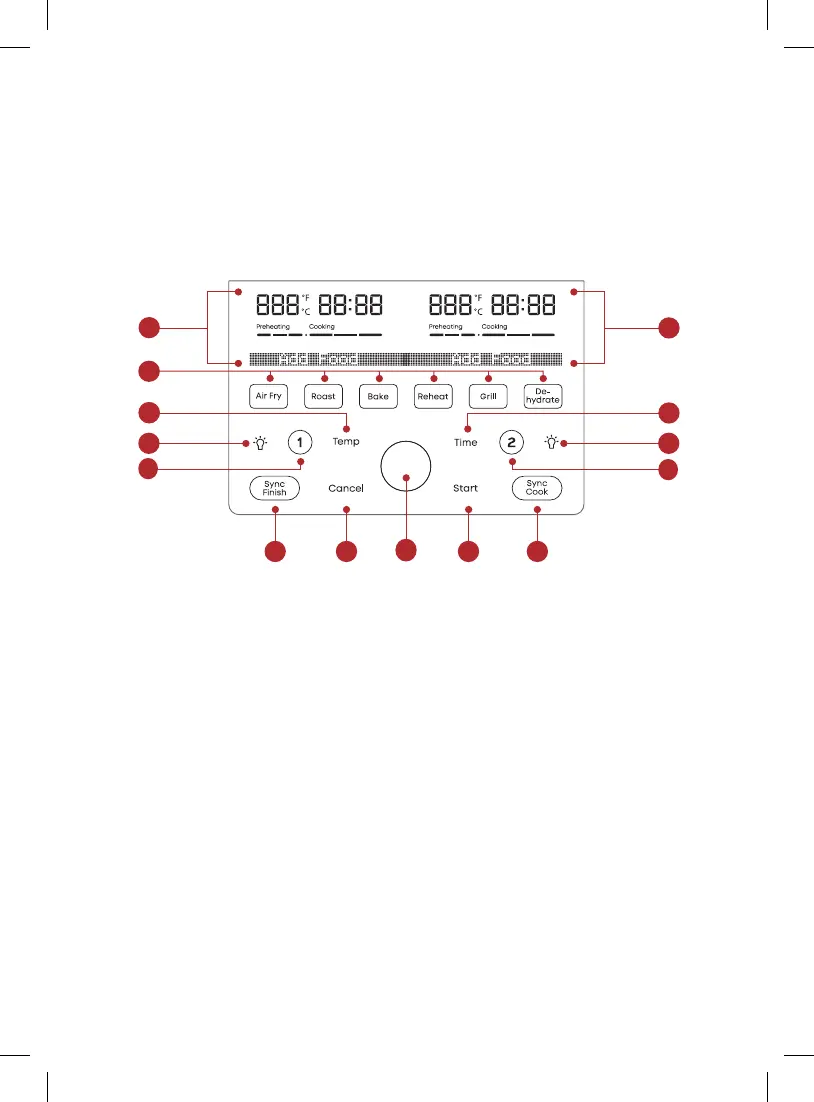
Control panel
We’ve designed the control panel to be simple to use and easy to read.
1. Left + Right Basket Status Display
• Cooking temperature
• Cooking time
• Messages
• Error codes
2. Smart Programmes
3. Temperature Control
• Increase or decrease cooking
temperature
4. Time Control
• Increase or decrease cooking time
5. Left (1) + Right (2) Basket Selectors
6. Light
7. SyncFinish
• Set separate programmes to end at
the same time
8. SyncCook
• Match right and left basket settings
9. Start
10. Cancel
11. Control Dial
4
2
1
1
7
8910
33
5
5
66
11


 To Next Page