
 Need help?
Do you have a question about the Instapark PWT-07 and is the answer not in the manual?
Instructions for setting the current time on the digital water timer, including 24hr mode selection.
Guide to setting the desired daily start time for automatic watering cycles on the timer.
Details on selecting the length of each watering session, from seconds to minutes.
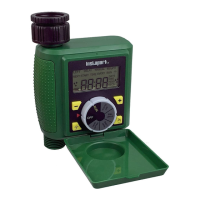
The PWT-07 Digital Programmable Water Timer is a device designed to automate the watering of your garden or lawn. It offers a range of programmable features to ensure efficient and customized watering schedules.
The primary function of the PWT-07 is to control the flow of water at specified times and for set durations. It operates using an impulse solenoid valve, which precisely manages water release. The timer is powered by two 1.5V AA alkaline batteries, making it a self-contained unit that does not require an external power source. Its digital interface allows for easy programming and monitoring of watering cycles. The device is designed to be robust, with an IP66 waterproof rating, ensuring its durability in outdoor environments.
The PWT-07 offers a user-friendly interface with a dial and "+" and "-" buttons for setting various parameters.
Setting the Clock: To begin, the user needs to set the current time. This is done by turning the dial to the "SET CLOCK" position. The clock operates in 24-hour mode. The "+" and "-" buttons are used to adjust the time, with a press-and-hold function for faster adjustments. It's important to note that upon inserting new batteries, the clock will reset to 12:00 PM, requiring the user to set the current time again.
Setting the Start Time: Once the clock is set, the user can program the desired start time for watering. By turning the dial to "START TIME," the "+" and "-" buttons allow for the selection of the specific hour and minute for the watering cycle to commence. The default start time is 5:00 AM.
Setting the Watering Duration: The duration of each watering session can be customized. With the dial set to "RUN TIME," the "+" and "-" buttons enable the user to choose from a range of durations, including 5, 10, 15, 20, 25, 30, 35, 40, 45, 50, 55 seconds, and from 1 minute up to 360 minutes. The default watering duration is 15 minutes. A crucial point is that if the "RUN TIME" is set to 0, the device will not operate, effectively disabling the watering function.
Setting the Water Frequency: The PWT-07 allows for flexible scheduling of watering frequency. By turning the dial to "FREQUENCY," the user can select how often the watering cycle should occur using the "+" and "-" buttons. The frequency can range from as short as 10 seconds to as long as 7 days. The default frequency is 1 day. It's important to ensure that the "RUN TIME" set is not greater than the "FREQUENCY," as this would prevent the timer from running. Once all settings are configured, turning the dial to "RUN" will activate the timer according to the programmed schedule.
Setting a Rain Delay: A practical feature of the PWT-07 is the rain delay function, which allows users to temporarily pause watering during rainy periods. To activate this, the user turns the dial to "RUN" and then presses the "↑" button once to display "DELAY." Pressing the "↑" button again allows selection of the delay duration in hours (e.g., 24, 48, or 72 hours). If no further adjustments are made within 5 seconds, the setting is saved, and the device returns to the home screen, alternating between the clock and the rain delay time. To deactivate the rain delay, the user can turn the dial to "OFF" or "RUN," or set the rain delay time back to "0."
Manual Watering Mode: The timer also supports manual watering. By pressing a specific button (indicated by an icon in the manual) while the dial is set to "RUN," the timer will switch to manual mode, and watering will begin immediately. The default manual watering time is 30 minutes, with a setting range from 0 to 240 minutes. Pressing the button again or turning the dial to any position other than "RUN" will stop manual watering. In manual mode, if a rain delay is active, the rain delay time will not be displayed.
The PWT-07 is designed for ease of use and minimal maintenance, primarily focusing on battery management and protection.
Battery Installation: The device requires two 1.5V AA alkaline batteries. To install them, the user needs to remove the battery housing located at the back of the timer. After inserting the new batteries, the housing should be reinserted, ensuring the grooves align correctly. There will be a brief delay of 1 to 5 seconds before the timer becomes operational after battery installation.
Low Battery Indication: The timer is equipped with a low battery warning system. When the battery voltage drops below 2.4V, a low battery sign will flash on the screen, and the timer will cease to function. This alerts the user to replace the batteries promptly to ensure continuous operation.
Protection from Elements: To safeguard the timer from weather conditions, it is recommended to cover the front panel with the provided cover once all settings are complete. This helps maintain the device's integrity and prolong its lifespan, especially given its outdoor application.
Stopping Watering: If the user wishes to stop watering immediately, turning the dial from "RUN" to any other position will halt the current watering cycle. Additionally, turning the dial to "OFF" will completely power down the timer.
The PWT-07 aims to provide a reliable and convenient solution for automated watering, offering flexibility in scheduling and ease of operation for various gardening needs.
 General
| Model | PWT-07 |
|---|---|
| Output Voltage | 12VDC |
| Output Current | 7A |
| Power | 84W |
| Input Voltage | 12V DC |
| Operating Temperature | -20°C to 60°C |

 To Next Page